
ESM PLUS

What tools are needed to
effectively manage
sales activities?

Sellers need to efficiently process orders and communicate with customers—key features of seller administration tools.
I led the ideation, strategy and design for order and customer service menus in ESM PLUS.
My Role
- Create a new UX flow from the Order & Shipping menu to Customer Management menu.
- Organize and define design components.
- Identify and prioritize user feedback from user research.
Type
Web design
Tablet design
Team (40)
Project Manager
Publishers
QA Team
Date
June 2023 -
June 2024
1 year
Challenge
Normally, it is easy to understand people who buy products, because everyone is a consumer, too. However, it is difficult to find opportunities to understand the perspectives of people who sell products. Therefore, it was crucial to conduct iterative scenario testing and in-depth user research.
Furthermore, with ESM, eBay Korea’s seller administration tool, being over 10 years old, numerous technical hurdles arose due to its legacy systems during project implementation. Therefore, it was sometimes necessary to quickly adjust scenarios and redefine designs as needed.
Although this was a challenging project in terms of both user-centered design and communication, everyone involved across all teams made every effort to solve the problems.
Preview:
The day of sellers
- Respond to customer inquiriesand check product reviews.
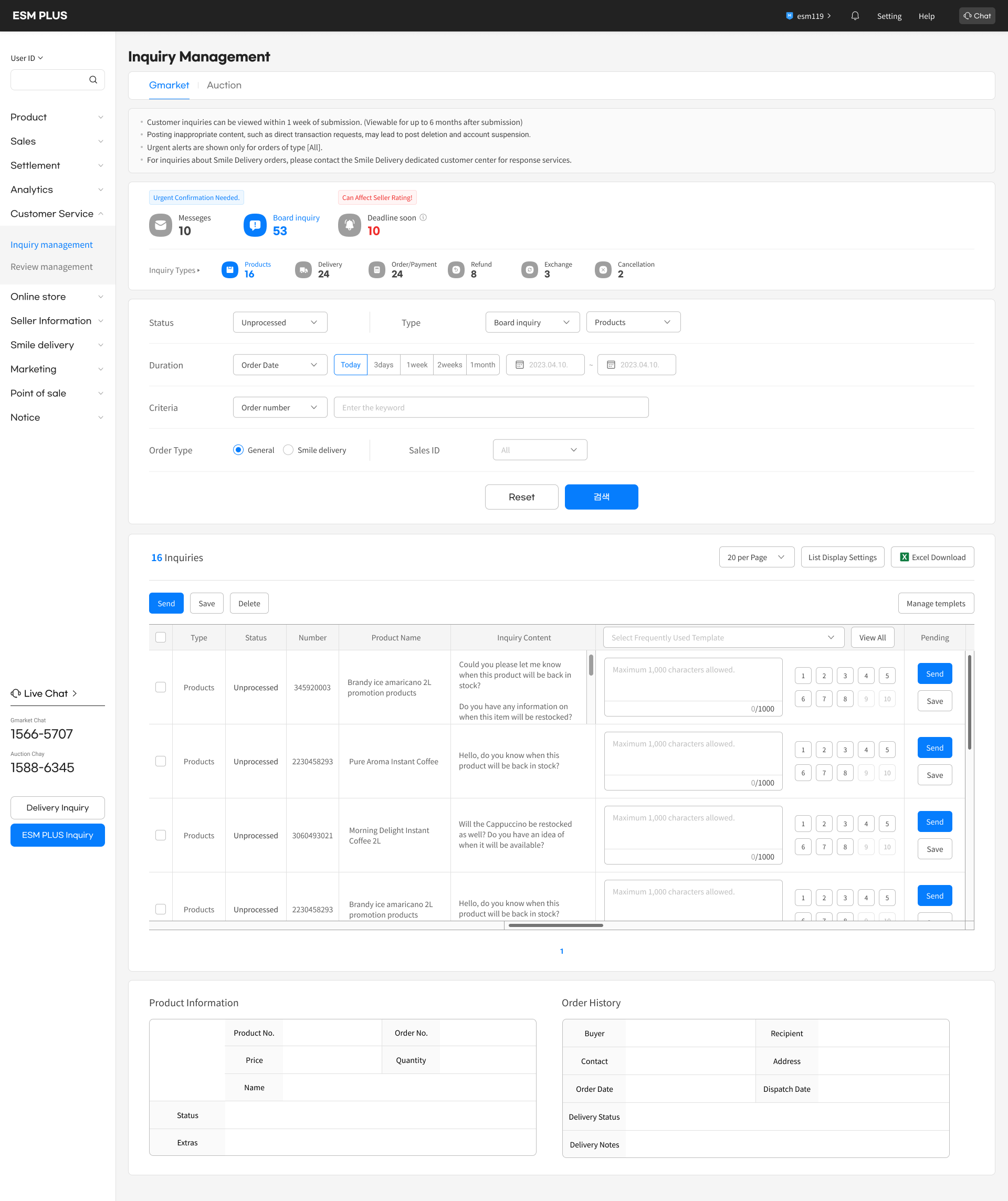
Check the received inquiries
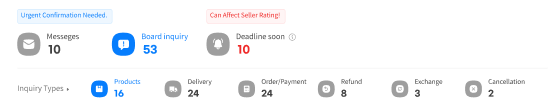
by main categories.
Manage templets
Send
Save
Delete

Type
Status
Number
Product Name
Inquiry Content
- Restock Notification

View All
Pending
Process
판매자 아이디
상품번호
마지막 저장일
접수일시
처리일시
구매자명
발송자명
구매자 ID
판매진행상태
주문종류
장바구니번호
Products
Unprocessed
345920003
Brandy ice amaricano 2L promotion products
Could you please let me know when this product will be back in stock?
Do you have any information on when this item will be restocked?
317/1000
Dear Customer,
Thank you for your inquiry about the availability of our product.
We are pleased to inform you that the item will be back in stock on [Date]. We appreciate your patience and understanding during this time.
If you have any further questions or need assistance with anything else, please do not hesitate to contact us.
79/2500
1
2
3
4
5
6
7
8
9
10
Send
Save
R
G QQQQQQQQQQ
3137433519

2023.06.30. 17:30
2023.06.30. 17:30
2023.06.30. 17:30
김미소
김미소
woo*****
판매중
스마일배송 주문
12345678901
Products
Unprocessed
2230458293
Pure Aroma Instant Coffee
Hello, do you know when this product will be back in stock?
317/1000
Dear Customer,
Thank you for your inquiry about the availability of our product.
We are pleased to inform you that the item will be back in stock on [Date]. We appreciate your patience and understanding during this time.
If you have any further questions or need assistance with anything else, please do not hesitate to contact us.
79/2500
1
2
3
4
5
6
7
8
9
10
Send
Save
R
G QQQQQQQQQQ
3137433519

2023.06.30. 17:30
2023.06.30. 17:30
2023.06.30. 17:30
김미소
김미소
woo*****
판매중
스마일배송 주문
12345678901
Products
Unprocessed
3060493021
Morning Delight Instant Coffee 2L
Will the Cappuccino be restocked as well? Do you have an idea of when it will be available?
317/1000
Dear Customer,
Thank you for your inquiry about the availability of our product.
We are pleased to inform you that the item will be back in stock on [Date]. We appreciate your patience and understanding during this time.
If you have any further questions or need assistance with anything else, please do not hesitate to contact us.
79/2500
1
2
3
4
5
6
7
8
9
10
Send
Save
R
G QQQQQQQQQQ
3137433519

2023.06.30. 17:30
2023.06.30. 17:30
2023.06.30. 17:30
김미소
김미소
woo*****
판매중
스마일배송 주문
12345678901
Products
Unprocessed
2230458293
Brandy ice amaricano 2L promotion products
Hello, do you know when this product will be back in stock?
0/1000
Maximum 1,000 characters allowed.
0/1000
1
2
3
4
5
6
7
8
9
10
Send
Save
R
G QQQQQQQQQQ
3137433519

2023.06.30. 17:30
2023.06.30. 17:30
2023.06.30. 17:30
김미소
김미소
woo*****
판매중
스마일배송 주문
12345678901
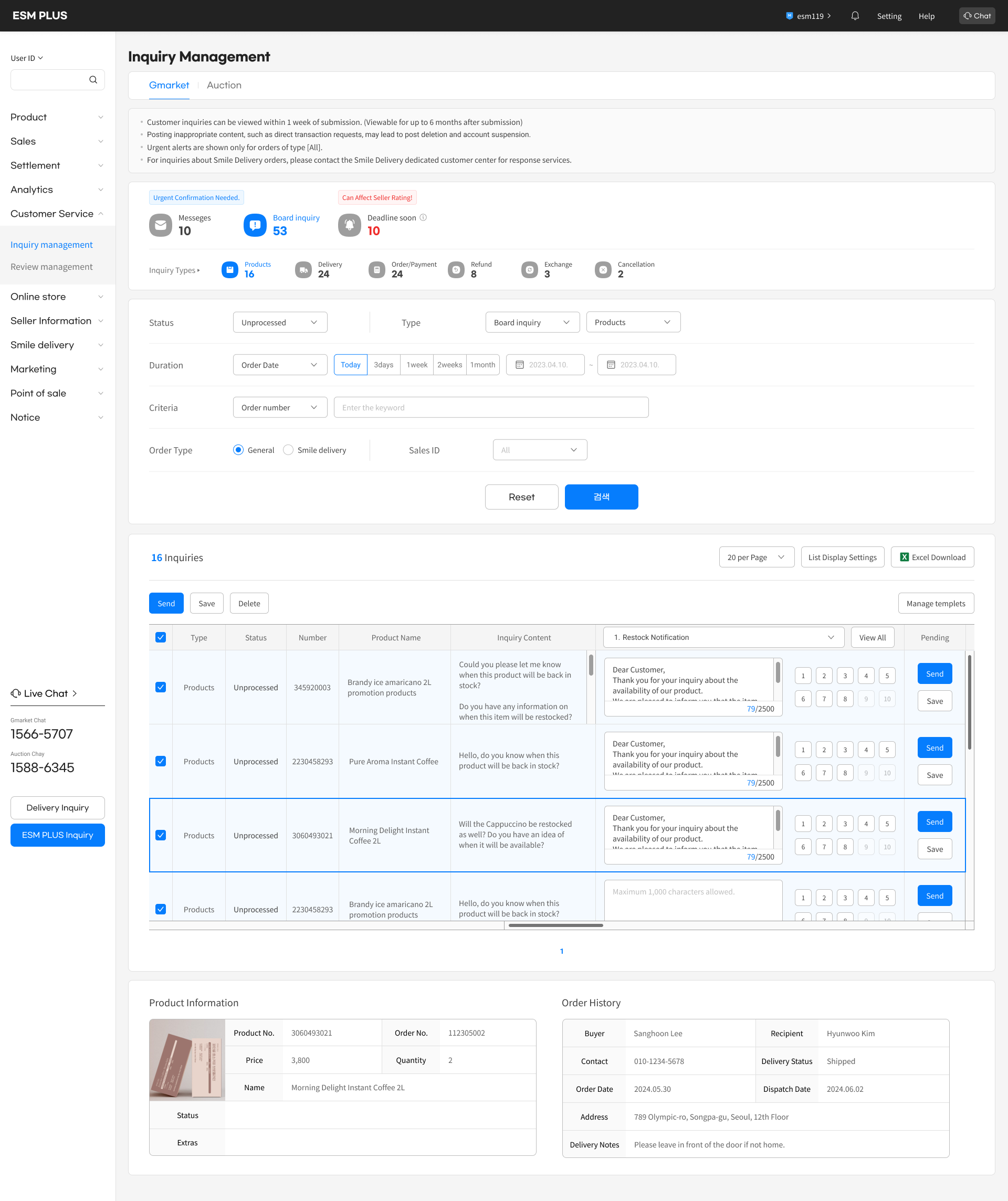
Press the shortcut button to insert
pre-written answers for similar inquiries.
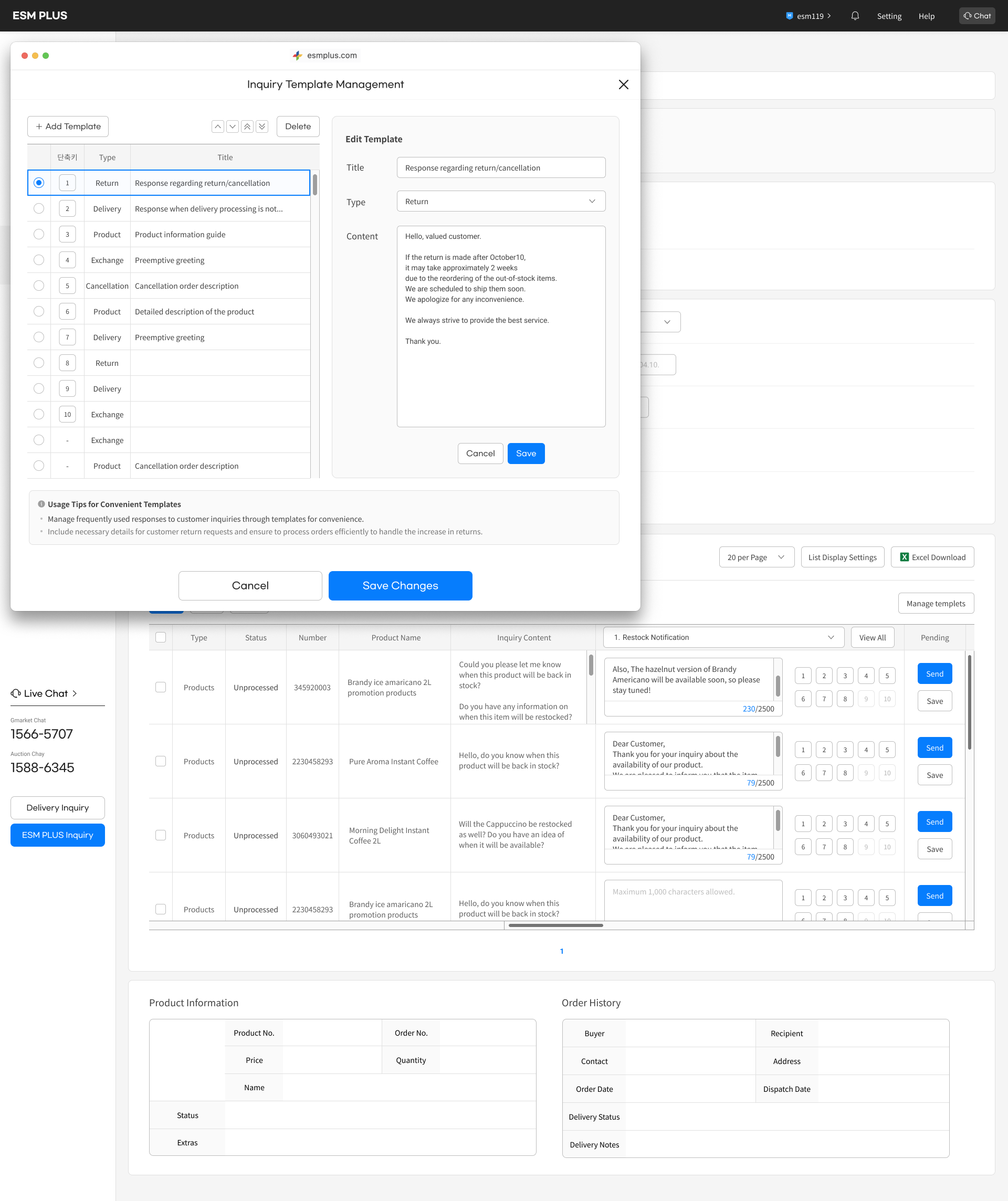
Save and manage templates
for shortcuts in a modal.
- Check the new orders.
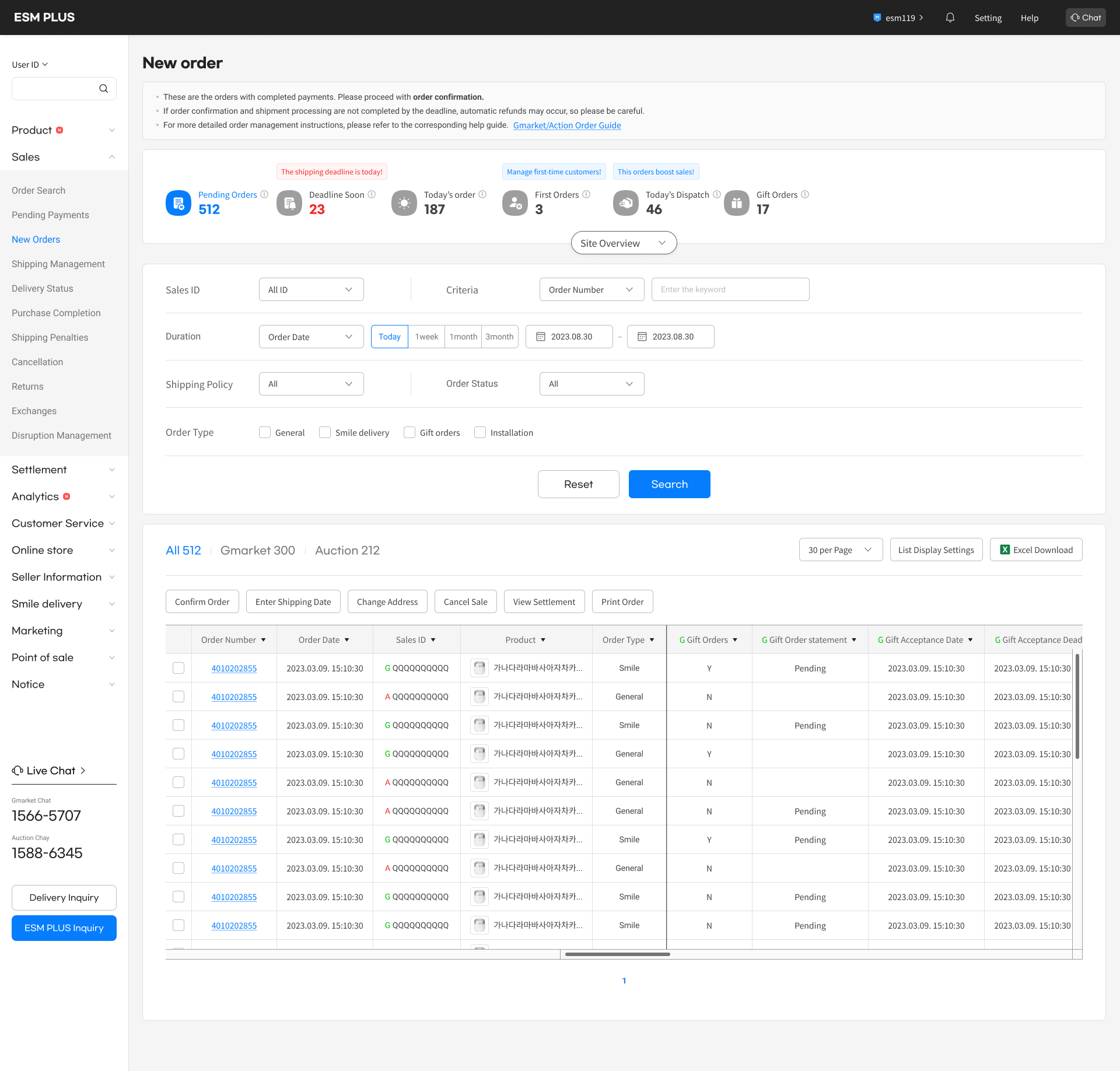

Check new orders by category
on the top dashboard.
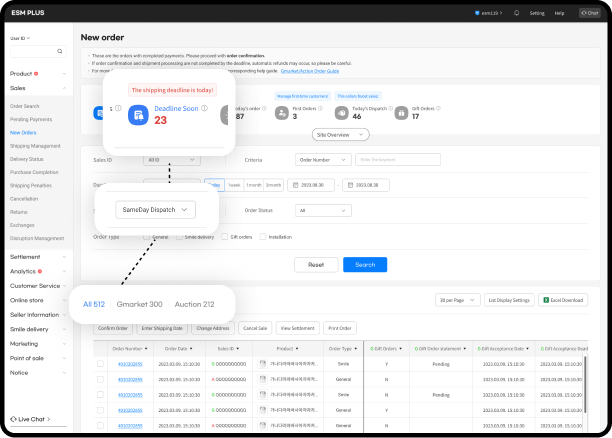
Prioritize and process orders
that require urgent checking.
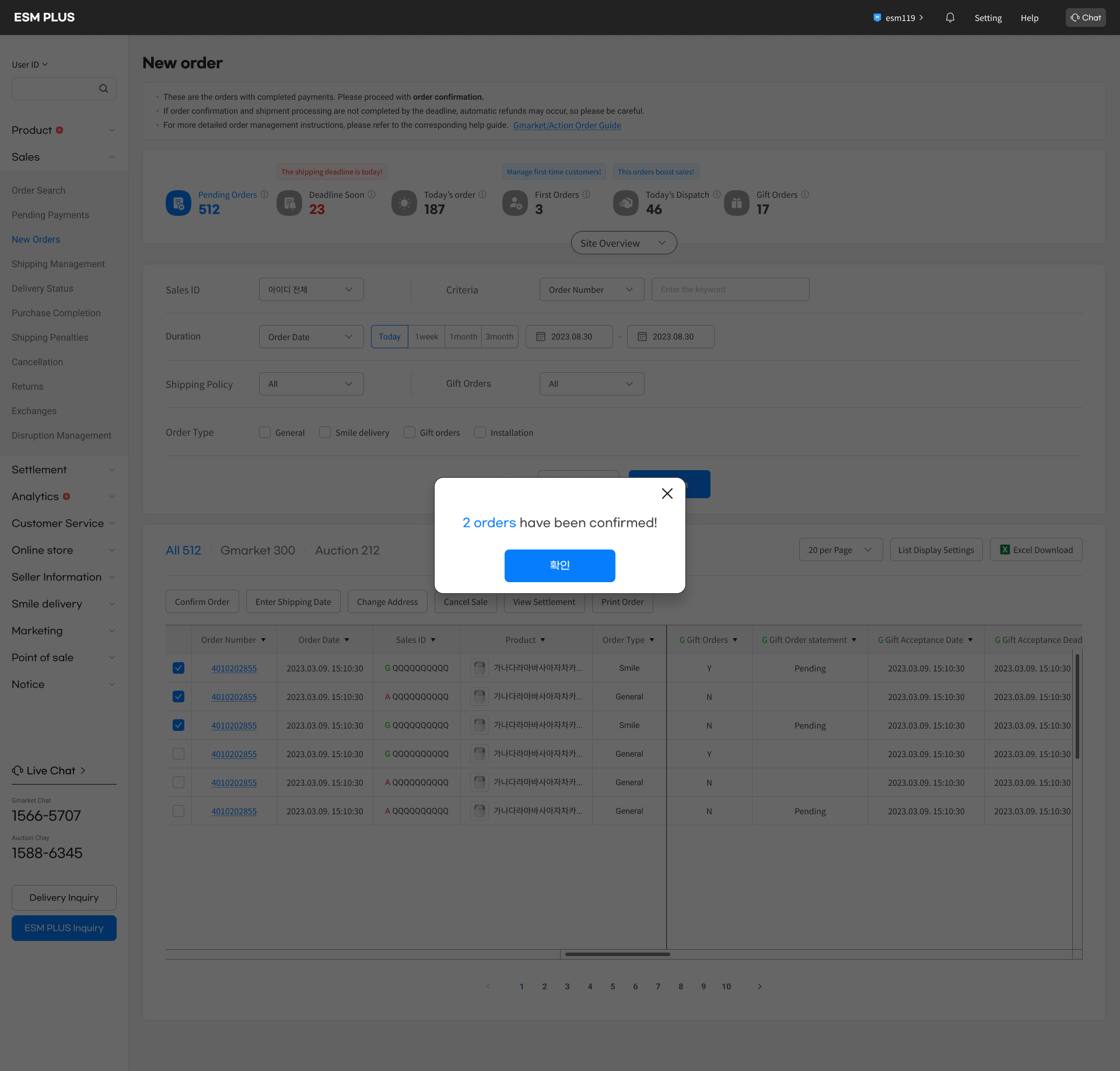
Confirmed orders are then moved to the
shipping management menu.
- Quickly ship productsusing the automated invoicing system.
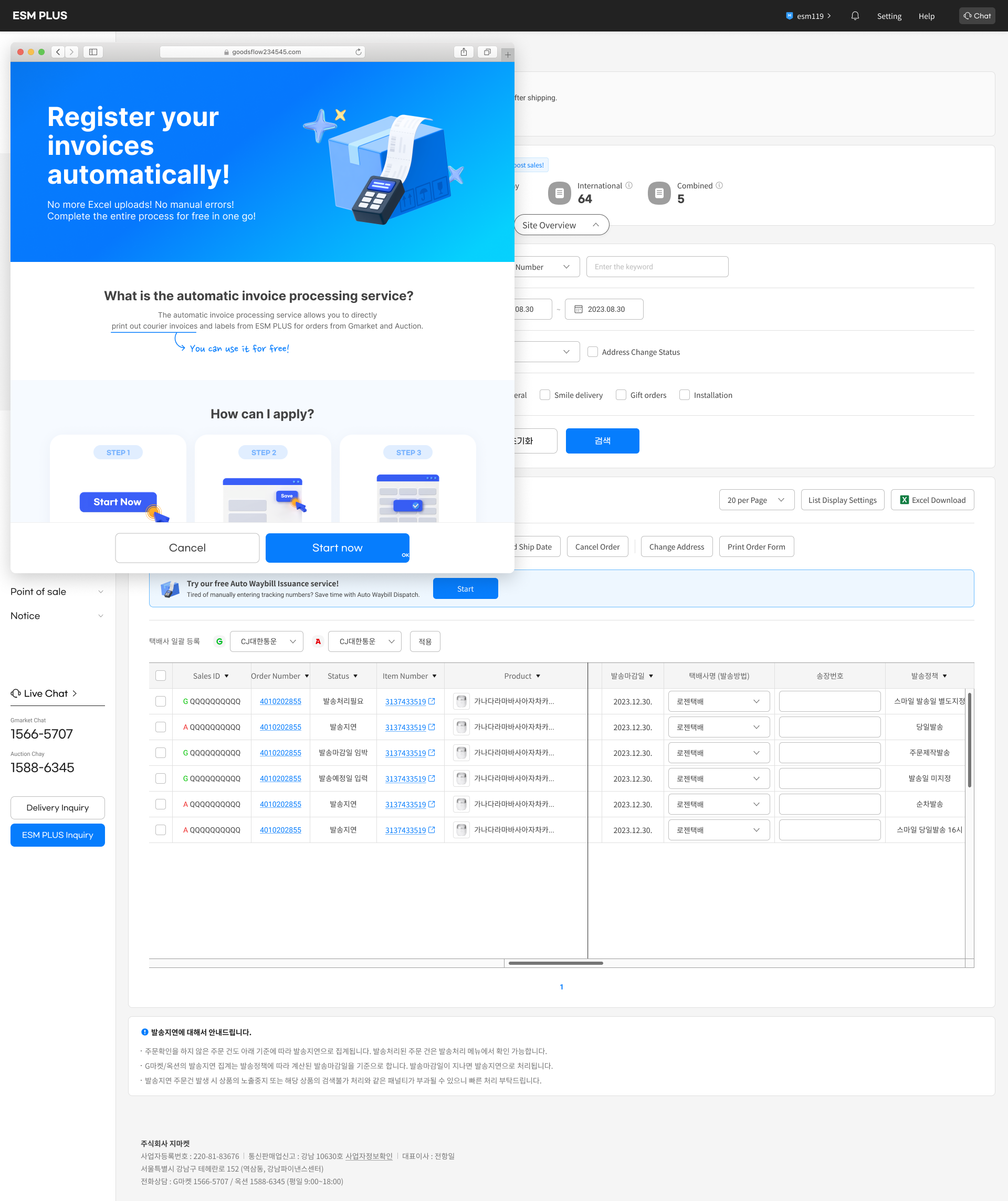
Register seller information for the
automated invoicing system.
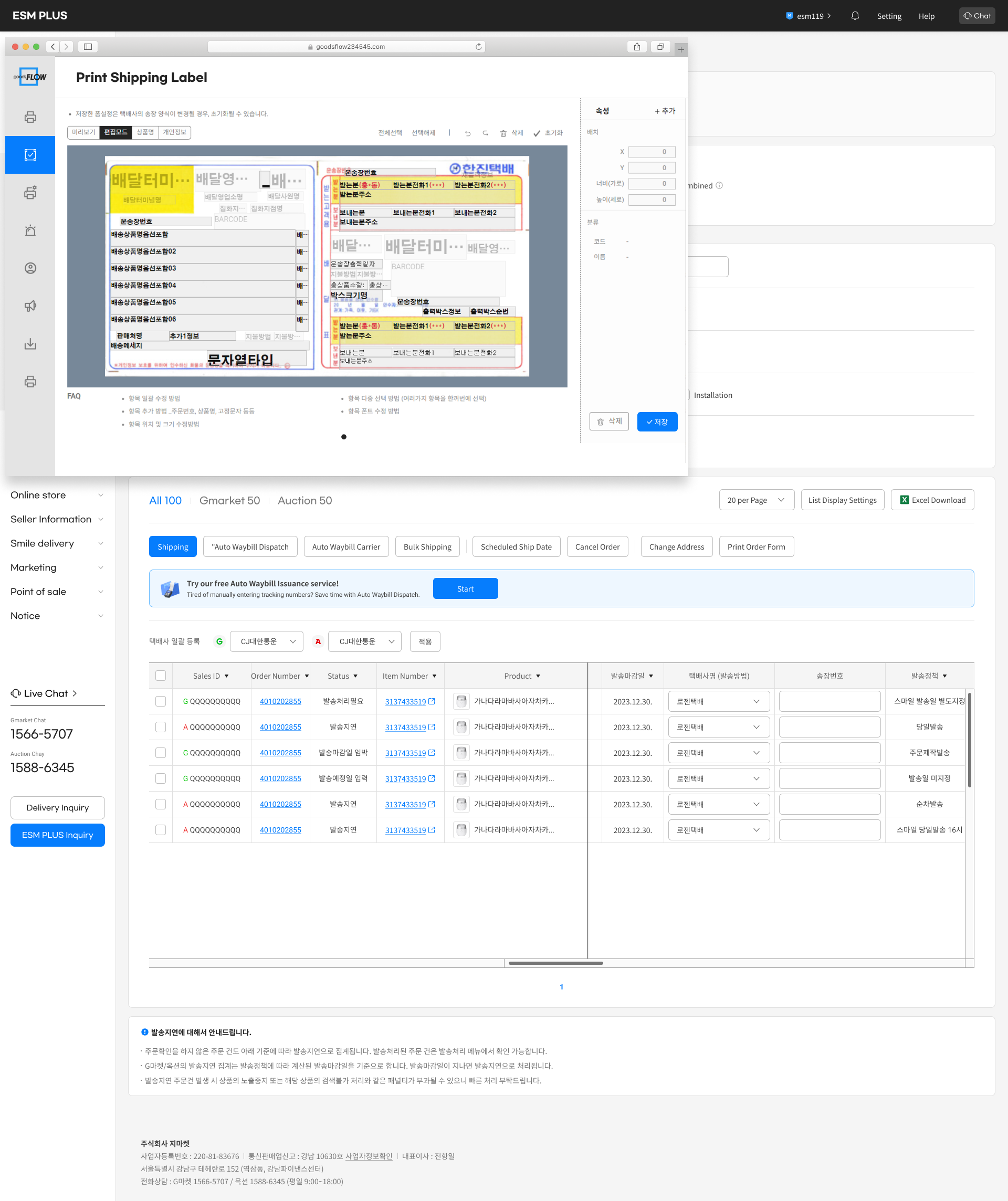
Select the orders to be shippedand click the "Ship" button.
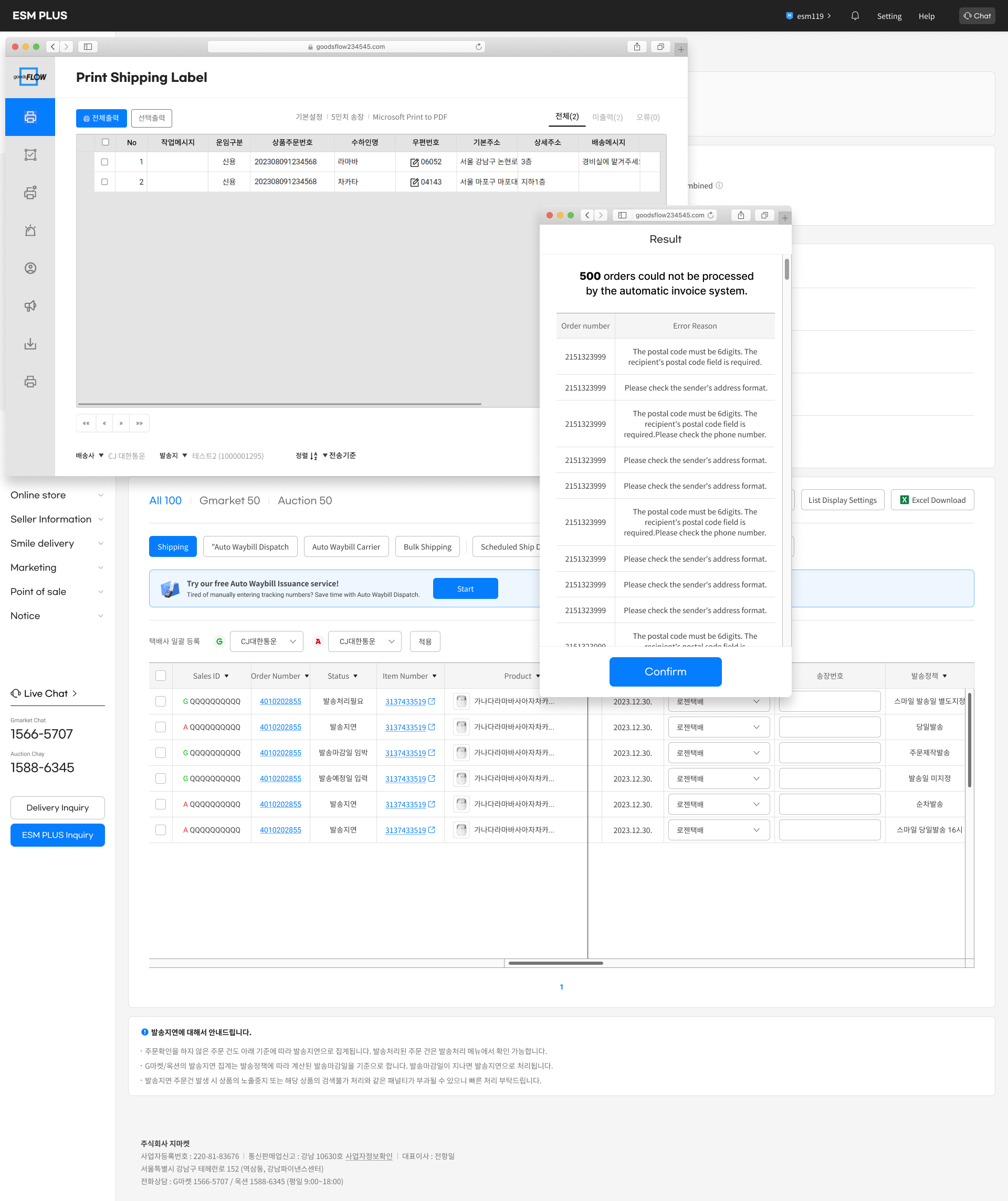
Monitor the shipping status andtrack the delivery information.
- Respond to refund / exchange
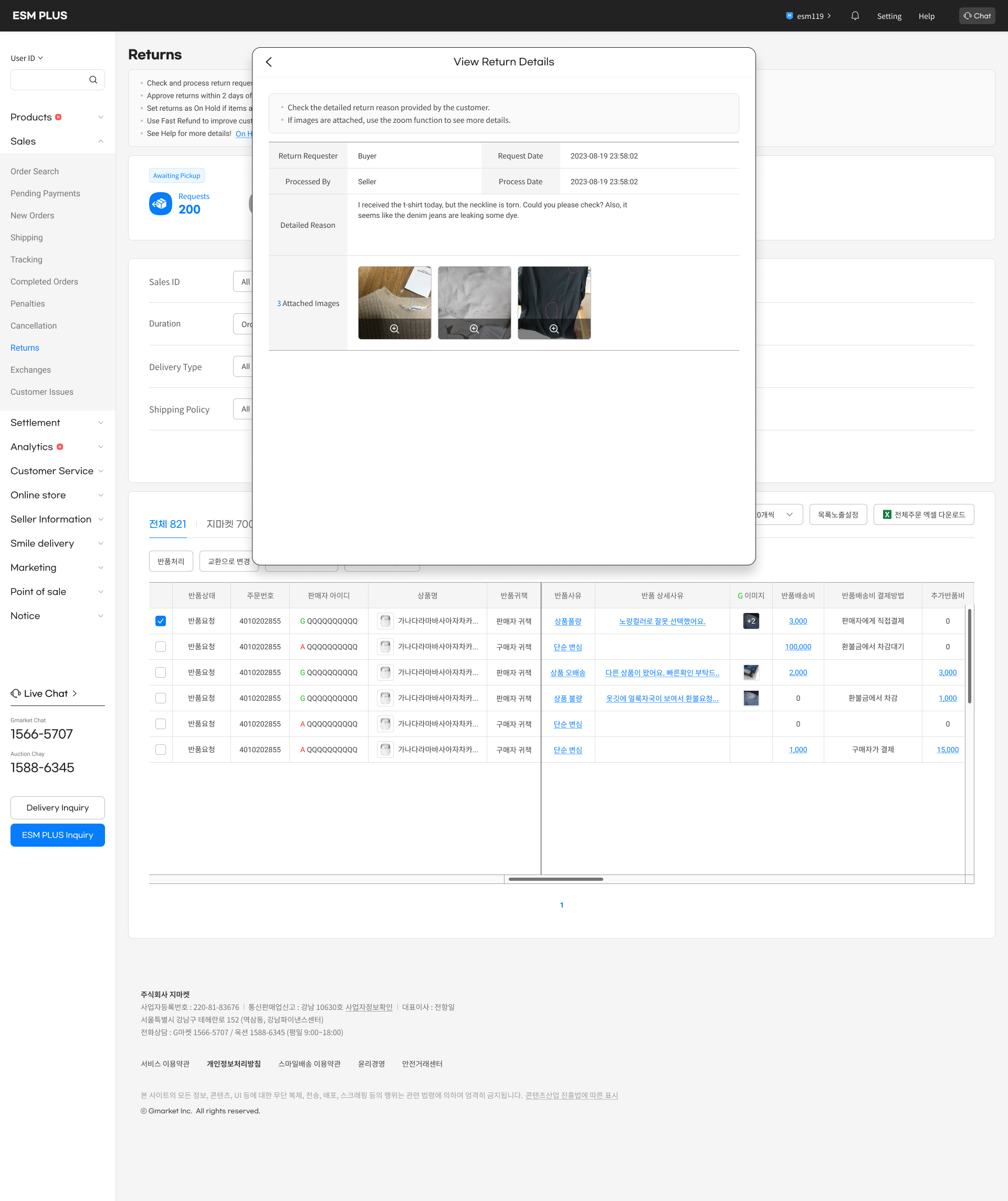
Check refund requests.
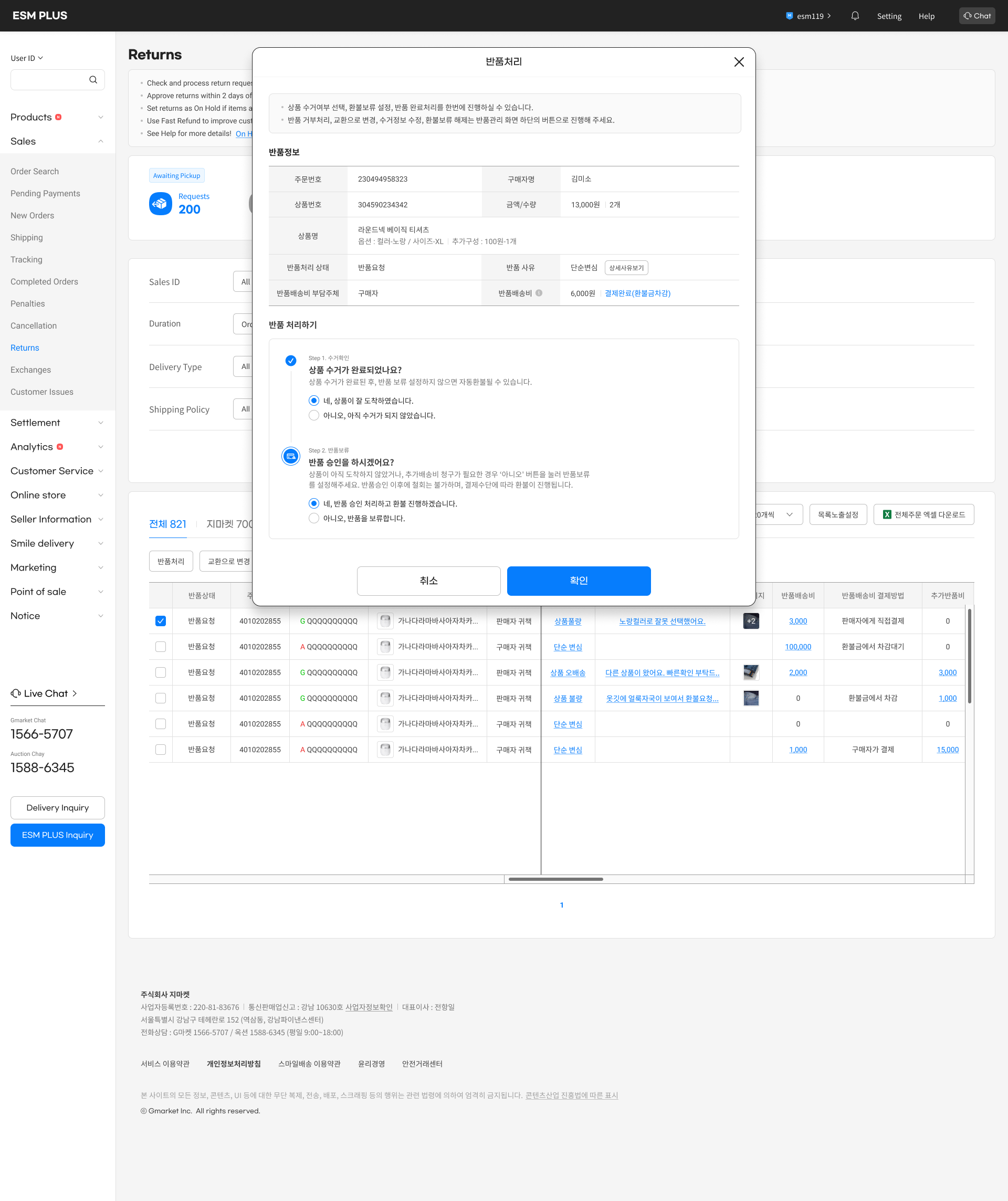

Check product condition
and approve request
If not approved, hold refund and
communicated reasons to buyer.
Backgrounds
What is the seller administration tool?
The seller administration tool is like a control center for sellers. It helps them manage everything related to their business, like keeping track of inventory, processing orders, talking to customers, and seeing how well their business is doing.
Seller
Shpping

Checking order
Answering
Managing customers

Buyer
Leave inquiry
Phurchasing
Refunding
Write review
Our history
The seller administration system on eBay Korea was designed 10 years ago, and many problems have arisen as a result.Therefore, this project aims to completely redesign the ESM, making the service much more user-friendly for sellers with improved UX design and new design components.

10
+
Years
The part I designed
During the complete redesign, I was in charge of the 'Sales Management' section, handling order processing, shipping, returns/exchanges, and managing customer inquiries and reviews.
The part i designed
The entire process of esm



Sales management
New
Orders
Boost Product
Visibility
Revenue
Management
New Product Listing & Editing
Order
Confirmation
Claim
Handling
Sales
Tracking
Customer
Support

User problem
Sellers perform key tasks in each menu. However, the usability of these menus was not effective for them.

What should be checked first?
How can I ship all these orders
faster and easier?

How do I talk to customers about refunds?
Is there an easier way to
answer customer questions?
Early research findings
Tracking a Seller's Daily Routine
To research seller activities, daily routines were gathered from around 20 sellers. Despite variations in routine order and details based on product type and business style, common usability issues were identified at each step of the process.
Field interview
2023.02 - 03

2 companies, 20 sellers
- Sellers want to quickly reply to multiple inquiriesand easily manage their responses.
Customer inquiries often contain urgent issues, so they need the quickest response.
It would be great if repetitive questions could be handled in bulk.

Seller1
Responses vary depending on the topic, such as shipping, products, or refunds. It would be helpful to categorize these inquiries.

Seller D
It would be great if I could quickly find the content I use frequently.
During promotion periods or holidays, I need templates that fit the occasion.

Seller C
- Sellers want to quickly identify rush orders and efficientlyship multiple orders at once.
The first thing I check is orders with urgent shipping deadlines. If I don't ship on time, I get penalized.
It would be great to easily spot rush orders.

Seller K
Shipping a product takes too many steps. Unlike other platforms that auto-generate waybills and handle shipping, ESM doesn’t offer this feature.

Seller L
Order confirmation, waybill
generation, and shipping are
repetitive tasks I do every day. Can these be streamlined?
Seller H
- When customers are dissatisfied with a product,sellers want to communicate with them directly.
When a customer requests a return but the product issue makes a refund impossible, I need to explain the reason for the denial. However, I can only select from pre-set options and can't write a detailed message.
Seller G
There are many factors to check before deciding whether to approve or deny a refund. I want to review all these details conveniently in one place.
Seller K
I'm curious why the customer requested a return. This information is helpful for future improvements, but right now, I can't access it, which is frustrating.
Seller O

Vision
- Visualize dashboard
Enhancing the dashboard to filter and display key information, such as urgent orders, high-priority orders, and customer inquiries by category.


- Implement new shipping features
Designing an efficient flow to meet diverse user needs
Auto Waybill Processing

- Enhance communication between sellers and buyers
Launching additional services aligned with the changing trends in the airline industry, we design a new business model and simultaneously raise consumer awareness.


Design process1 :
Inquiry/review management
Current problem
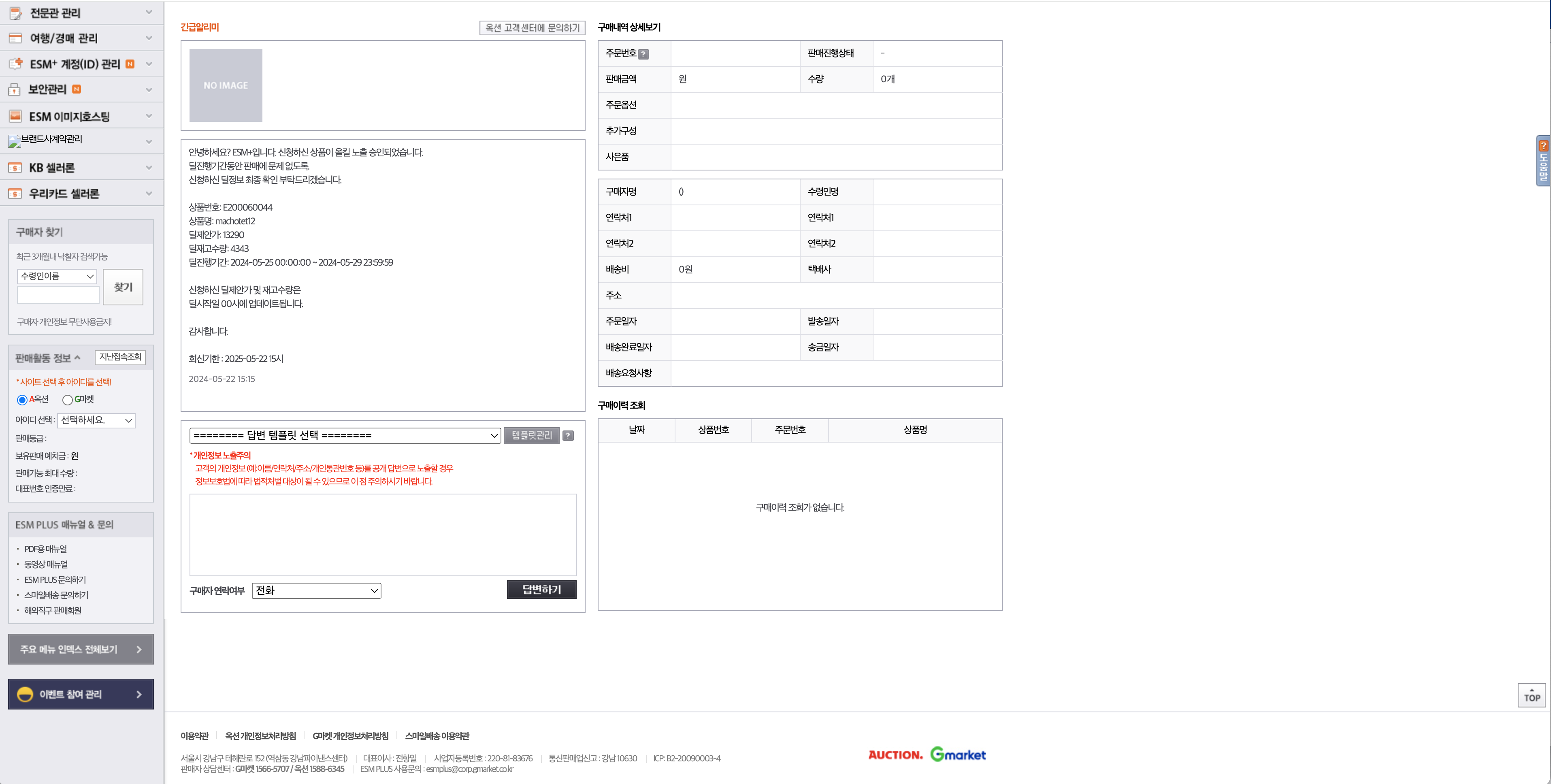
For individual responses
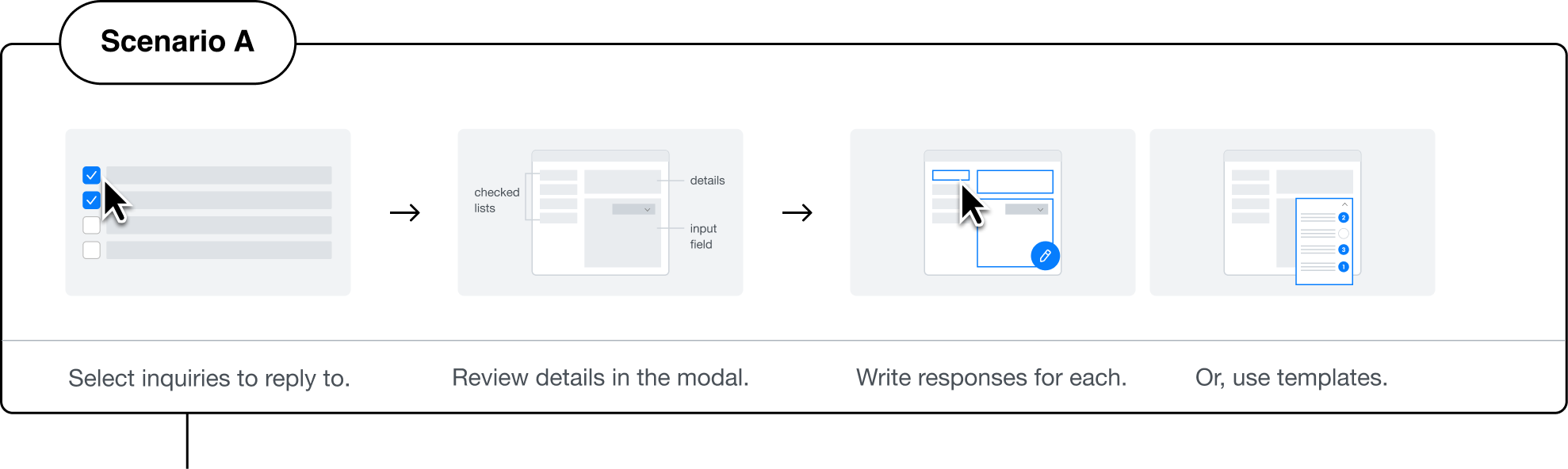
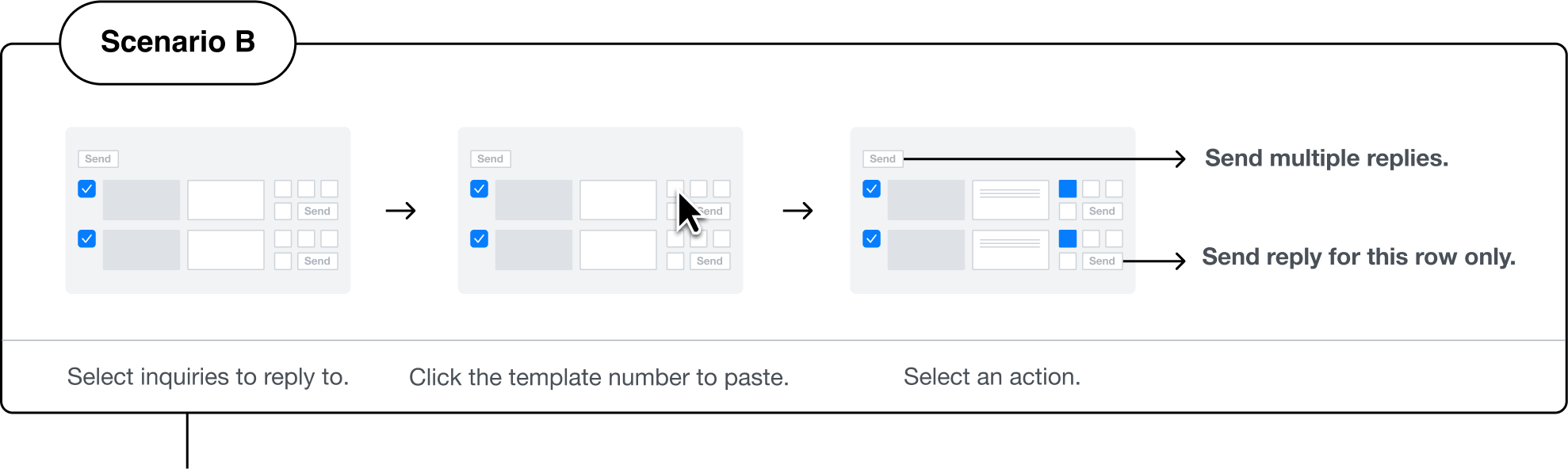
To answer individual inquiries, sellers needed to select the question and then type a response at the bottom of the screen.
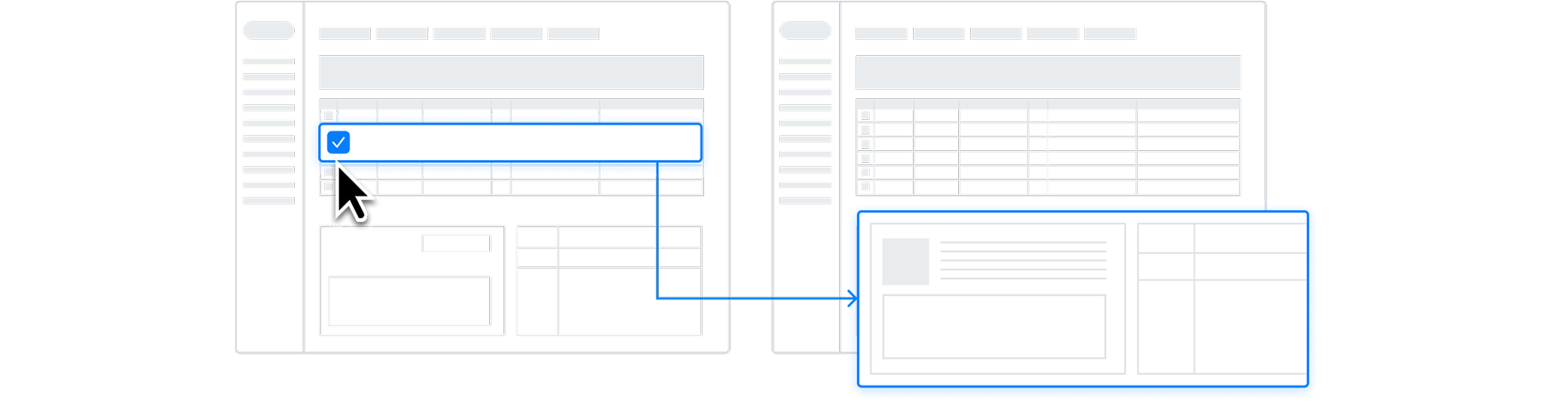
For bulk responses
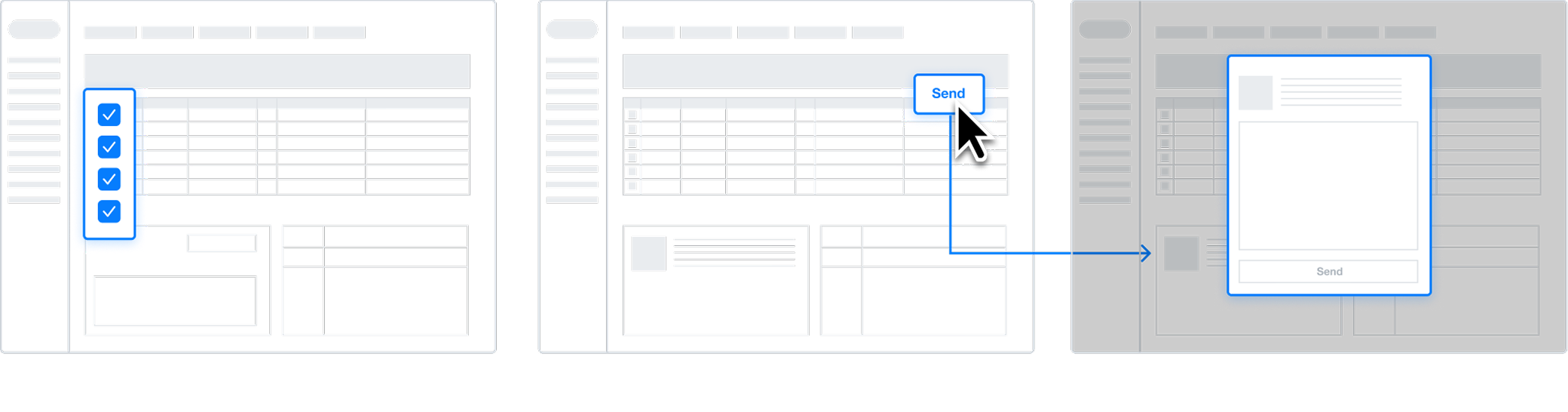
To bulk reply to messages, select the items and click the 'Send Reply' button at the top. Compose response within the modal window. At this point, the detailed content of the inquiry is located on the parent page, making it difficult to view.
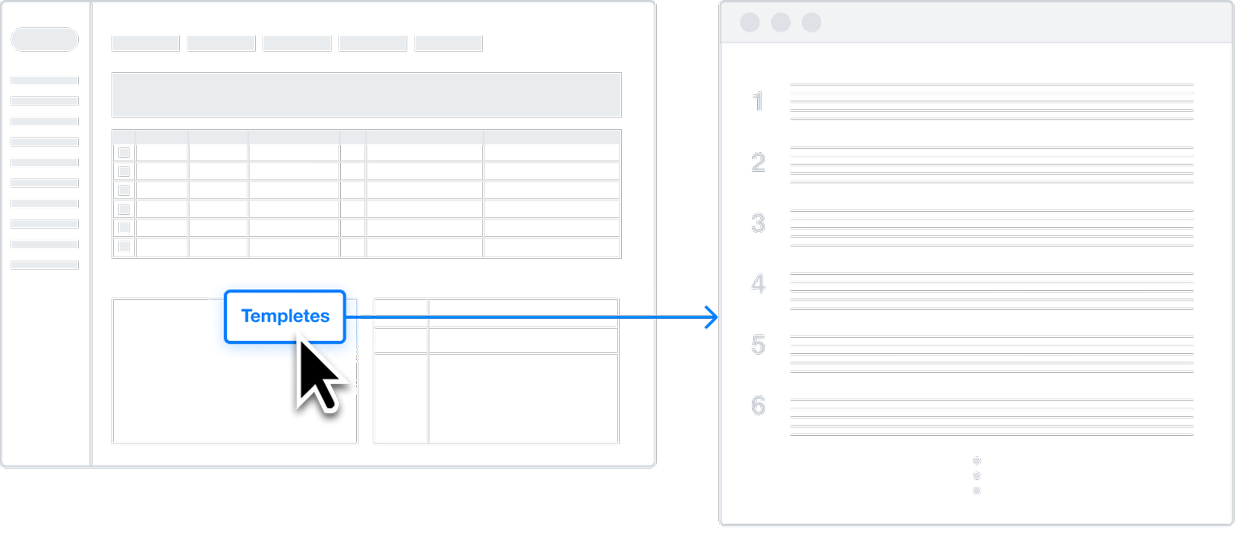
Unorganized templetes
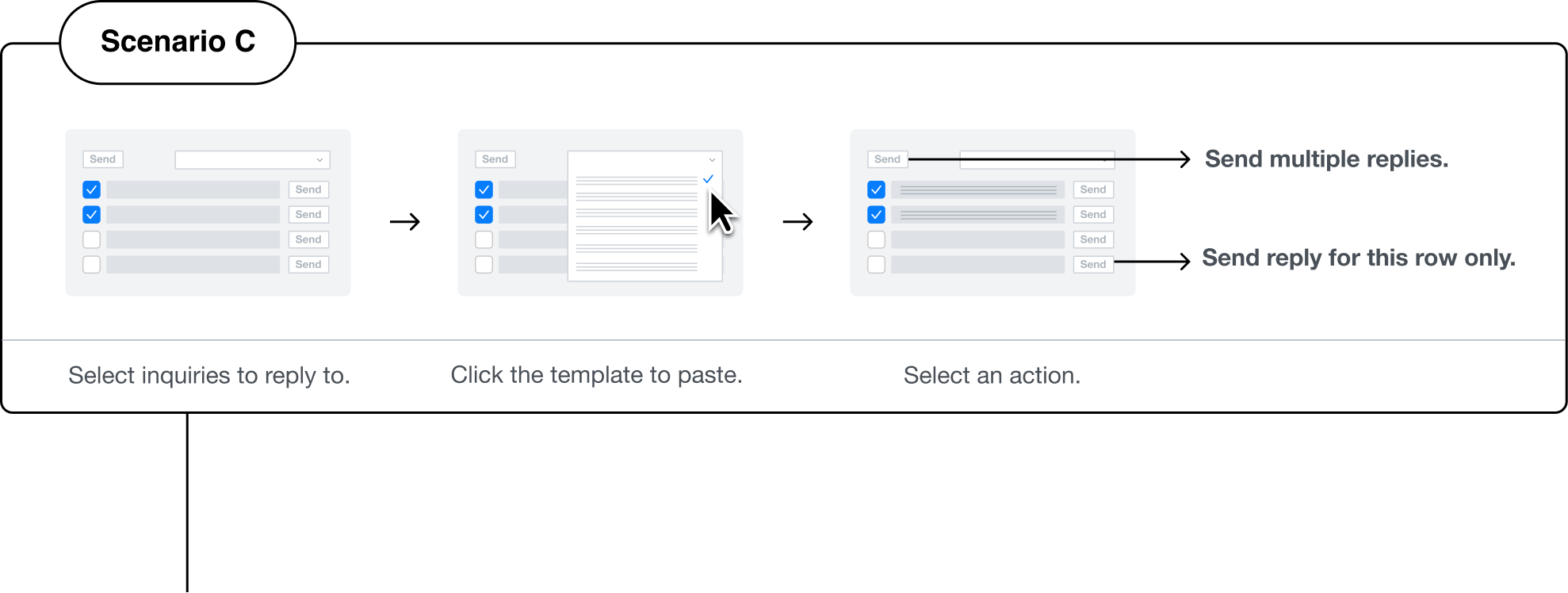
Templates previously created by sellers were sorted chronologically, making it difficult to quickly locate important older templates.
UX criteria

1

Combine message review and reply in one interface.
Viewing buyer messages and composing responses should occur in the same area, with key information clearly visible.
2

Ensure consistent usability for reply submission.
The workflows for bulk and individual responses should have a similar user experience.
3
Make reply templates easily accessible.
Position templates near the reply area for convenience and provide them in a user-friendly format.
Testing & Iteration
- Response writing usability

Chat

esm119


Setting
Help
ESM PLUS


Selected design:B
+ Some feature of C


CS Manager
More than 60% sellers in ESM frequently use predefined response types, usually consisting of three parts: greeting, main content, and closing. Within the main content, there are often recurring expressions like delivery delay notifications or restocking notices. Currently, many sellers resort to copying and pasting from a notepad since they can't combine templates.
It would be more convenient if templates could be combined like building blocks through a button.


Engineer
For important announcements, sometimes sellers need to check the content and apply it to all. It would be helpful to have a way to see template content for confirmation.
- Template usage usability
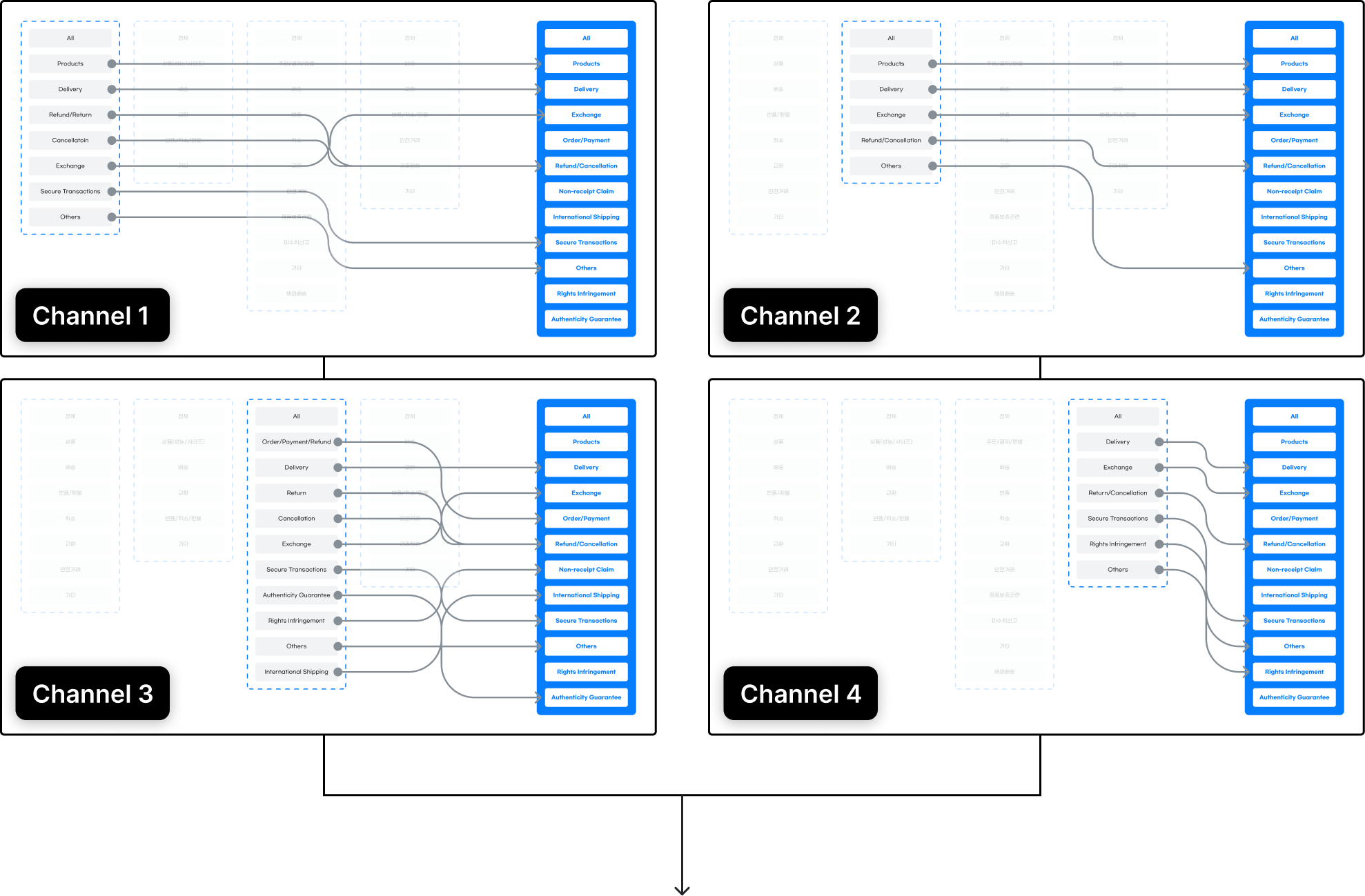
To enable sellers to easily manage and respond to inquiries and reviews by key categories, we have unified and reorganized the previously site-specific categories. This allows sellers to use the same categories across all sites where they sell their products. Additionally, we have selected the top six categories with the highest data volume and made them available for filtering on the dashboard.


Products


Delivery

Order/Payment

Refund

Exchange

Cancellation
Refined Solutions
From Dashboard to Template Usage
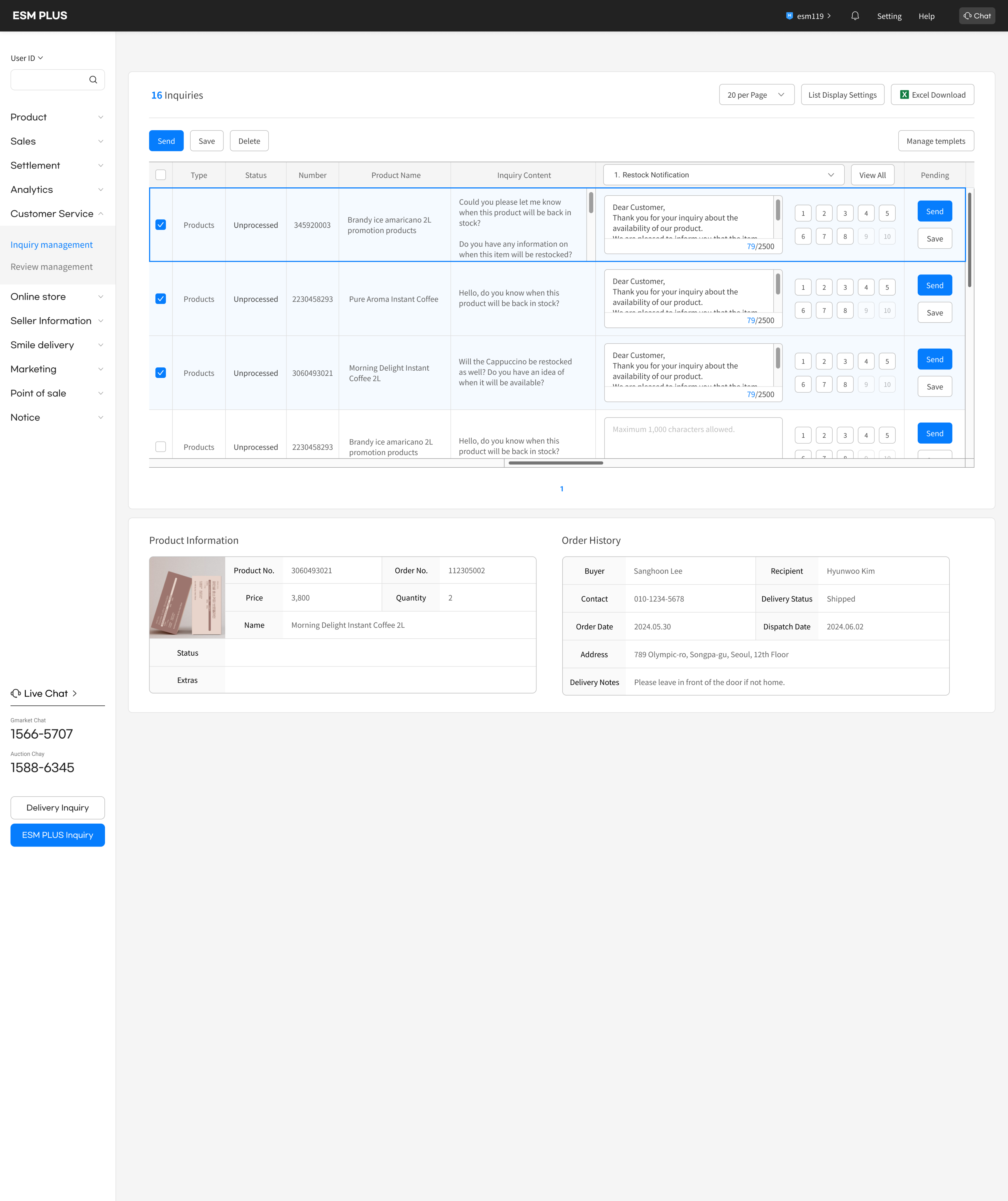
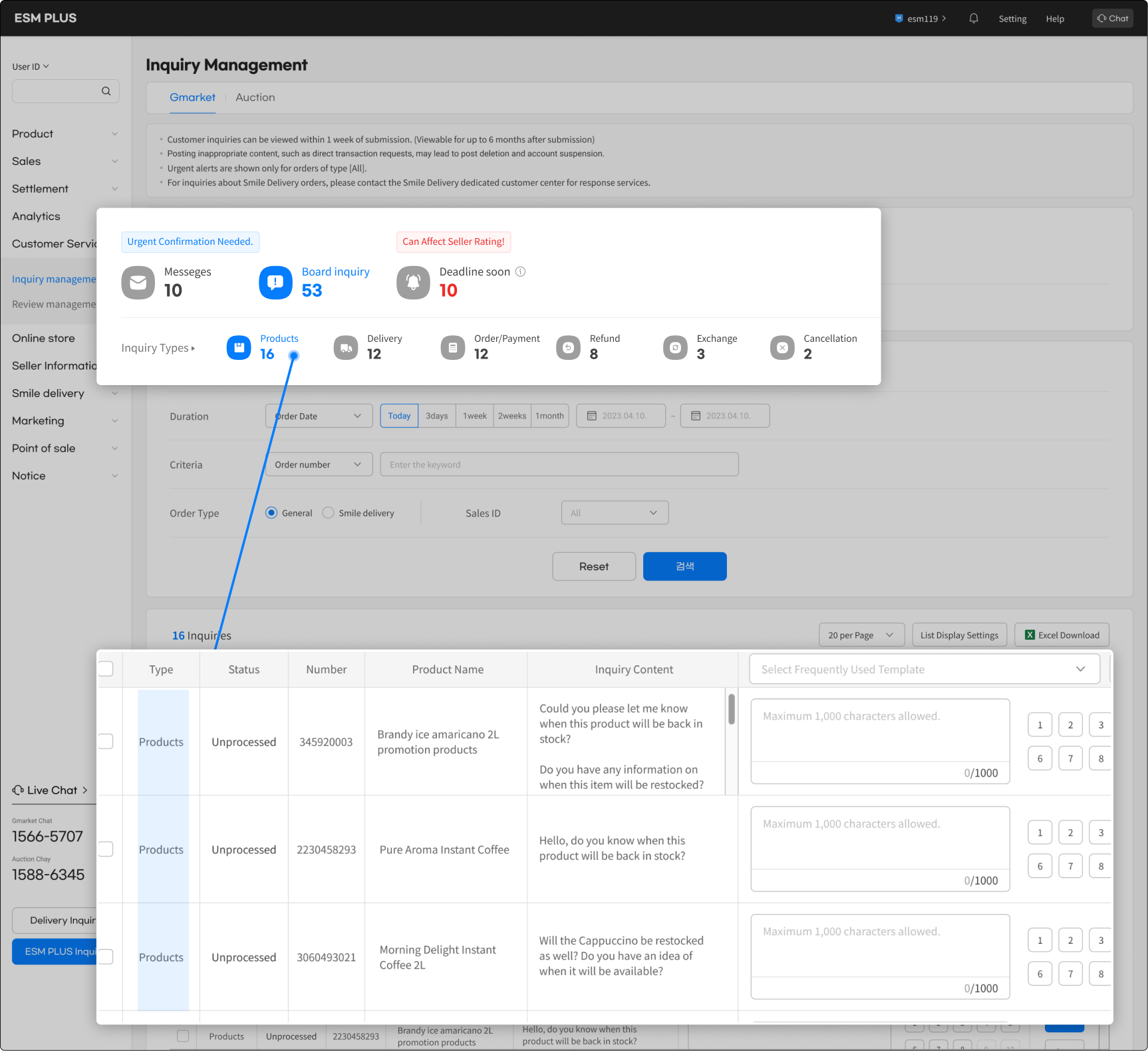
Sellers can not only prioritize bulk inquiries based on important categories but also write appropriate responses.
Manage Templates by Categories
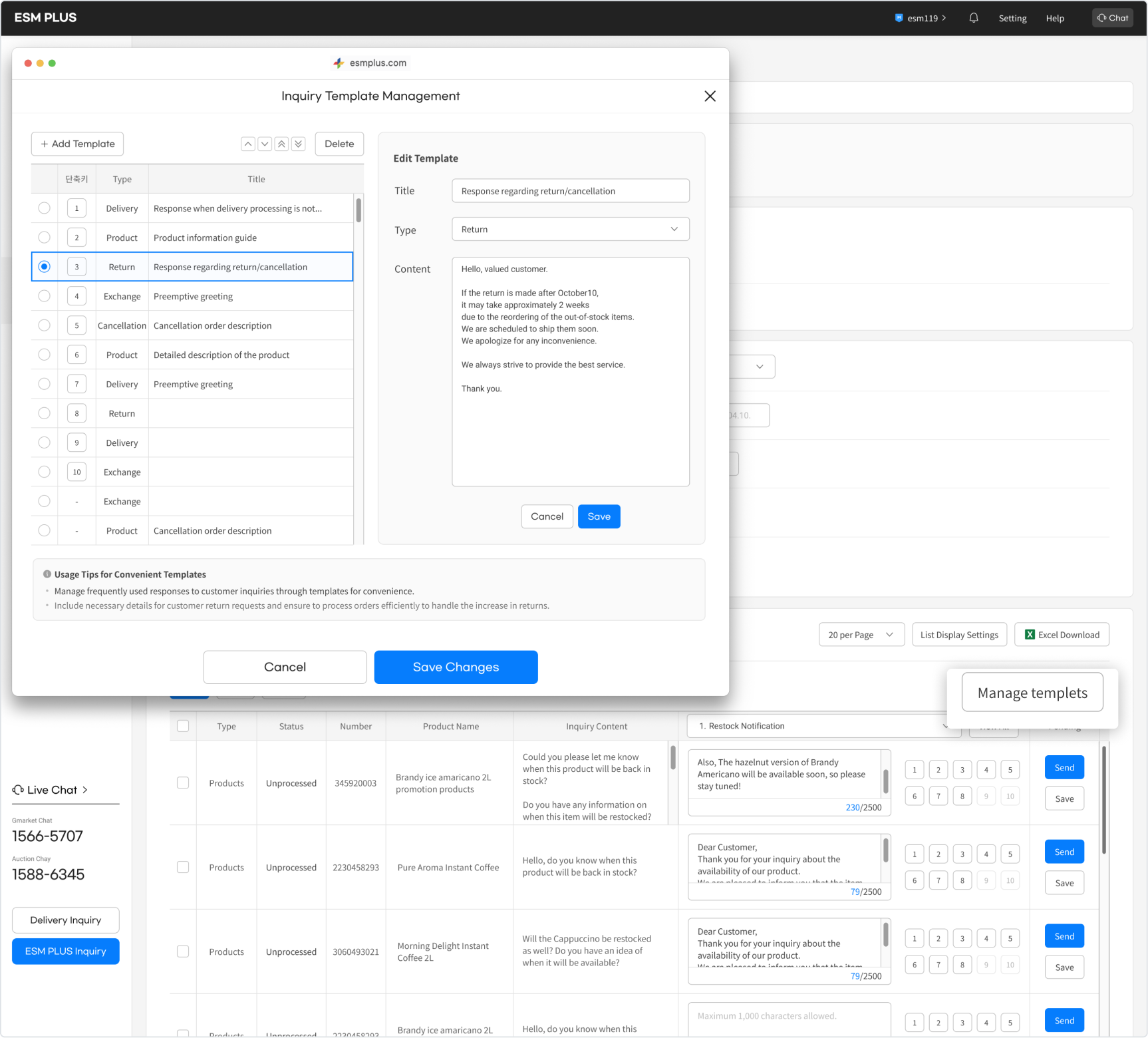
The dashboard allows sellers to manage their templates according to important categories. They can create new templates within specific categories and customize the order of shortcuts. These shortcuts are displayed as numbered buttons right after the input field, enhancing ease of use.
Final Design
Write and Send Responses :
Manage and Edit Templates:
Design process2 :
Sales management
Current problem
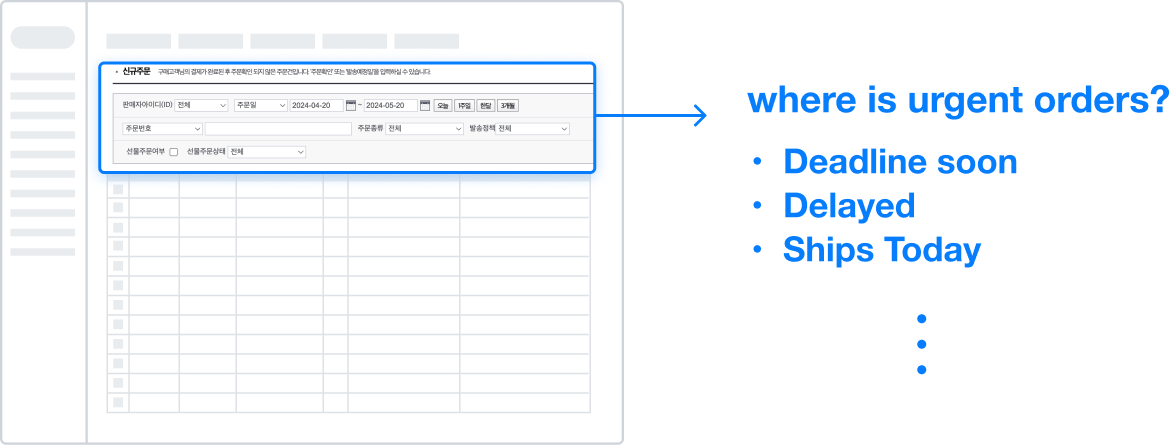
It's difficult to identify urgent orders.
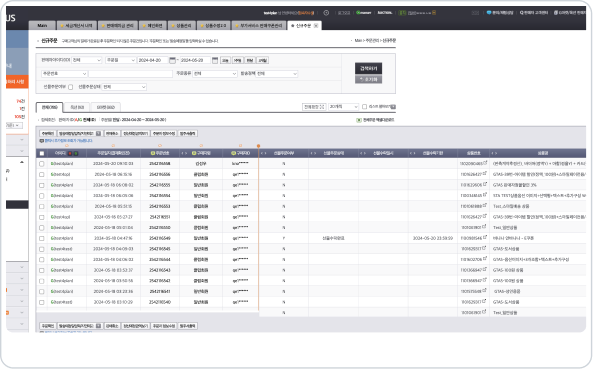
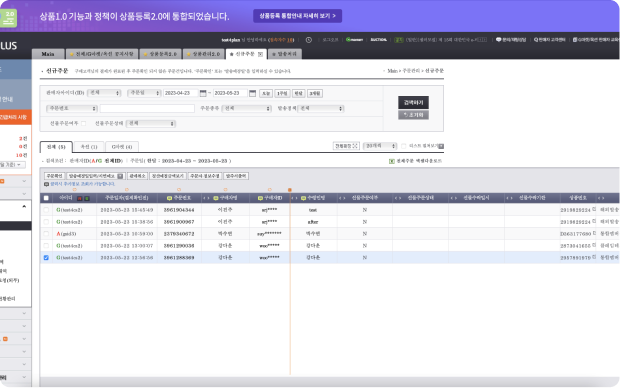
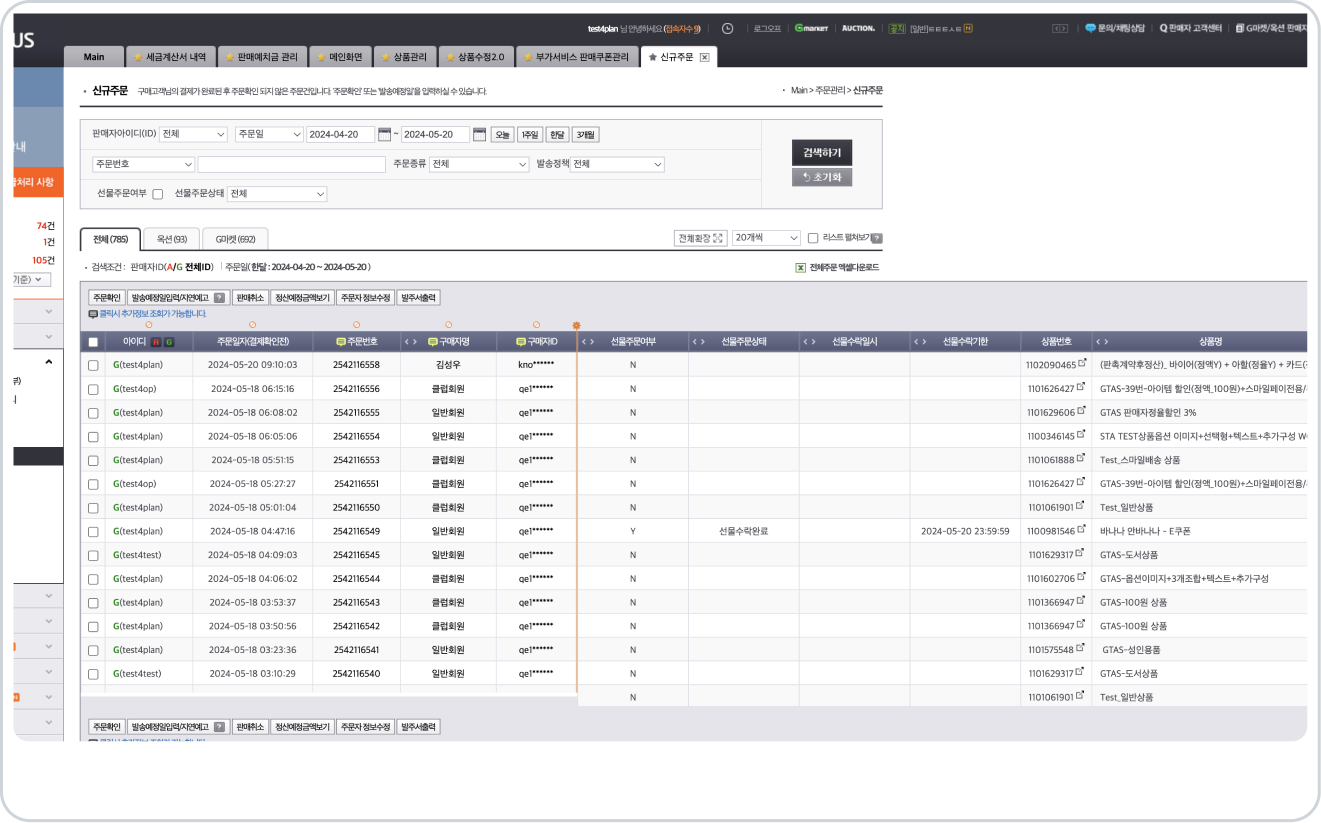
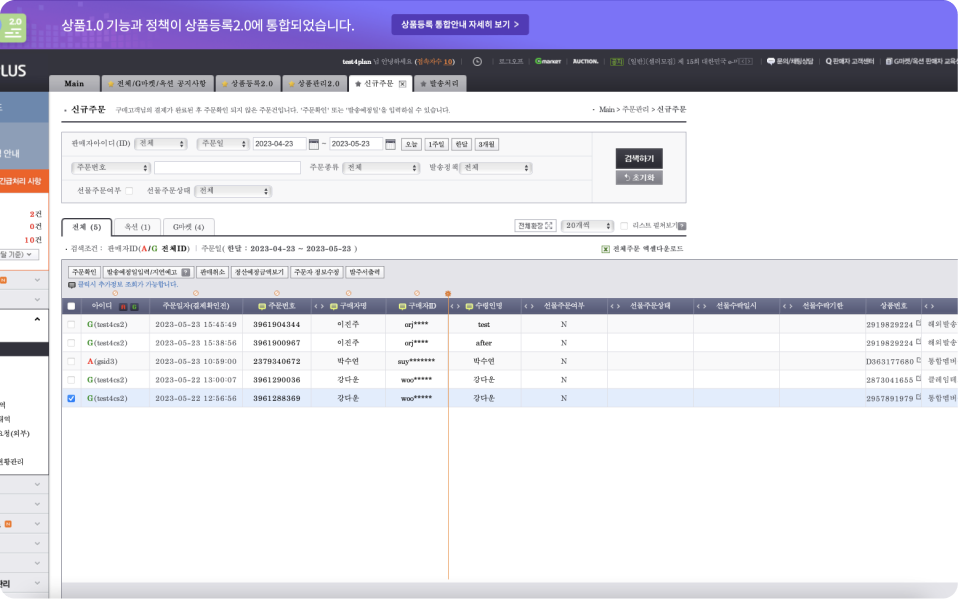
All new orders are sorted by the most recent, and urgent orders with imminent shipping deadlines can only be viewed by applying a filter in the search area.
The process for bulk order shipping is complicated.
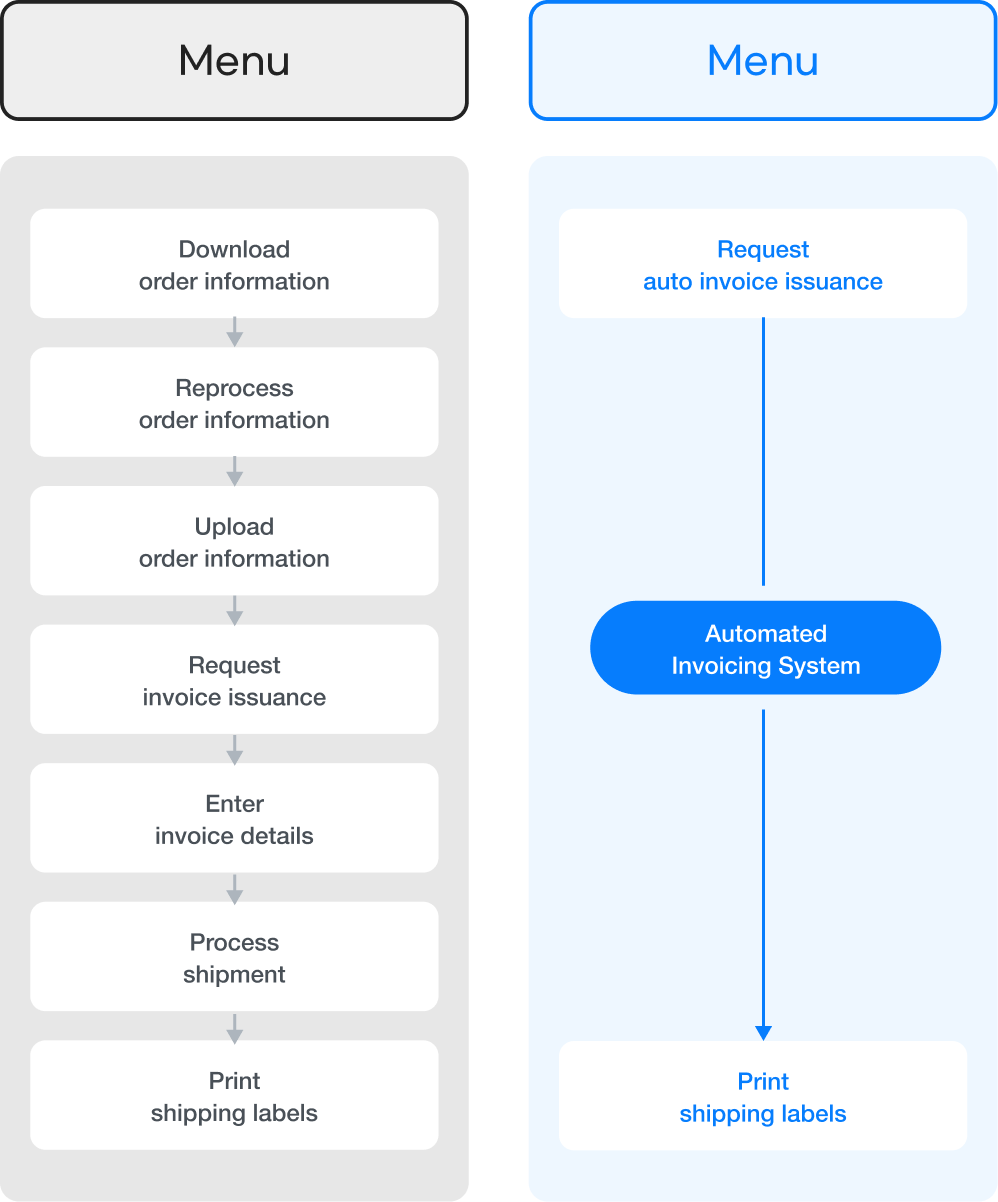
To ship a large number of orders at once, a complex process must be followed.
This is because the legacy system lacks automation capabilities.
Download
order information

Reprocess
order information
Upload
order information
Request
invoice issuance
Enter
invoice details
Process
shipment
shipping labels
UX Stratgies

1

Allows quick identification of orders that need fast processing.
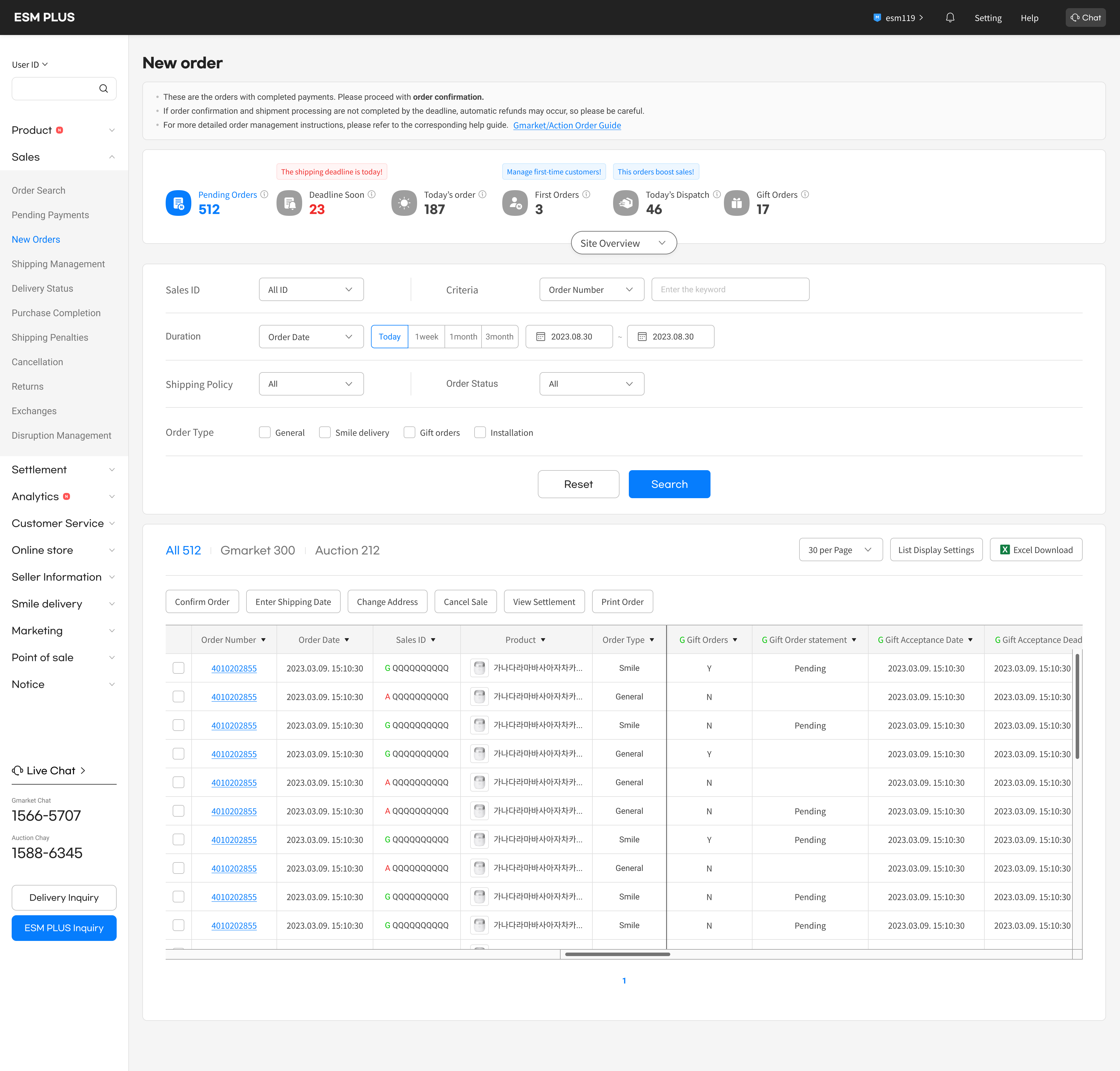
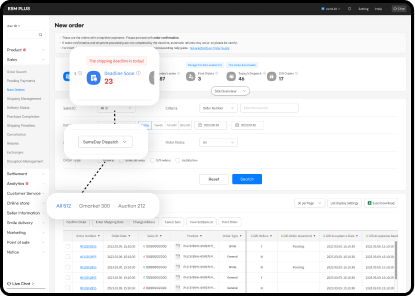
Allows sellers to easily identify key orders on the dashboard. Through the dashboard, sellers can quickly see their sales status and immediate tasks.
2
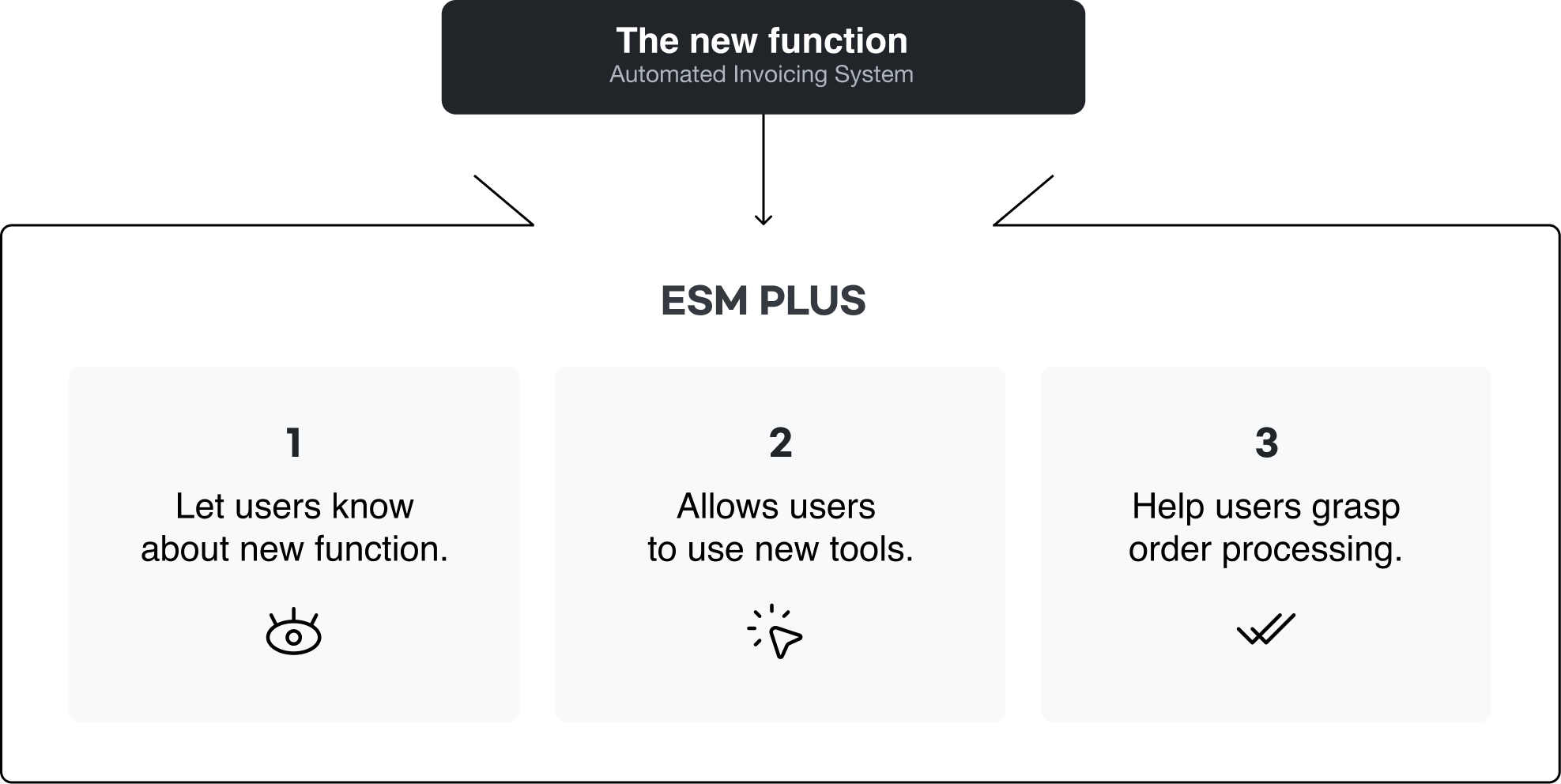
Ensures that sellers can effortlessly adopt new automation features.
Designs a UX that ensures the successful integration of the newly introduced automated shipping and invoicing features with the existing ESM system.
Testing & Iteration
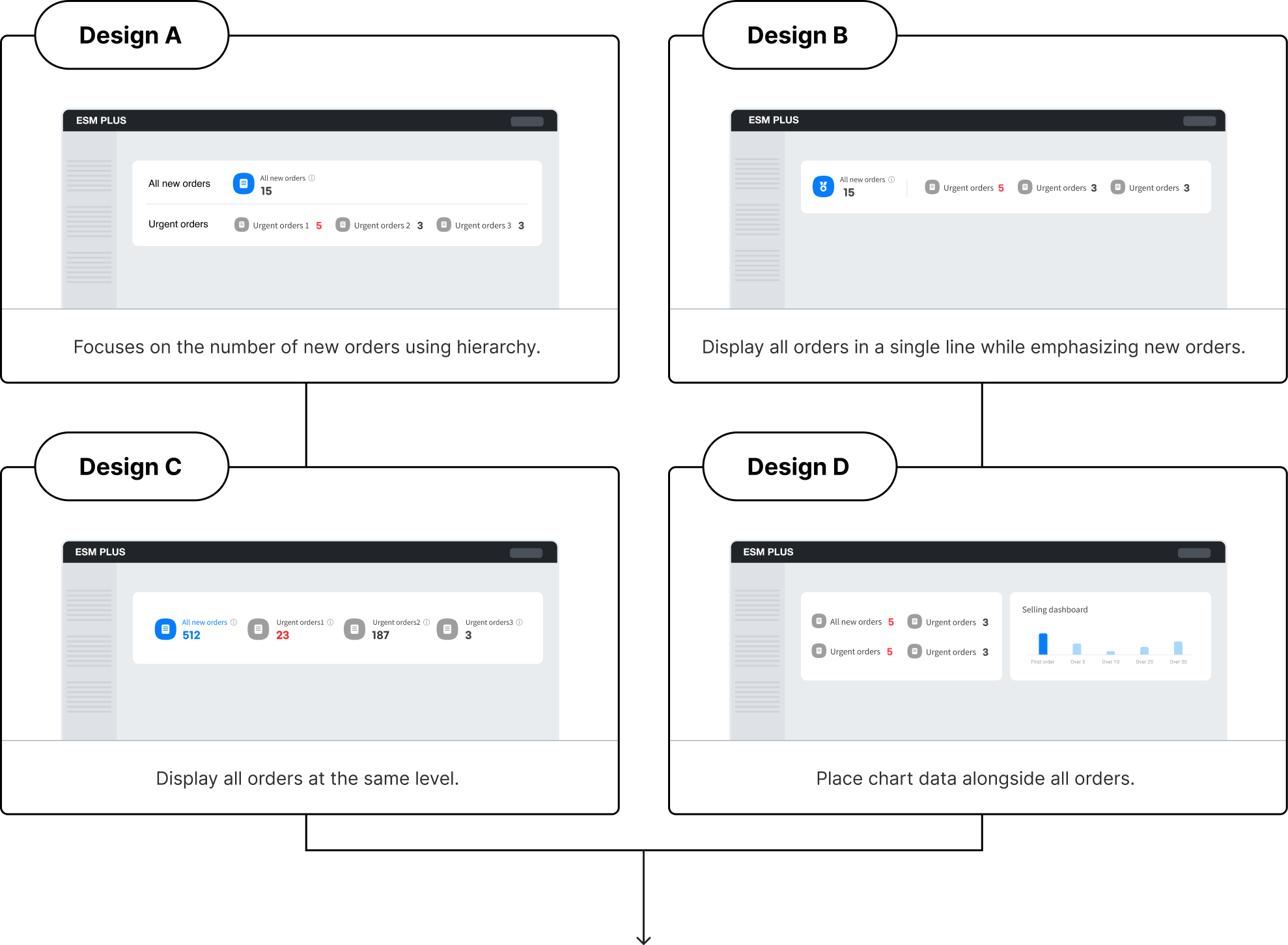
- Dashboard usability

Chat

esm119


Setting
Help
ESM PLUS


Selected design: C

Beta testers
Design C displays a complete overview of all new orders and urgent orders in one place. The numbers for each category are prominently shown, making it easier for sellers to quickly assess the situation.
The information hierarchy between orders isn’t important. Presenting them as separate types of orders could slow down the seller’s processing time. A simple display using titles and numbers would be the most effective.
- Introducing Automated Invoicing System
A new automated shipping label system will streamline sellers' shipping processes from 7 steps to 2, enhancing convenience. As this feature is from a different company's product, designing it to integrate seamlessly with ESM's internal UX requires careful consideration.
Refined Solutions
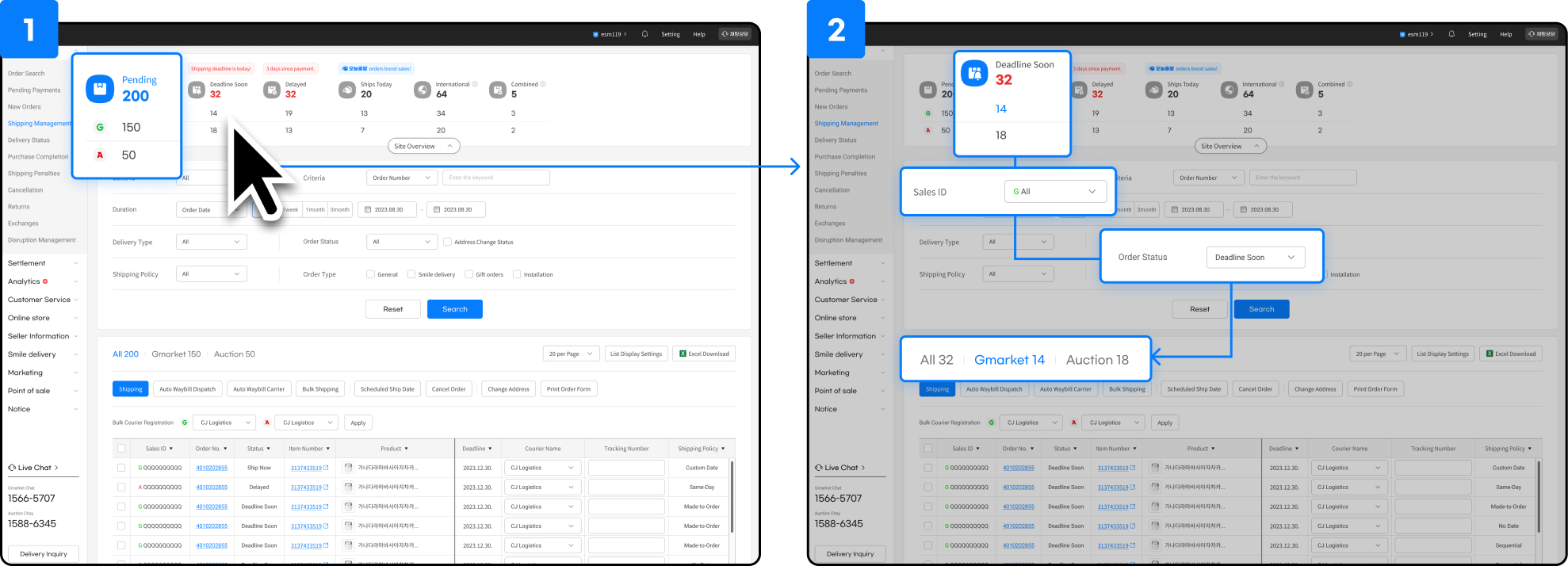
Operation of Each Dashboard Area
The user want to check urgent orders from each sites of Gmerket, Auction.
The dashboard represents the highest level in the hierarchy. Information selected on the dashboard is directly applied to the search area below.
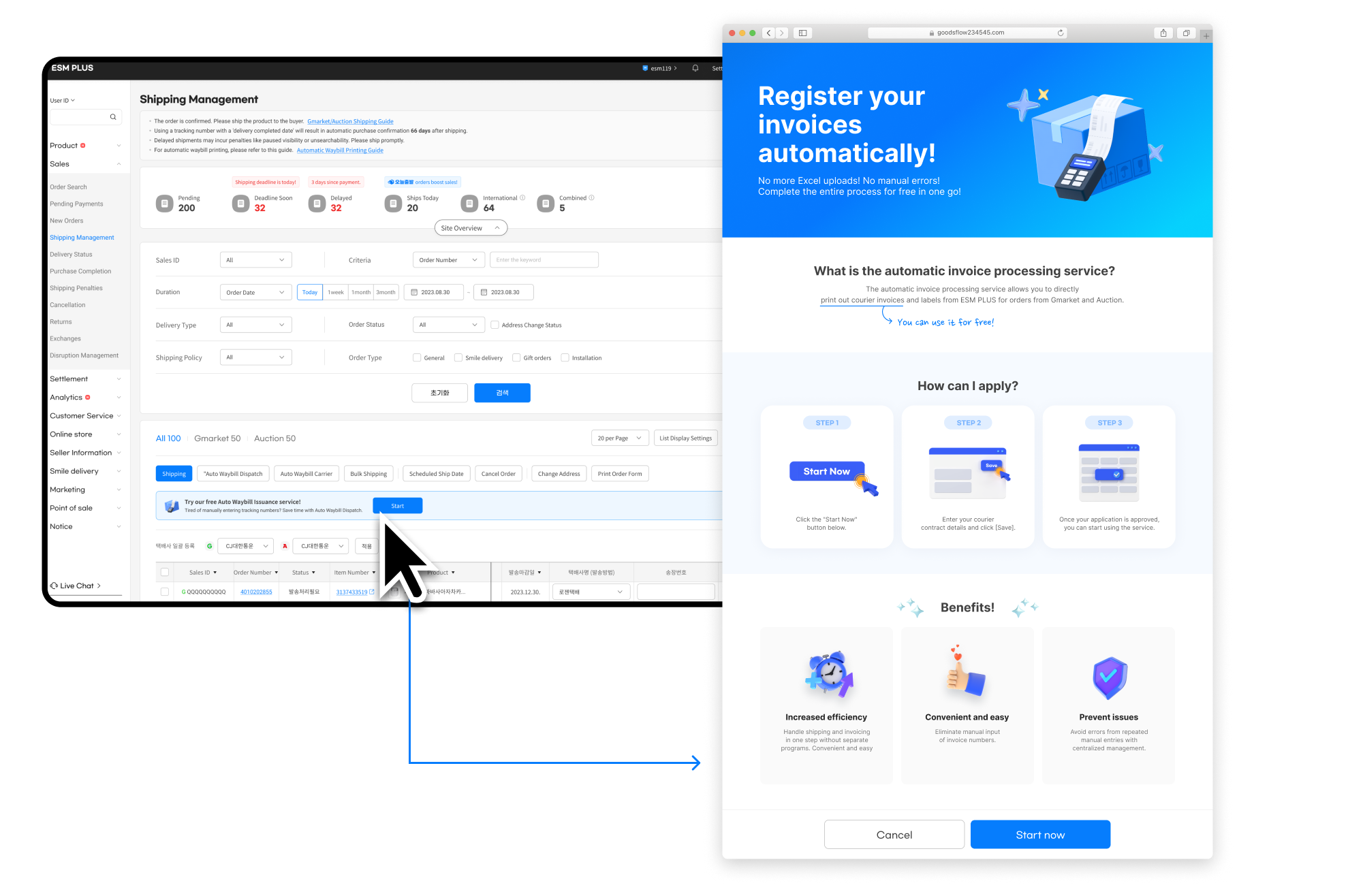
Design service usage guidelines
Designed a service guide page to help sellers understand and use new features.
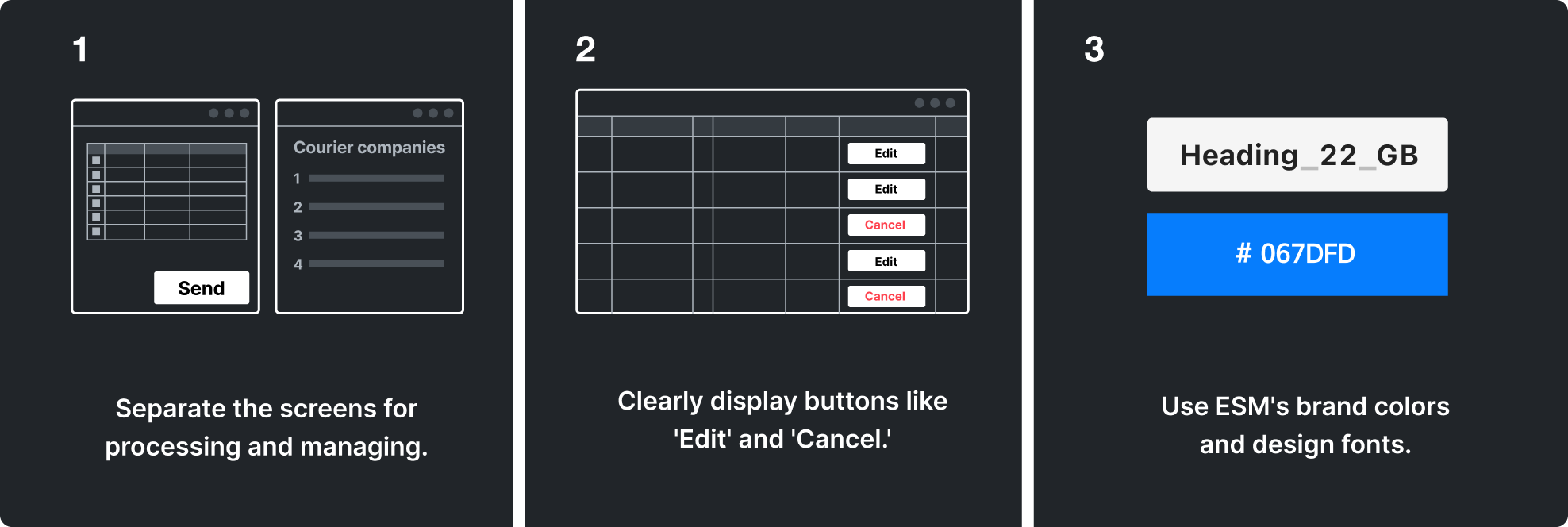
Feature Request
Conducted discussions to add features seamlessly into the existing workflow.
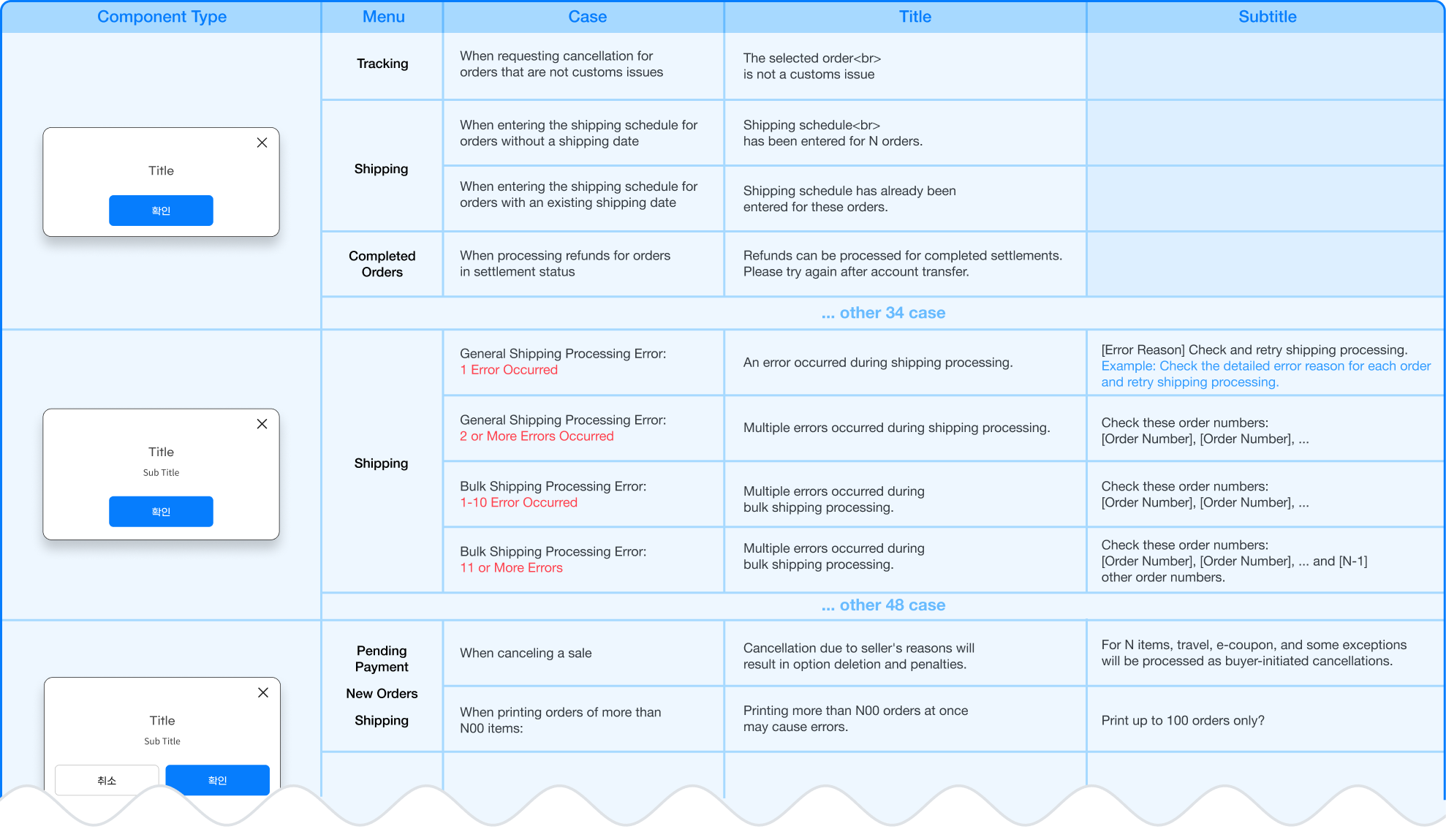
Define UX Writing
Gathered and rewrote all UX writing for the dial interface to ensure users can track shipping status and address errors.
Preview:
The day of sellers
Design process3 :
Refund management
Current problem
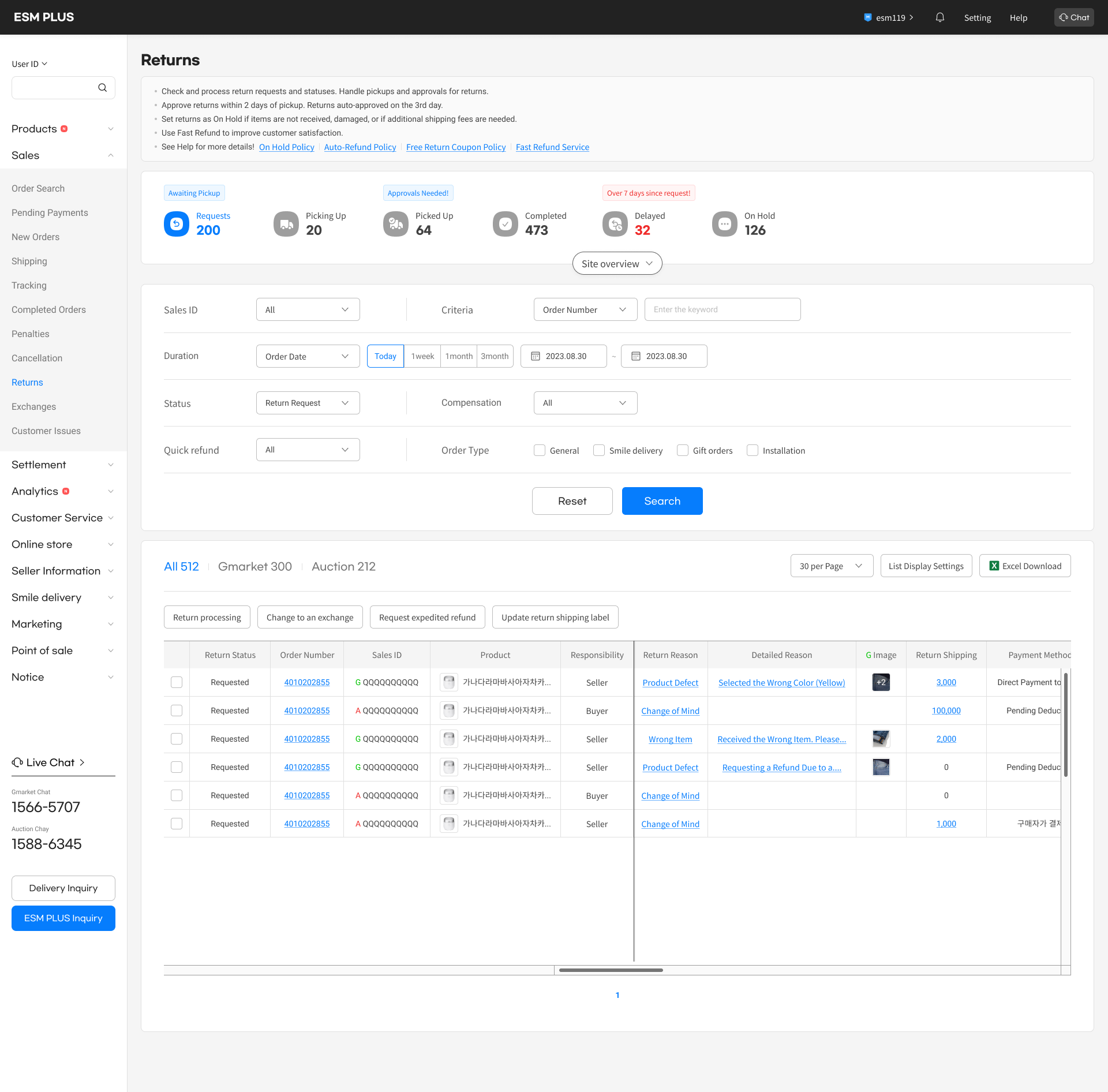
The return process is not user-friendly.
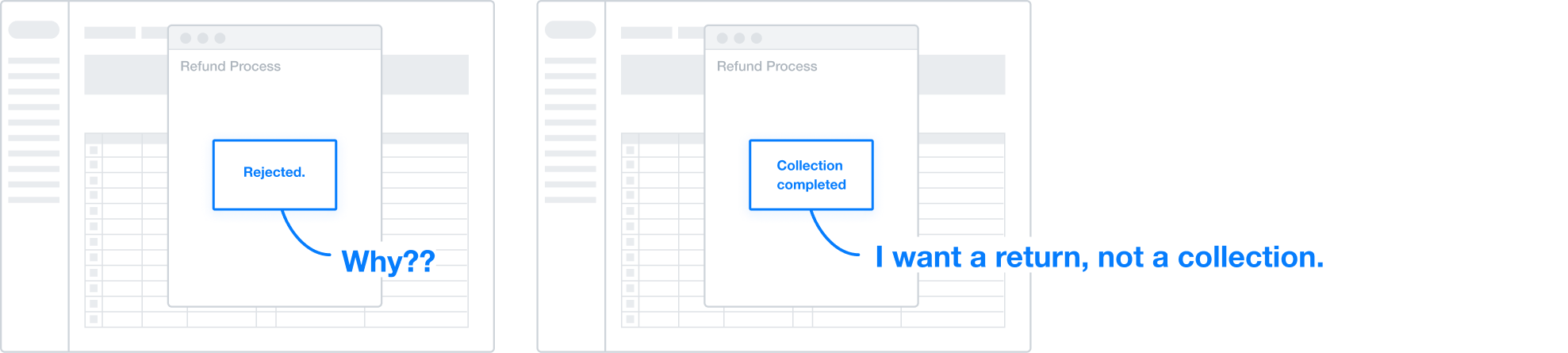
Due to the backend logic designed for handling returns, users may receive feedback that doesn’t align with the context. For example, based on the data processing results, a return may be marked as 'collection completed' instead of 'return processed,' even if that’s not what the user intended.
There is no way to communicate with customers.
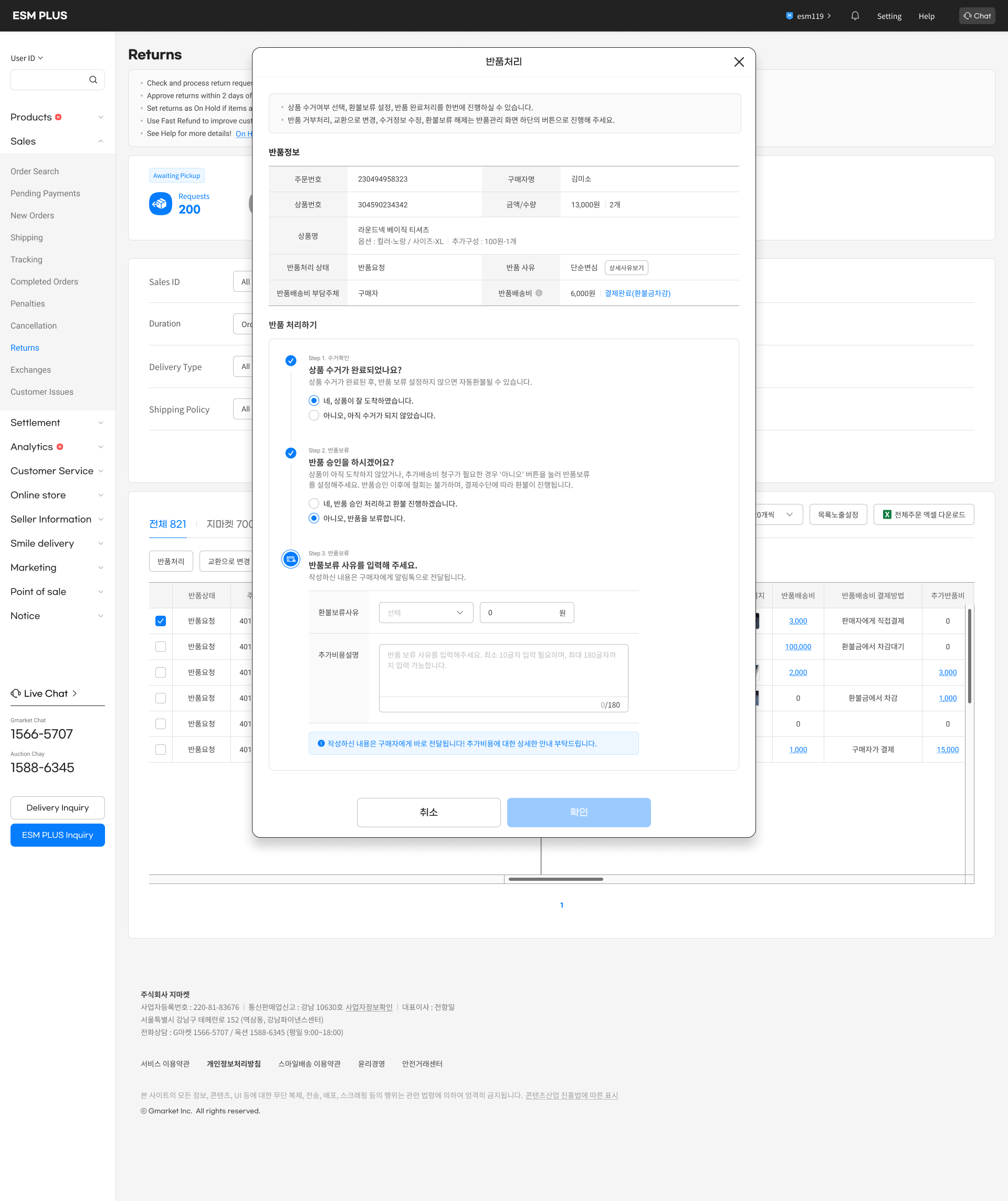
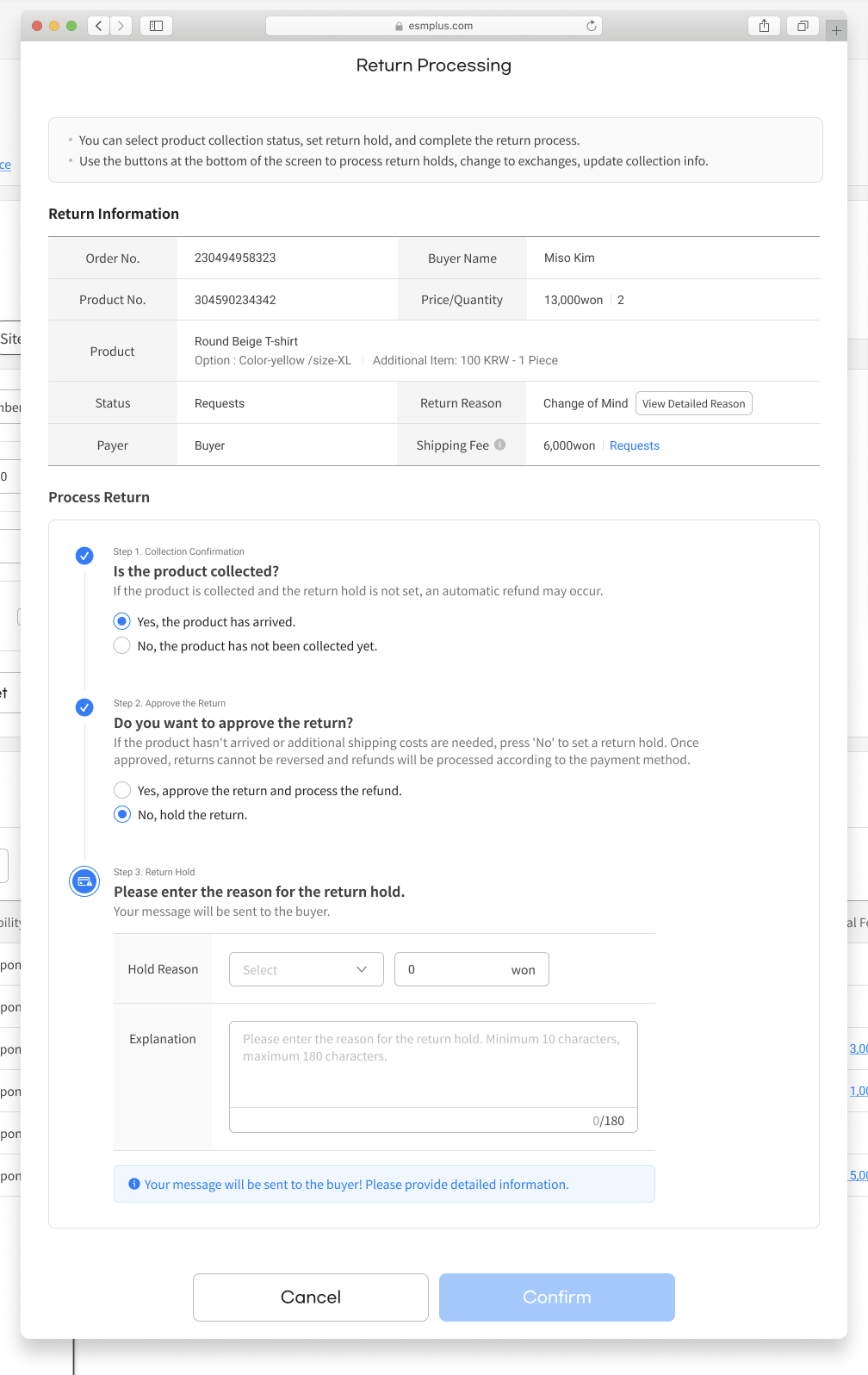
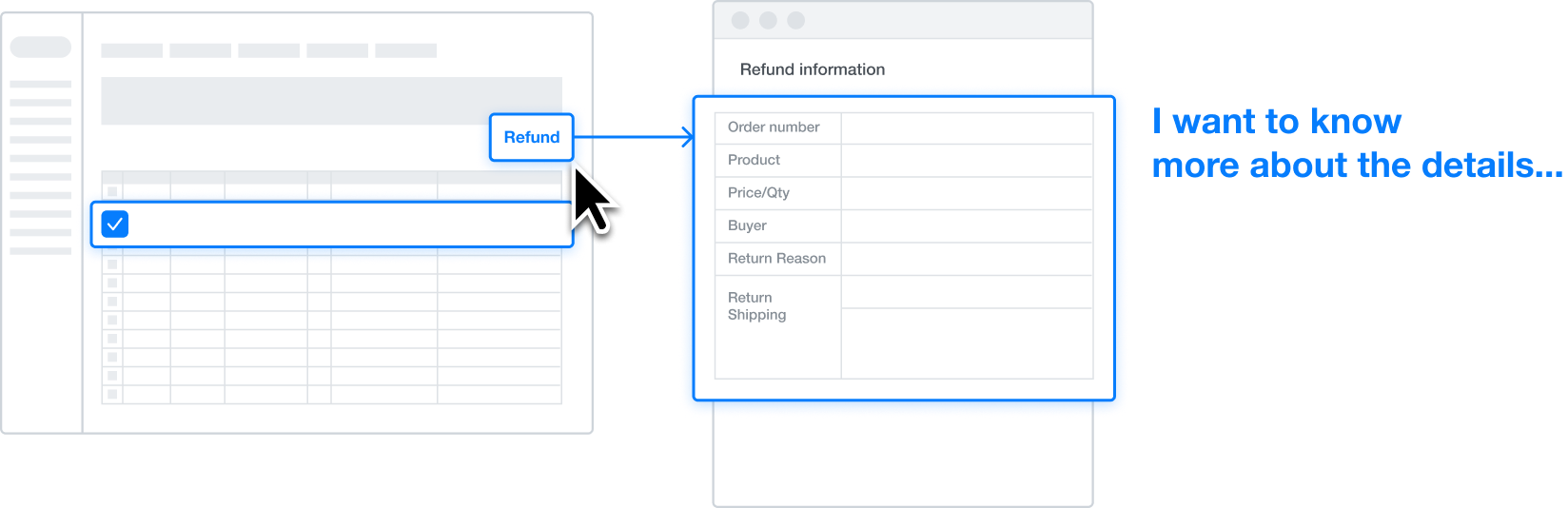
Clicking the "Process Return" button displays the customer's order details, product information, and shipping costs. The return reason is available only in the selected multiple-choice format, and any custom reason written by the customer is not accessible.
UX Stratgies
1

Design a return process that considers the seller’s situation.
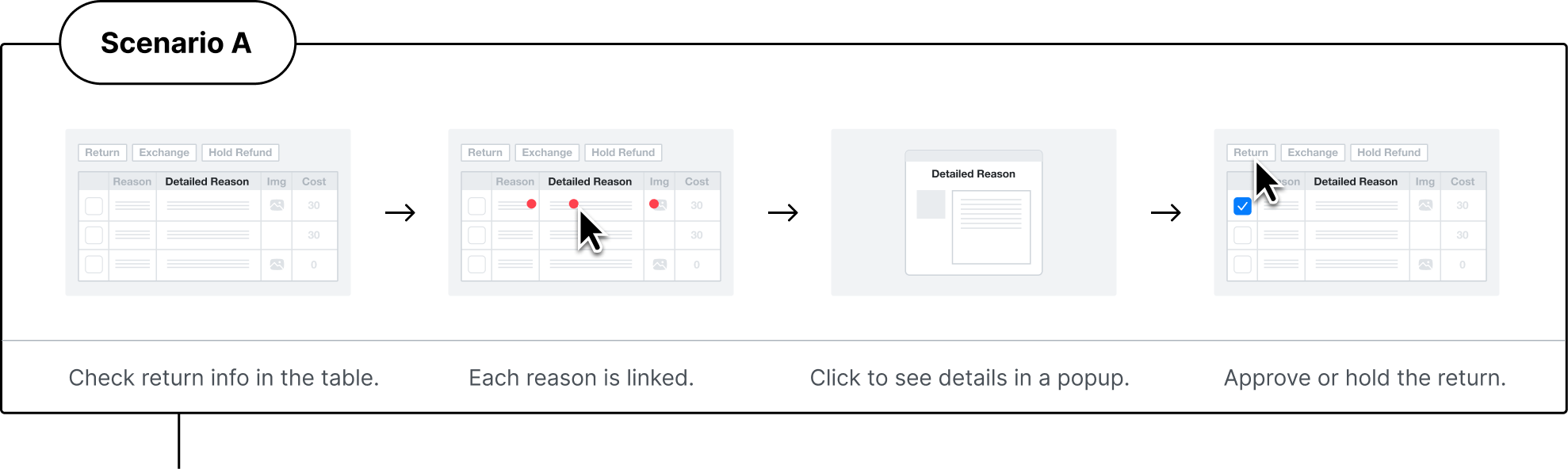
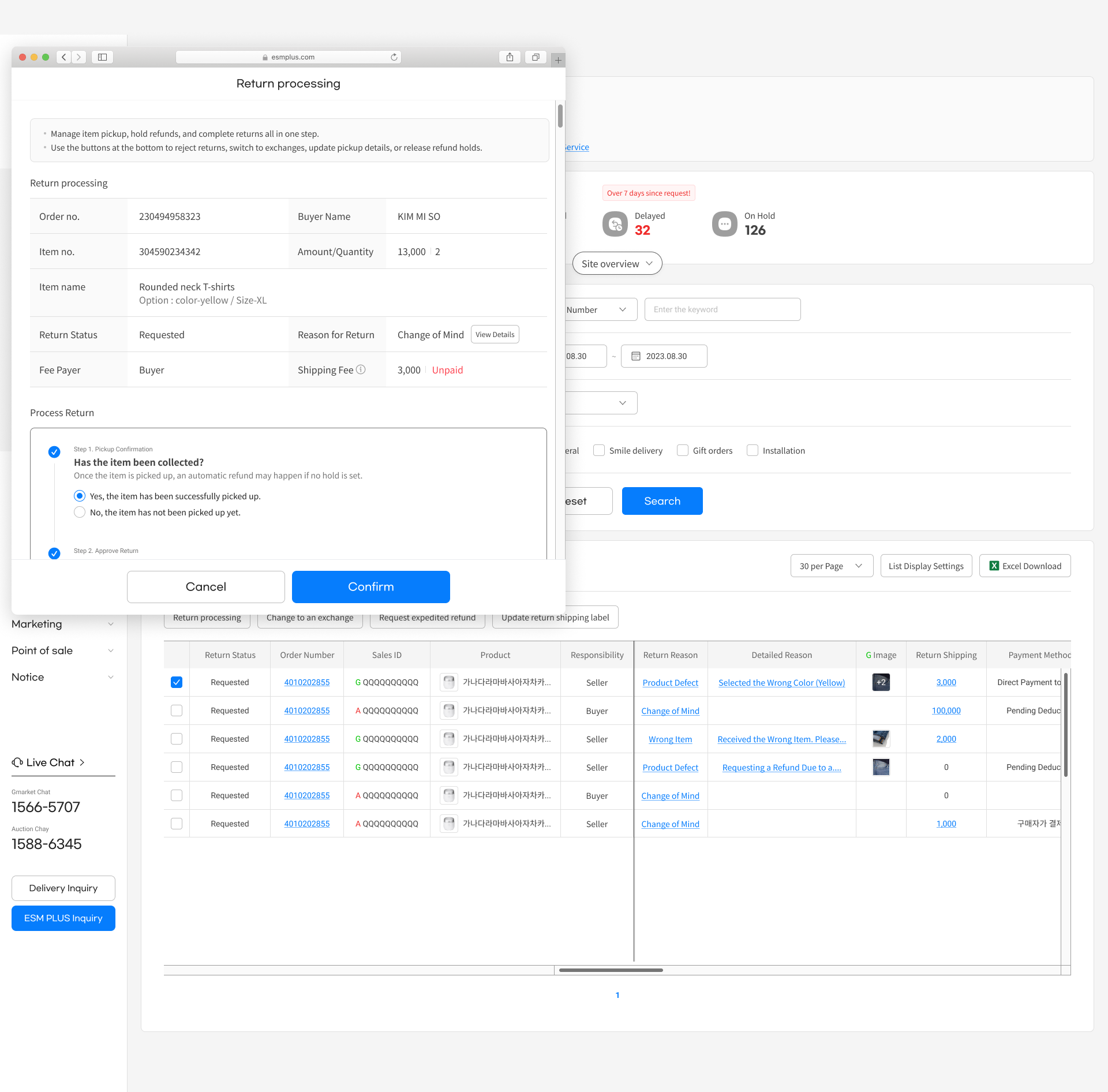
The UX allows for user-friendly decision-making, enabling sellers to make different choices based on the condition of the returned item.
2
Create a communication methods between sellers and customers.
Sellers can view not only the existing return reasons but also the customer's custom-written reasons, which can provide valuable insights for improving sales. Customers can send direct messages to sellers, which can help reduce the number of inquiries received by customer service.
Testing & Iteration
- Dashboard usability
Selected Scenario:B

Chat

esm119


Setting
Help
ESM PLUS



Chat

esm119


Setting
Help
ESM PLUS


Engineer
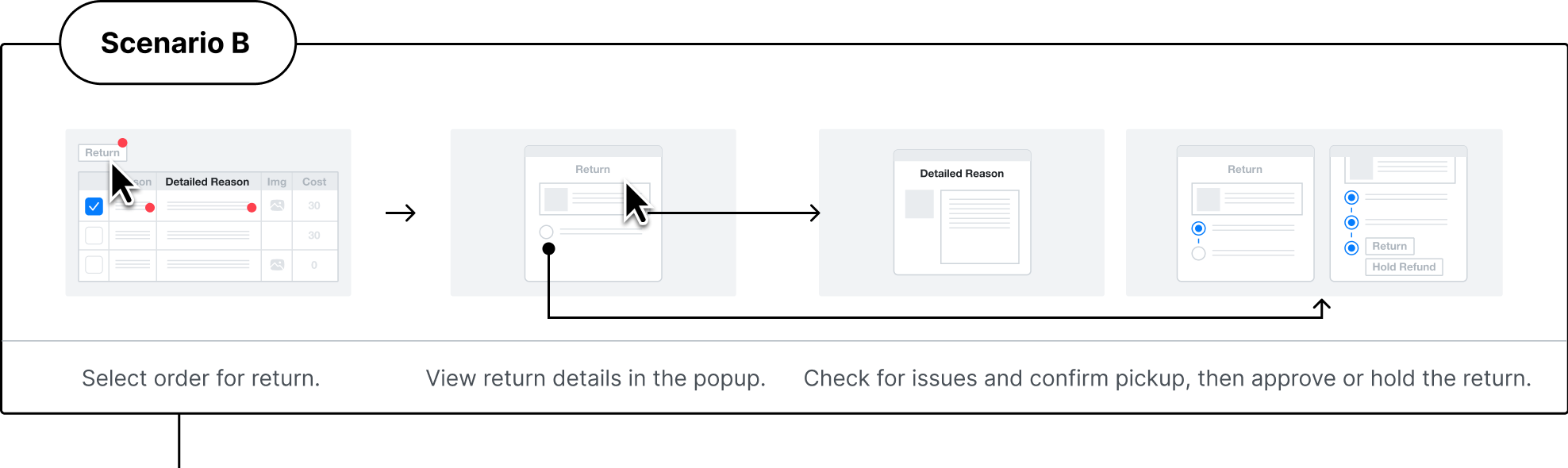
The return reason can vary in length depending on the buyer, so a separate area is necessary. Within the pop-up, there can be a 'View Return Reason' button to navigate to this section, while in the data table, a text button can be used to direct users to the respective path.


Claim menu department
Since return-related information is interrelated, it should be consolidated into a single area rather than scattered. Additionally, items being returned can have varying statuses, so they need to be checked simultaneously within a pop-up before proceeding to the next action. Each item in the data table should be individually accessible, but their connection points should be unified.
Refined Solutions
Creating UX Reflecting the Seller's Actual Workflow
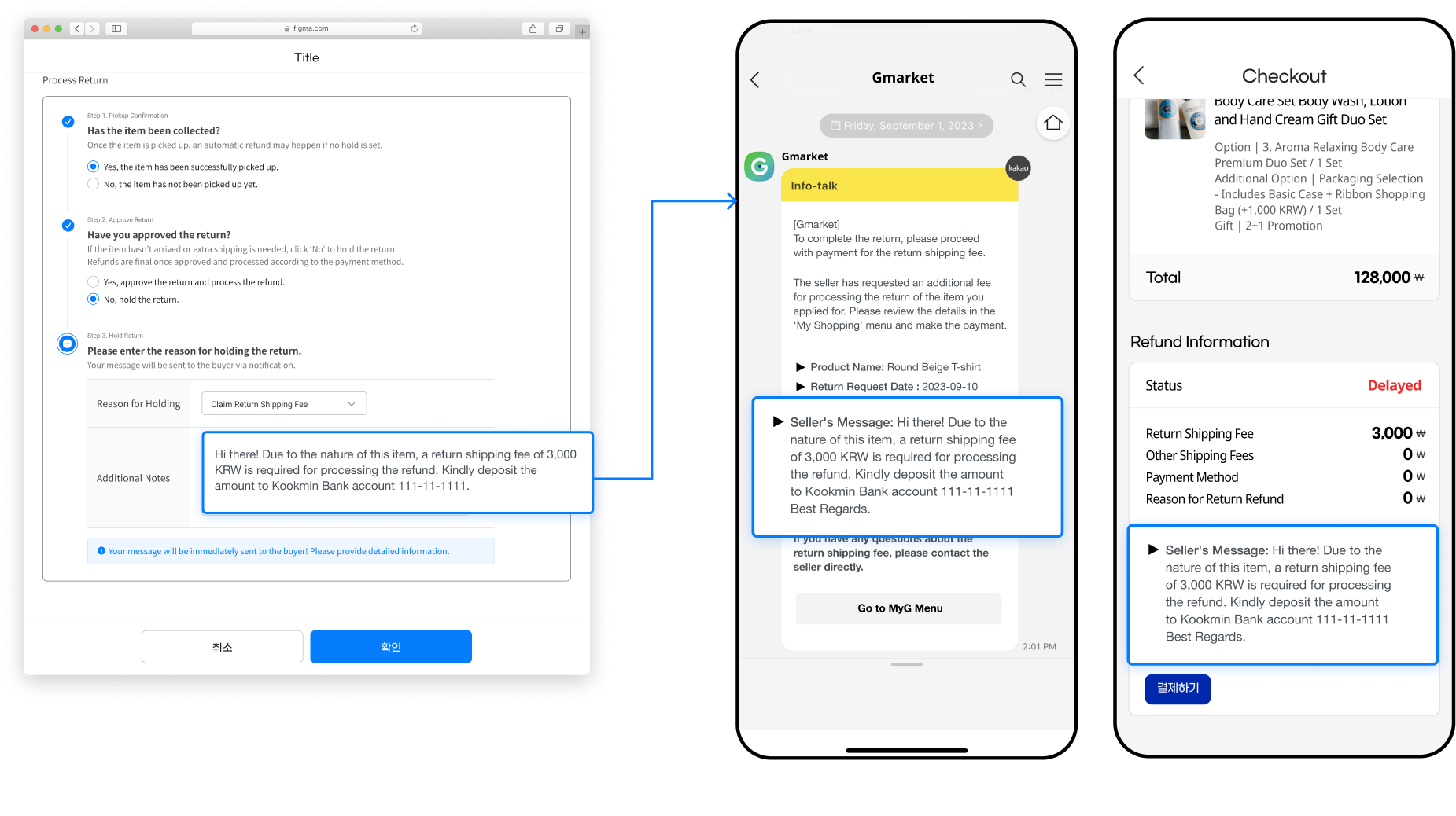
It's crucial for sellers to verify the condition of returned or exchanged items and identify the reasons for return. Therefore, within a popup, we guide sellers through the necessary procedures based on their specific situation and prompt detailed explanations in a separate window, minimizing distraction.
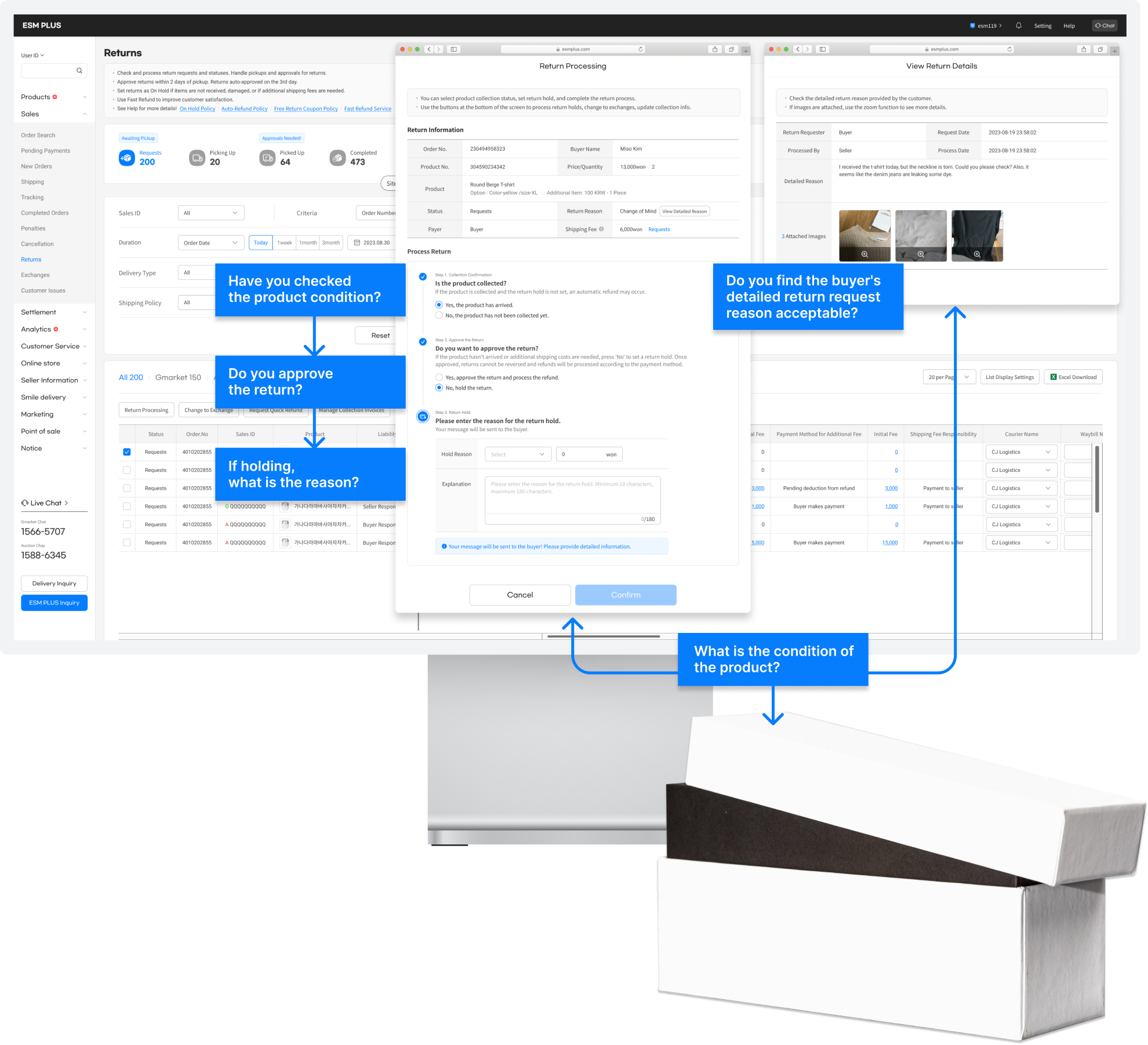
Make new features
Seller’s perspective : Sellers can view not only the existing return reasons but also the customer's custom-written reasons, which can provide valuable insights for improving sales. Customers can send direct messages to sellers, which can help reduce the number of inquiries received by customer service.
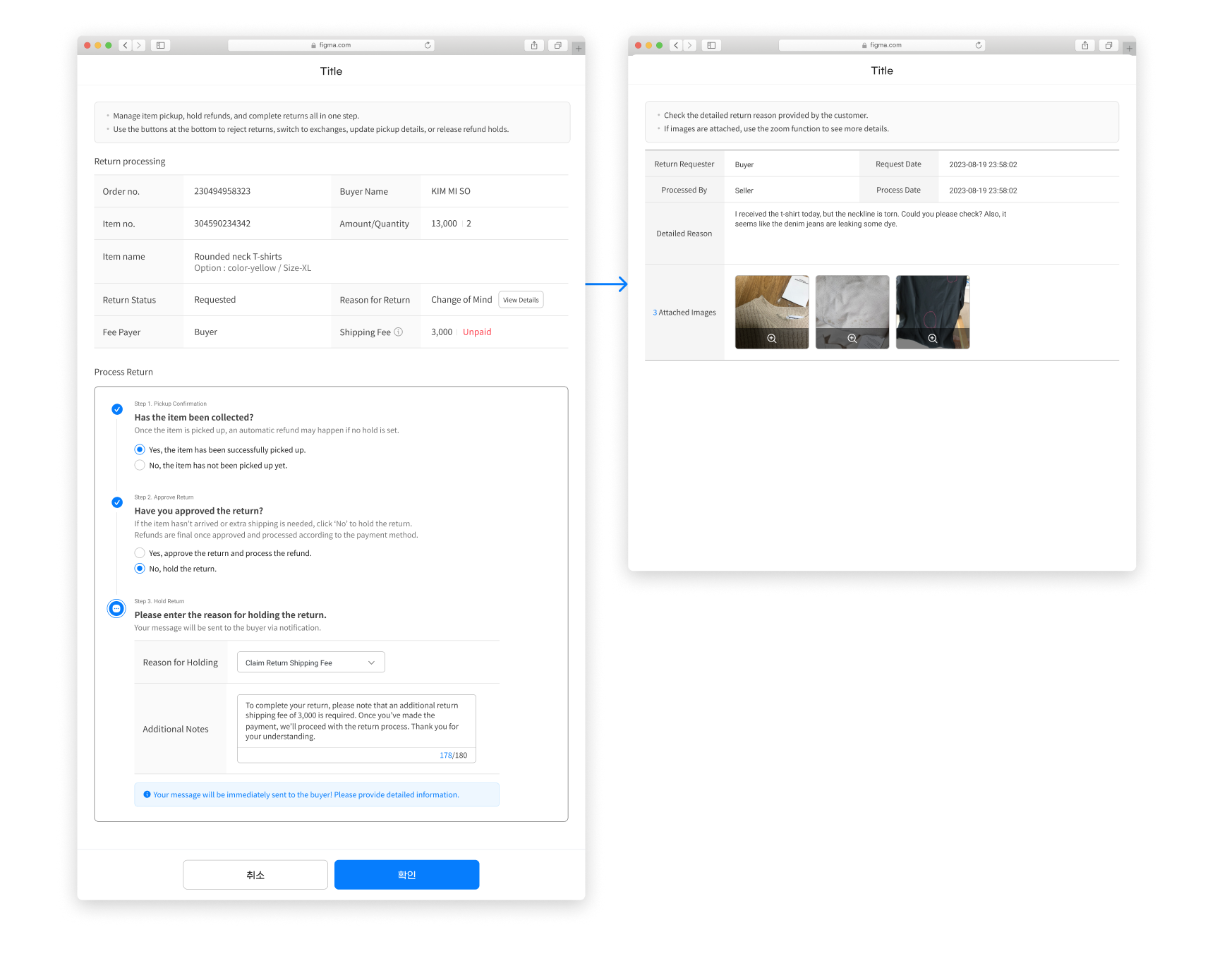
Buyer’s perspective : Sellers can view not only the existing return reasons but also the customer's custom-written reasons, which can provide valuable insights for improving sales. Customers can send direct messages to sellers, which can help reduce the number of inquiries received by customer service.
Preview:
The day of sellers
Result
We launched the new menu on June 26th and will conduct a user satisfaction survey and usability testing afterward. Based on these results, we will continually incorporate seller feedback into our products.
Reflection
Designing the seller experience was one of the most interesting and challenging tasks I handled at the open market. Understanding how key data is processed and used differently depending on the menu was crucial for admin design. This wasn't a quick process; it took a long time to master. Learning to be patient and persistent will be very helpful in my future career.



Let’s Get in Touch ✨
Open to coffee chats, advice, or conversations about favorite movies. :)
©Dawoon Kang 2026

ESM PLUS

What tools are needed to
effectively manage sales activities?

Sellers need to efficiently process orders and communicate with customers—key features of seller administration tools.
I led the ideation, strategy and design for order and customer service menus in ESM PLUS.
My Role
- Create a new UX flow from the Order & Shipping menu to Customer Management menu.
- Organize and define design components.
- Identify and prioritize user feedback from user research.
Type
Web design
Tablet design
Team (40)
Project Manager
Publishers
QA Team
Date
June 2023 -
June 2024
1 year
Challenge
Normally, it is easy to understand people who buy products, because everyone is a consumer, too. However, it is difficult to find opportunities to understand the perspectives of people who sell products. Therefore, it was crucial to conduct iterative scenario testing and in-depth user research.
Furthermore, with ESM, eBay Korea’s seller administration tool, being over 10 years old, numerous technical hurdles arose due to its legacy systems during project implementation. Therefore, it was sometimes necessary to quickly adjust scenarios and redefine designs as needed.
Although this was a challenging project in terms of both user-centered design and communication, everyone involved across all teams made every effort to solve the problems.
Preview:
The day of sellers
- Respond to customer inquiriesand check product reviews.

Play
Urgent Confirmation Needed.
10
Messeges


53
Board inquiry


Can Affect Seller Rating!
10
Deadline soon


Inquiry Types


Products
16


Delivery
24

Order/Payment
24

Refund
8

Exchange
3

Cancellation
2
Check the received inquiries
by main categories.
Manage templets
Send
Save
Delete

Type
Status
Number
Product Name
Inquiry Content
- Restock Notification

View All
Pending
Process
판매자 아이디
상품번호
마지막 저장일
접수일시
처리일시
구매자명
발송자명
구매자 ID
판매진행상태
주문종류
장바구니번호
Products
Unprocessed
345920003
Brandy ice amaricano 2L promotion products
Could you please let me know when this product will be back in stock?
Do you have any information on when this item will be restocked?
317/1000
Dear Customer,
Thank you for your inquiry about the availability of our product.
We are pleased to inform you that the item will be back in stock on [Date]. We appreciate your patience and understanding during this time.
If you have any further questions or need assistance with anything else, please do not hesitate to contact us.
79/2500
1
2
3
4
5
6
7
8
9
10
Send
Save
R
G QQQQQQQQQQ
3137433519

2023.06.30. 17:30
2023.06.30. 17:30
2023.06.30. 17:30
김미소
김미소
woo*****
판매중
스마일배송 주문
12345678901
Products
Unprocessed
2230458293
Pure Aroma Instant Coffee
Hello, do you know when this product will be back in stock?
317/1000
Dear Customer,
Thank you for your inquiry about the availability of our product.
We are pleased to inform you that the item will be back in stock on [Date]. We appreciate your patience and understanding during this time.
If you have any further questions or need assistance with anything else, please do not hesitate to contact us.
79/2500
1
2
3
4
5
6
7
8
9
10
Send
Save
R
G QQQQQQQQQQ
3137433519

2023.06.30. 17:30
2023.06.30. 17:30
2023.06.30. 17:30
김미소
김미소
woo*****
판매중
스마일배송 주문
12345678901
Products
Unprocessed
3060493021
Morning Delight Instant Coffee 2L
Will the Cappuccino be restocked as well? Do you have an idea of when it will be available?
317/1000
Dear Customer,
Thank you for your inquiry about the availability of our product.
We are pleased to inform you that the item will be back in stock on [Date]. We appreciate your patience and understanding during this time.
If you have any further questions or need assistance with anything else, please do not hesitate to contact us.
79/2500
1
2
3
4
5
6
7
8
9
10
Send
Save
R
G QQQQQQQQQQ
3137433519

2023.06.30. 17:30
2023.06.30. 17:30
2023.06.30. 17:30
김미소
김미소
woo*****
판매중
스마일배송 주문
12345678901
Products
Unprocessed
2230458293
Brandy ice amaricano 2L promotion products
Hello, do you know when this product will be back in stock?
0/1000
Maximum 1,000 characters allowed.
0/1000
1
2
3
4
5
6
7
8
9
10
Send
Save
R
G QQQQQQQQQQ
3137433519

2023.06.30. 17:30
2023.06.30. 17:30
2023.06.30. 17:30
김미소
김미소
woo*****
판매중
스마일배송 주문
12345678901
Press the shortcut button to insert
pre-written answers for similar inquiries.
Save and manage templates
for shortcuts in a modal.
- Check the new orders.
Play

Check new orders by category
on the top dashboard.
Prioritize and process orders
that require urgent checking.
Confirmed orders are then moved to the
shipping management menu.
- Quickly ship productsusing the automated invoicing system.
Play
Register seller information for the
automated invoicing system.
Select the orders to be shippedand click the "Ship" button.
Monitor the shipping status andtrack the delivery information.
- Respond to refund / exchange
Play
Check refund requests.
Check product condition
and approve request
If not approved, hold refund and
communicated reasons to buyer.
Backgrounds
What is the seller administration tool?
The seller administration tool is like a control center for sellers. It helps them manage everything related to their business, like keeping track of inventory, processing orders, talking to customers, and seeing how well their business is doing.
Seller
Shpping

Checking order
Answering
Managing customers

Buyer
Leave inquiry
Phurchasing
Refunding
Write review
Our history
The seller administration system on eBay Korea was designed 10 years ago, and many problems have arisen as a result.Therefore, this project aims to completely redesign the ESM, making the service much more user-friendly for sellers with improved UX design and new design components.

10
+
Years
The part I designed
During the complete redesign, I was in charge of the 'Sales Management' section, handling order processing, shipping, returns/exchanges, and managing customer inquiries and reviews.
The part i designed
The entire process of esm



Sales management
New
Orders
Boost Product
Visibility
Revenue
Management
New Product Listing & Editing
Order
Confirmation
Claim
Handling
Sales
Tracking
Customer
Support

User problem
Sellers perform key tasks in each menu. However, the usability of these menus was not effective for them.

What should be checked first?
How can I ship all these orders
faster and easier?

How do I talk to customers about refunds?
Is there an easier way to
answer customer questions?
Early research findings
Tracking a Seller's Daily Routine
To research seller activities, daily routines were gathered from around 20 sellers. Despite variations in routine order and details based on product type and business style, common usability issues were identified at each step of the process.
Field interview
2023.02 - 03
2 companies, 20 sellers

Support the
customer
09:00

09:30

10:00
10:30
11:00
11:30
Respond to customer
inquiries
Write replies
to reviews.
- Sellers want to quickly reply to multiple inquiries and easily manage their responses.
Customer inquiries often contain urgent issues, so they need the quickest response.
It would be great if repetitive questions could be handled in bulk.
Seller1
Responses vary depending on the topic, such as shipping, products, or refunds. It would be helpful to categorize these inquiries.
Seller D
It would be great if I could quickly find the content I use frequently.
During promotion periods or holidays, I need templates that fit the occasion.
Seller C

Check the
orders
09:00

12:30
13:00
13:30
14:00
14:30
Check
new orders
Ship
products
- Sellers want to quickly identify rush orders and efficientlyship multiple orders at once.
The first thing I check is orders with urgent shipping deadlines. If I don't ship on time, I get penalized.
It would be great to easily spot rush orders.
Seller K
Shipping a product takes too many steps. Unlike other platforms that auto-generate waybills and handle shipping, ESM doesn’t offer this feature.
Seller L
Order confirmation, waybill
generation, and shipping are
repetitive tasks I do every day. Can these be streamlined?
Seller H

Check the
claims
09:00
15:30
16:00
16:30
17:00
17:30
Handle
returns and
exchanges.
- When customers are dissatisfied with a product, sellers want to communicate with them directly.
When a customer requests a return but the product issue makes a refund impossible, I need to explain the reason for the denial. However, I can only select from pre-set options and can't write a detailed message.
Seller G
There are many factors to check before deciding whether to approve or deny a refund. I want to review all these details conveniently in one place.
Seller K
I'm curious why the customer requested a return. This information is helpful for future improvements, but right now, I can't access it, which is frustrating.
Seller O
Vision
- Visualize dashboard
Enhancing the dashboard to filter and display key information, such as urgent orders, high-priority orders, and customer inquiries by category.

- Implement new shipping features
Designing an efficient flow to meet diverse user needs
Auto Waybill Processing

- Enhance communication between sellers and buyers
Launching additional services aligned with the changing trends in the airline industry, we design a new business model and simultaneously raise consumer awareness.

Preview:
The day of sellers
From Dashboard to Template Usage
Design process2 :
Sales management
Current problem
It's difficult to identify urgent orders.
All new orders are sorted by the most recent, and urgent orders with imminent shipping deadlines can only be viewed by applying a filter in the search area.
The process for bulk order shipping is complicated.
To ship a large number of orders at once, a complex process must be followed.
This is because the legacy system lacks automation capabilities.
Download
order information
Reprocess
order information
Upload
order information
Request
invoice issuance
Enter
invoice details
Process
shipment
shipping labels
UX Stratgies

1

Allows quick identification of orders that need fast processing.
Allows sellers to easily identify key orders on the dashboard. Through the dashboard, sellers can quickly see their sales status and immediate tasks.
2
Ensures that sellers can effortlessly adopt new automation features.
Designs a UX that ensures the successful integration of the newly introduced automated shipping and invoicing features with the existing ESM system.
Testing & Iteration
- Dashboard usability

Chat

esm119


Setting
Help
ESM PLUS


Selected design: C
Beta testers

Design C displays a complete overview of all new orders and urgent orders in one place. The numbers for each category are prominently shown, making it easier for sellers to quickly assess the situation.
The information hierarchy between orders isn’t important. Presenting them as separate types of orders could slow down the seller’s processing time. A simple display using titles and numbers would be the most effective.
- Introducing Automated Invoicing System
A new automated shipping label system will streamline sellers' shipping processes from 7 steps to 2, enhancing convenience. As this feature is from a different company's product, designing it to integrate seamlessly with ESM's internal UX requires careful consideration.
Refined Solutions
Operation of Each Dashboard Area
The user want to check urgent orders from each sites of Gmerket, Auction.
The dashboard represents the highest level in the hierarchy. Information selected on the dashboard is directly applied to the search area below.
Design service usage guidelines
Designed a service guide page to help sellers understand and use new features.
Feature Request
Conducted discussions to add features seamlessly into the existing workflow.
Define UX Writing
Gathered and rewrote all UX writing for the dial interface to ensure users can track shipping status and address errors.
Preview:
The day of sellers
Design process1 :
Inquiry/review management
Current problem
For individual responses
To answer individual inquiries, sellers needed to select the question and then type a response at the bottom of the screen.
For bulk responses
To bulk reply to messages, select the items and click the 'Send Reply' button at the top. Compose response within the modal window. At this point, the detailed content of the inquiry is located on the parent page, making it difficult to view.
Unorganized templetes
Templates previously created by sellers were sorted chronologically, making it difficult to quickly locate important older templates.
UX criteria
1
Combine message review and reply in one interface.
Viewing buyer messages and composing responses should occur in the same area, with key information clearly visible.
2
Ensure consistent usability for reply submission.
The workflows for bulk and individual responses should have a similar user experience.
3
Make reply templates easily accessible.
Position templates near the reply area for convenience and provide them in a user-friendly format.
Testing & Iteration
- Response writing usability

Chat

esm119


Setting
Help
ESM PLUS


Selected design:B
+ Some feature of C


CS
Manager
More than 60% sellers in ESM frequently use predefined response types, usually consisting of three parts: greeting, main content, and closing. Within the main content, there are often recurring expressions like delivery delay notifications or restocking notices. Currently, many sellers resort to copying and pasting from a notepad since they can't combine templates.
It would be more convenient if templates could be combined like building blocks through a button.


Engineer
For important announcements, sometimes sellers need to check the content and apply it to all. It would be helpful to have a way to see template content for confirmation.
- Template usage usability
To enable sellers to easily manage and respond to inquiries and reviews by key categories, we have unified and reorganized the previously site-specific categories. This allows sellers to use the same categories across all sites where they sell their products. Additionally, we have selected the top six categories with the highest data volume and made them available for filtering on the dashboard.


Products
Refined Solutions
From Dashboard to Template Usage
Sellers can not only prioritize bulk inquiries based on important categories but also write appropriate responses.
Manage Templates by Categories
The dashboard allows sellers to manage their templates according to important categories. They can create new templates within specific categories and customize the order of shortcuts. These shortcuts are displayed as numbered buttons right after the input field, enhancing ease of use.
Design process3 :
Refund management
Current problem
The return process is not user-friendly.
Due to the backend logic designed for handling returns, users may receive feedback that doesn’t align with the context. For example, based on the data processing results, a return may be marked as 'collection completed' instead of 'return processed,' even if that’s not what the user intended.
There is no way to communicate with customers.
Clicking the "Process Return" button displays the customer's order details, product information, and shipping costs. The return reason is available only in the selected multiple-choice format, and any custom reason written by the customer is not accessible.
UX Stratgies
1
Design a return process that considers the seller’s situation.
The UX allows for user-friendly decision-making, enabling sellers to make different choices based on the condition of the returned item.
2
Create a communication methods between sellers and customers.
Sellers can view not only the existing return reasons but also the customer's custom-written reasons, which can provide valuable insights for improving sales. Customers can send direct messages to sellers, which can help reduce the number of inquiries received by customer service.
Testing & Iteration
- Dashboard usability
Selected Scenario:B

Chat

esm119


Setting
Help
ESM PLUS


Chat
esm119
Setting
Help
ESM PLUS


Engineer
The return reason can vary in length depending on the buyer, so a separate area is necessary. Within the pop-up, there can be a 'View Return Reason' button to navigate to this section, while in the data table, a text button can be used to direct users to the respective path.


Claim menu
department
Since return-related information is interrelated, it should be consolidated into a single area rather than scattered. Additionally, items being returned can have varying statuses, so they need to be checked simultaneously within a pop-up before proceeding to the next action. Each item in the data table should be individually accessible, but their connection points should be unified.
Refined Solutions
Creating UX Reflecting the Seller's Actual Workflow
It's crucial for sellers to verify the condition of returned or exchanged items and identify the reasons for return. Therefore, within a popup, we guide sellers through the necessary procedures based on their specific situation and prompt detailed explanations in a separate window, minimizing distraction.
Make new features
Seller’s perspective : Sellers can view not only the existing return reasons but also the customer's custom-written reasons, which can provide valuable insights for improving sales. Customers can send direct messages to sellers, which can help reduce the number of inquiries received by customer service.
Buyer’s perspective : Sellers can view not only the existing return reasons but also the customer's custom-written reasons, which can provide valuable insights for improving sales. Customers can send direct messages to sellers, which can help reduce the number of inquiries received by customer service.
Preview:
The day of sellers
Result
We launched the new menu on June 26th and will conduct a user satisfaction survey and usability testing afterward. Based on these results, we will continually incorporate seller feedback into our products.
Reflection
Designing the seller experience was one of the most interesting and challenging tasks I handled at the open market. Understanding how key data is processed and used differently depending on the menu was crucial for admin design. This wasn't a quick process; it took a long time to master. Learning to be patient and persistent will be very helpful in my future career.

Let’s Get in Touch ✨
Open to coffee chats, advice, or conversations about favorite movies. :)
©Dawoon Kang 2026
ESM PLUS
What tools are needed to
effectively manage sales activities?

Sellers need to efficiently process orders and communicate with customers—key features of seller administration tools.
I led the ideation, strategy and design for order and customer service menus in ESM PLUS.
My Role
- Create a new UX flow from the Order & Shipping menu to Customer Management menu.
- Organize and define design components.
- Identify and prioritize user feedback from user research.
Type
Web design
Tablet design
Team (40)
Project Manager
Publishers
QA Team
Date
June 2023 -
June 2024
1 year
Challenge
Normally, it is easy to understand people who buy products, because everyone is a consumer, too. However, it is difficult to find opportunities to understand the perspectives of people who sell products. Therefore, it was crucial to conduct iterative scenario testing and in-depth user research.
Furthermore, with ESM, eBay Korea’s seller administration tool, being over 10 years old, numerous technical hurdles arose due to its legacy systems during project implementation. Therefore, it was sometimes necessary to quickly adjust scenarios and redefine designs as needed.
Although this was a challenging project in terms of both user-centered design and communication, everyone involved across all teams made every effort to solve the problems.
Preview:
The day of sellers
- Respond to customer inquiriesand check product reviews.
Check the received inquiries
by main categories.
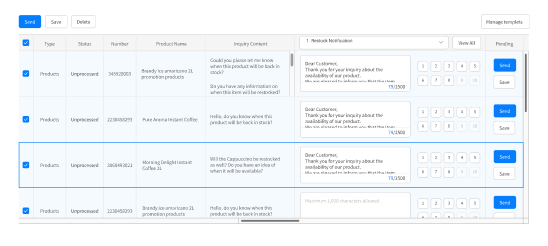
Press the shortcut button to insert
pre-written answers for similar inquiries.
Save and manage templates
for shortcuts in a modal.
- Check the new orders.
Check the list of new ordersreceived on the top dashboard.
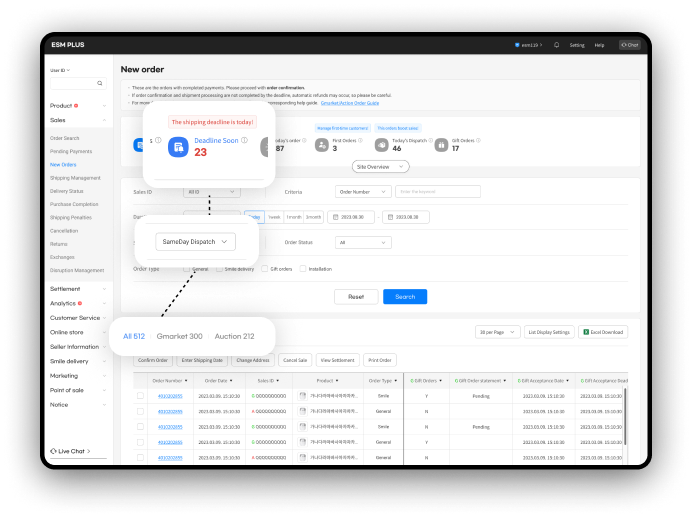
Prioritize and process orders
that require urgent checking.
Confirmed orders are then moved to the
shipping management menu.
- Quickly ship productsusing the automated invoicing system.
Register seller information for the
automated invoicing system.
Select the orders to be shippedand click the "Ship" button.
Monitor the shipping status andtrack the delivery information.
- Respond to refund / exchange
Check refund/exhange requests.
Check product condition
and approve request
If not approved, hold refund and
communicated reasons to buyer.
Backgrounds
What is the seller administration tool?
The seller administration tool is like a control center for sellers. It helps them manage everything related to their business, like keeping track of inventory, processing orders, talking to customers, and seeing how well their business is doing.
Seller
Shpping

Checking order
Answering
Managing customers

Buyer
Leave inquiry
Phurchasing
Refunding
Write review
Our history
The seller administration system on eBay Korea was designed 10 years ago, and many problems have arisen as a result.Therefore, this project aims to completely redesign the ESM, making the service much more user-friendly for sellers with improved UX design and new design components.
10
+
Years
The part I designed
During the complete redesign, I was in charge of the 'Sales Management' section, handling order processing, shipping, returns/exchanges, and managing customer inquiries and reviews.
The part i designed
The entire process of esm







Sales management
New
Orders
Boost Product
Visibility
Revenue
Management
New Product Listing & Editing
Order
Confirmation
Claim
Handling
Sales
Tracking
Customer
Support

User problem
Sellers perform key tasks in each menu. However, the usability of these menus was not effective for them.
What should be checked first?
How can I ship all these orders
faster and easier?
How do I talk to customers about refunds?
Is there an easier way to
answer customer questions?
Early research findings
Tracking a Seller's Daily Routine
To research seller activities, daily routines were gathered from around 20 sellers. Despite variations in routine order and details based on product type and business style, common usability issues were identified at each step of the process.
Field interview
2023.02 - 03

2 companies, 20 sellers
Support the
customer
09:00
09:30
10:00
10:30
11:00
11:30
Respond to customer
inquiries
Write replies
to reviews.
- Sellers want to quickly reply to multiple inquiriesand easily manage their responses.
Customer inquiries are often urgent and need quick responses. Repetitive questions should be handled in bulk.
Seller H
Responses vary by topic (e.g., shipping, products, refunds), so inquiries should be categorized.
Seller D
I need quick access to frequently used content, and templates tailored to promotions and holidays
Seller C
Check the
orders
12:00
12:30
13:00
13:30
14:00
14:30
Check
new orders
Ship
products
- Sellers want to quickly identify rush orders and efficientlyship multiple orders at once.
The first thing I check is orders with urgent shipping deadlines, since late shipments result in penalties, so I need a way to quickly identify rush orders.
Seller K
Shipping a product takes too many steps. Unlike other platforms that auto-generate waybills and handle shipping, ESM doesn’t offer this feature.
Seller L
Order confirmation, waybill generation, and shipping are repetitive daily tasks — they should be streamlined.
Seller H
Check the
claims
15:00
15:30
16:00
16:30
17:00
17:30
Handle
returns and
exchanges.
- When customers are dissatisfied with a product,sellers want to communicate with them directly.
When a return can’t be refunded due to a product issue, I need to explain why, but I’m limited to preset options and can’t add a detailed message.
Seller G
Approving or denying a refund requires reviewing multiple factors, so I need to see all relevant details in one place.
Seller K
I want to know why customers request returns, since that insight helps improve the product, but I can’t access it right now, which is frustrating.
Seller O
Vision
- Visualize dashboard
Enhancing the dashboard to filter and display key information, such as urgent orders, high-priority orders, and customer inquiries by category.

- Implement new shipping features
Designing an efficient flow to meet diverse user needs
Auto Waybill Processing

- Enhance communication between sellers and buyers
Launching additional services aligned with the changing trends in the airline industry, we design a new business model and simultaneously raise consumer awareness.

Design process1 :
Inquiry/review management
Current problem
For individual responses
To answer individual inquiries, sellers needed to select the question and then type a response at the bottom of the screen.
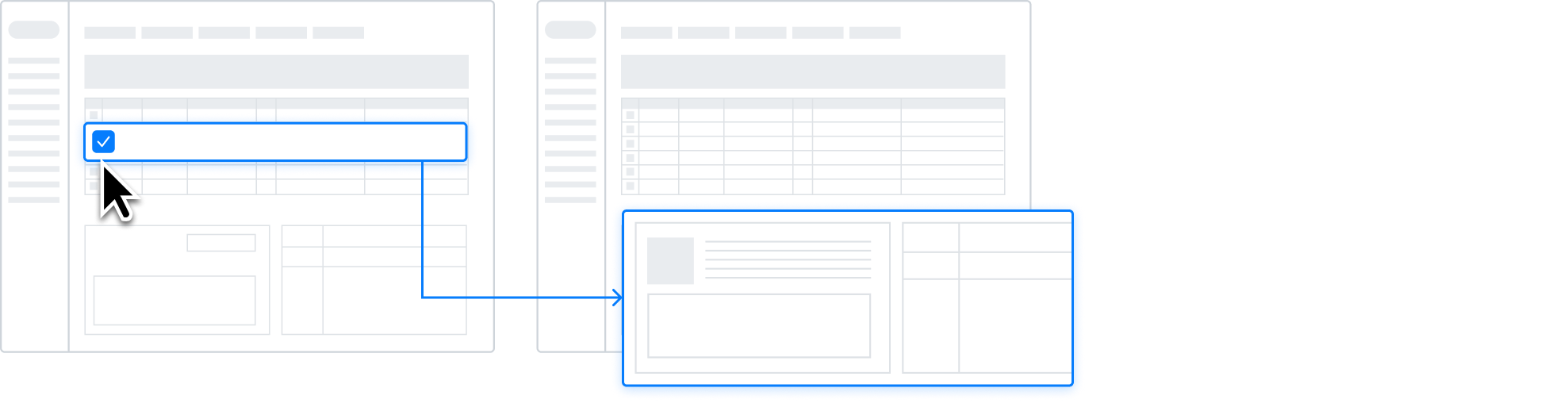
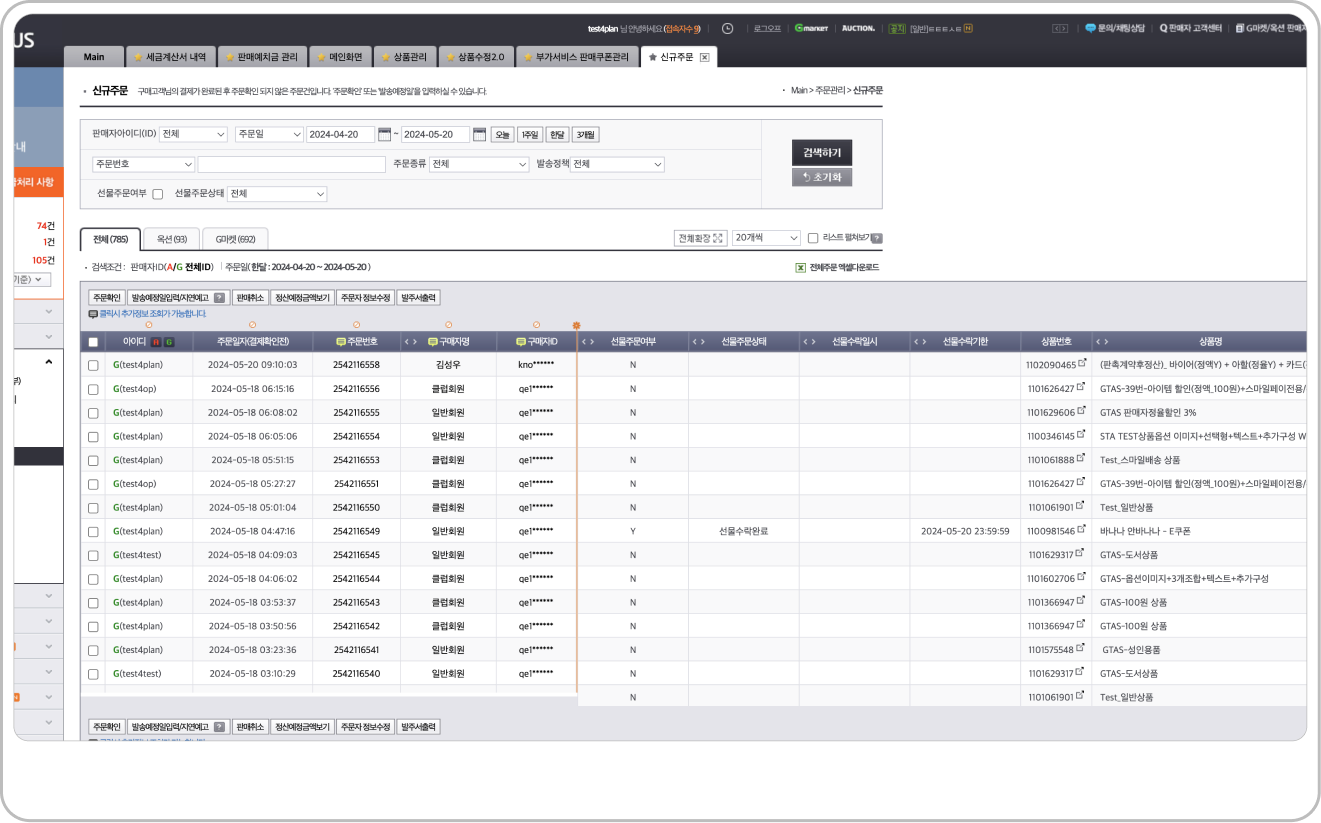
For bulk responses
To bulk reply to messages, select the items and click the 'Send Reply' button at the top. Compose response within the modal window. At this point, the detailed content of the inquiry is located on the parent page, making it difficult to view.
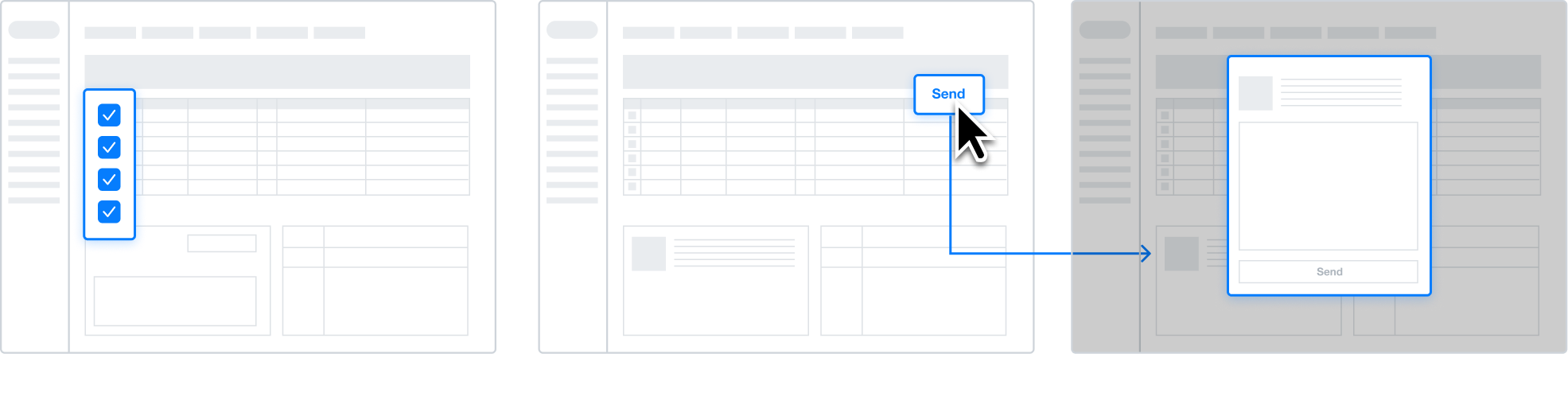
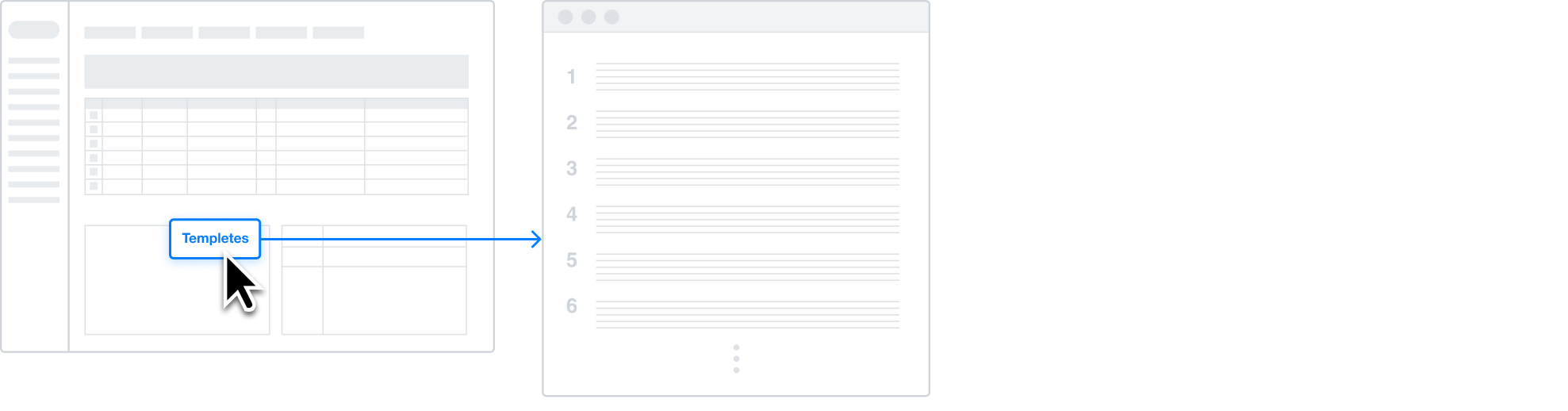
Unorganized templetes
Templates previously created by sellers were sorted chronologically, making it difficult to quickly locate important older templates.
UX criteria
1

Combine message review and reply in one interface.
Viewing buyer messages and composing responses should occur in the same area, with key information clearly visible.
2
Ensure consistent usability for reply submission.
The workflows for bulk and individual responses should have a similar user experience.
3
Make reply templates easily accessible.
Position templates near the reply area for convenience and provide them in a user-friendly format.
Testing & Iteration
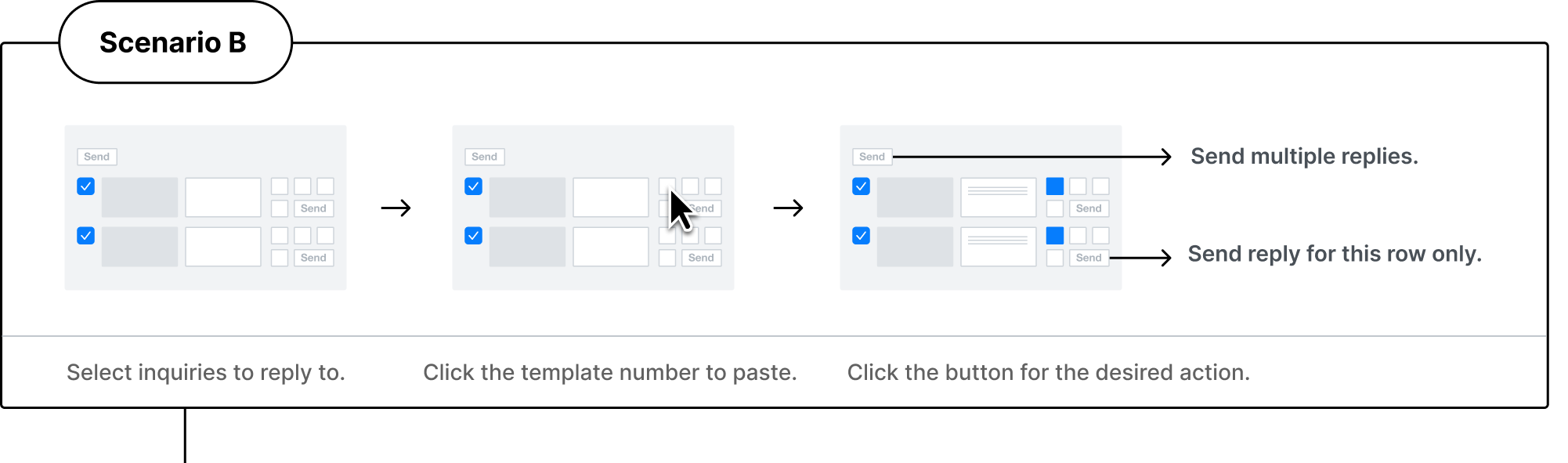
- Response writing usability
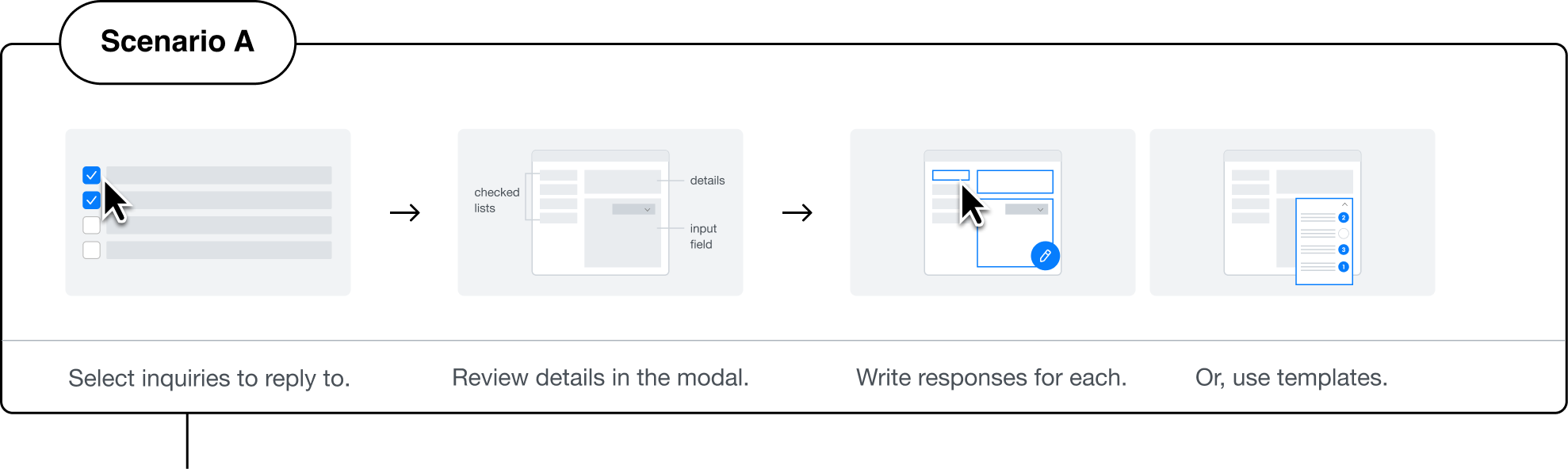
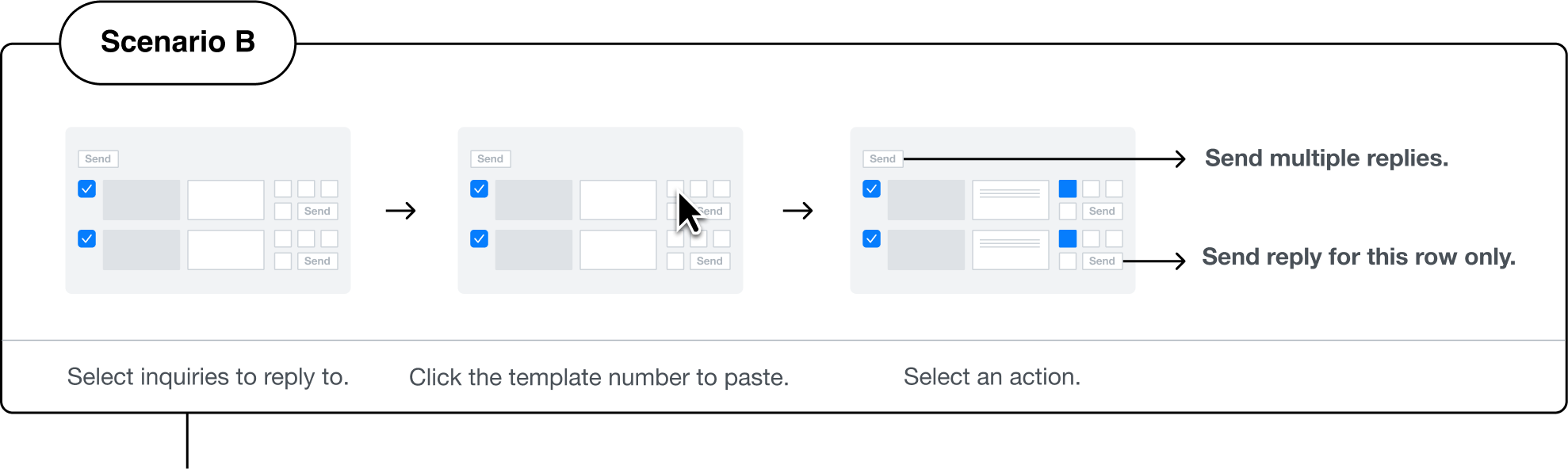

Chat

esm119


Setting
Help
ESM PLUS


Selected design:B
+ Some feature of C


CS
Manager
More than 60% sellers in ESM frequently use predefined response types, usually consisting of three parts: greeting, main content, and closing. Within the main content, there are often recurring expressions like delivery delay notifications or restocking notices. Currently, many sellers resort to copying and pasting from a notepad since they can't combine templates.
It would be more convenient if templates could be combined like building blocks through a button.


Engineer
For important announcements, sometimes sellers need to check the content and apply it to all. It would be helpful to have a way to see template content for confirmation.
- Template usage usability
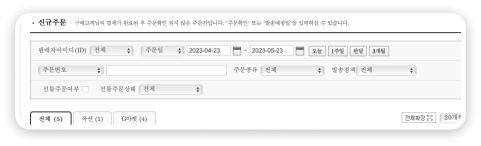
To enable sellers to easily manage and respond to inquiries and reviews by key categories, we have unified and reorganized the previously site-specific categories. This allows sellers to use the same categories across all sites where they sell their products. Additionally, we have selected the top six categories with the highest data volume and made them available for filtering on the dashboard.


Products


Delivery

Order/Payment

Refund

Exchange

Cancellation
Refined Solutions
From Dashboard to Template Usage
Sellers can not only prioritize bulk inquiries based on important categories but also write appropriate responses.
Manage Templates by Categories
The dashboard allows sellers to manage their templates according to important categories. They can create new templates within specific categories and customize the order of shortcuts. These shortcuts are displayed as numbered buttons right after the input field, enhancing ease of use.
Final Design
Write and Send Responses :
Manage and Edit Templates:
Design process2 :
Sales management
Current problem
It's difficult to identify urgent orders.
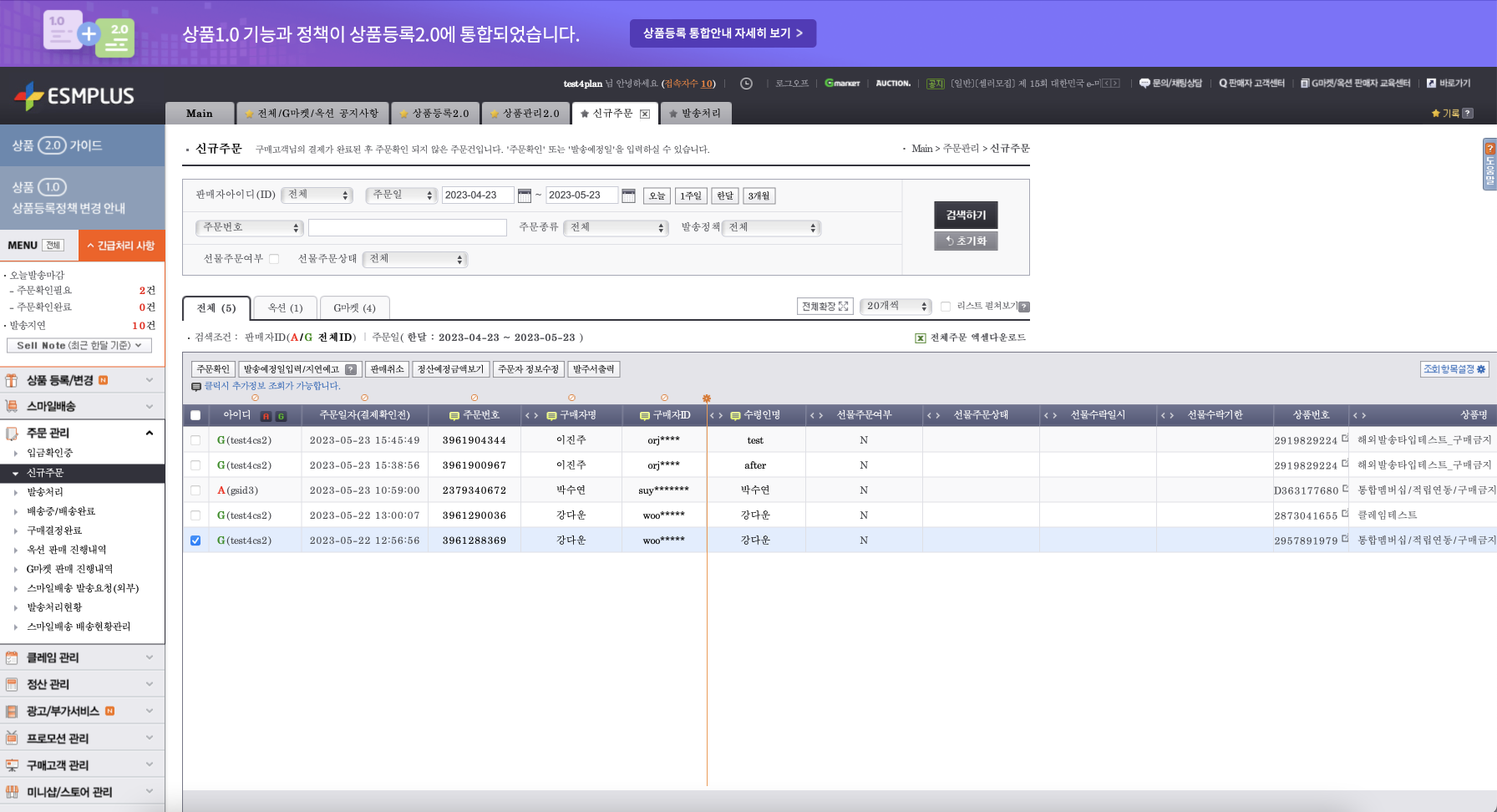
All new orders are sorted by the most recent, and urgent orders with imminent shipping deadlines can only be viewed by applying a filter in the search area.
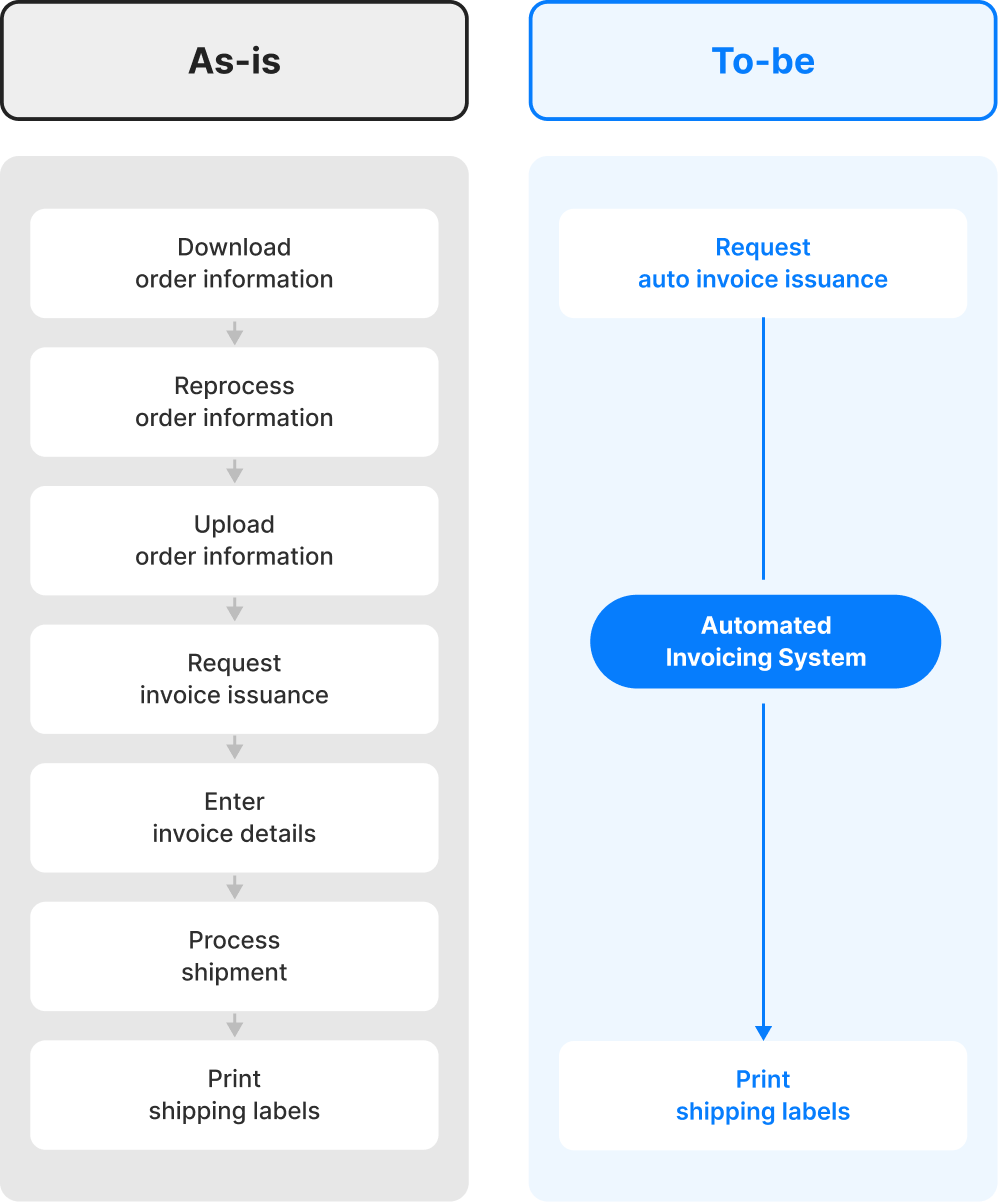
The process for bulk order shipping is complicated.
To ship a large number of orders at once, a complex process must be followed.
This is because the legacy system lacks automation capabilities.
Download
order information
Reprocess
order information
Upload
order information
Request
invoice issuance
Enter
invoice details
Process
shipment
shipping labels
UX Stratgies
1

Allows quick identification of orders that need fast processing.
Allows sellers to easily identify key orders on the dashboard. Through the dashboard, sellers can quickly see their sales status and immediate tasks.
2
Ensures that sellers can effortlessly adopt new automation features.
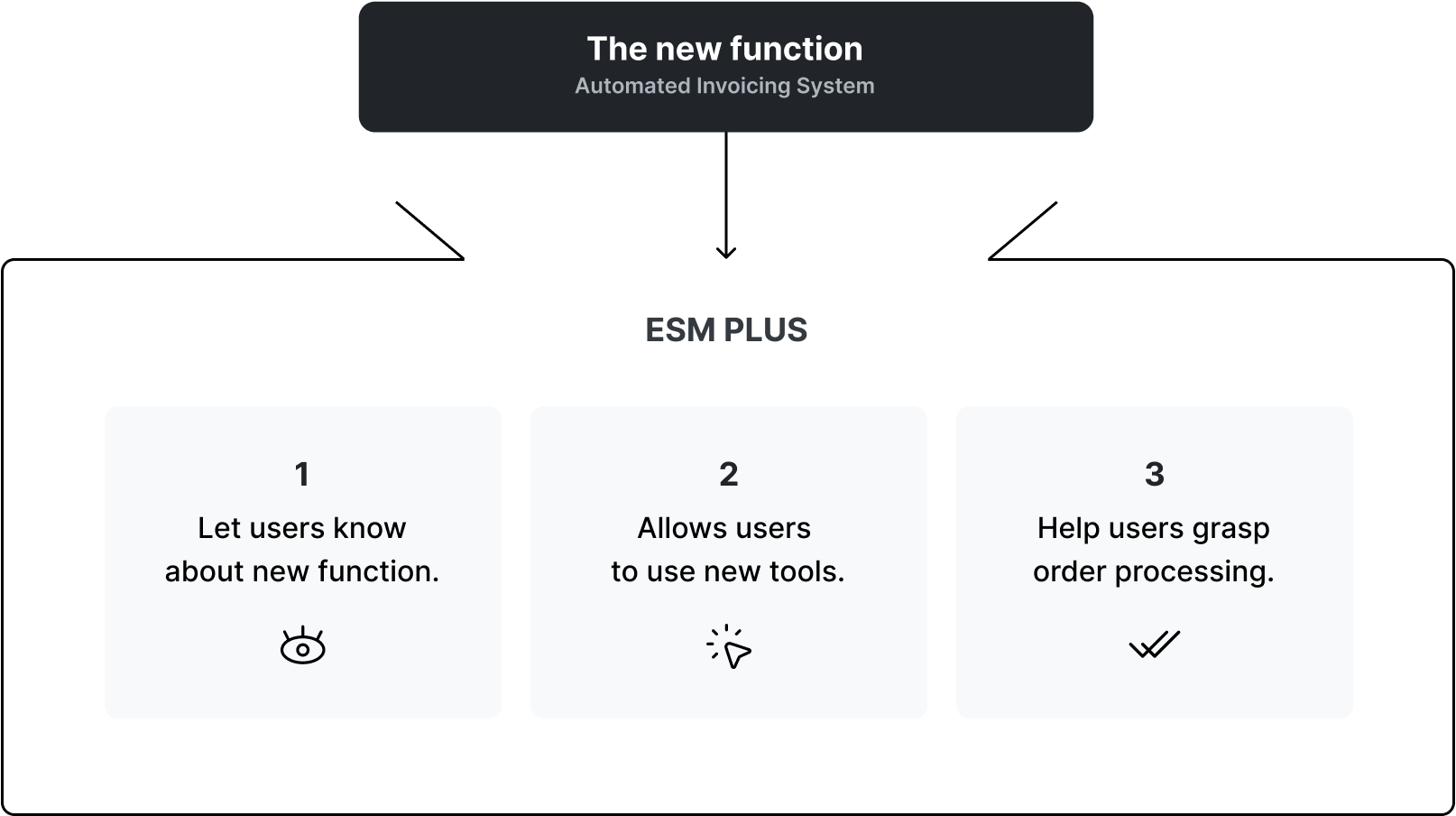
Designs a UX that ensures the successful integration of the newly introduced automated shipping and invoicing features with the existing ESM system.
Testing & Iteration
- Dashboard usability

Chat
esm119

Setting
Help
ESM PLUS


Selected design: C
Beta testers
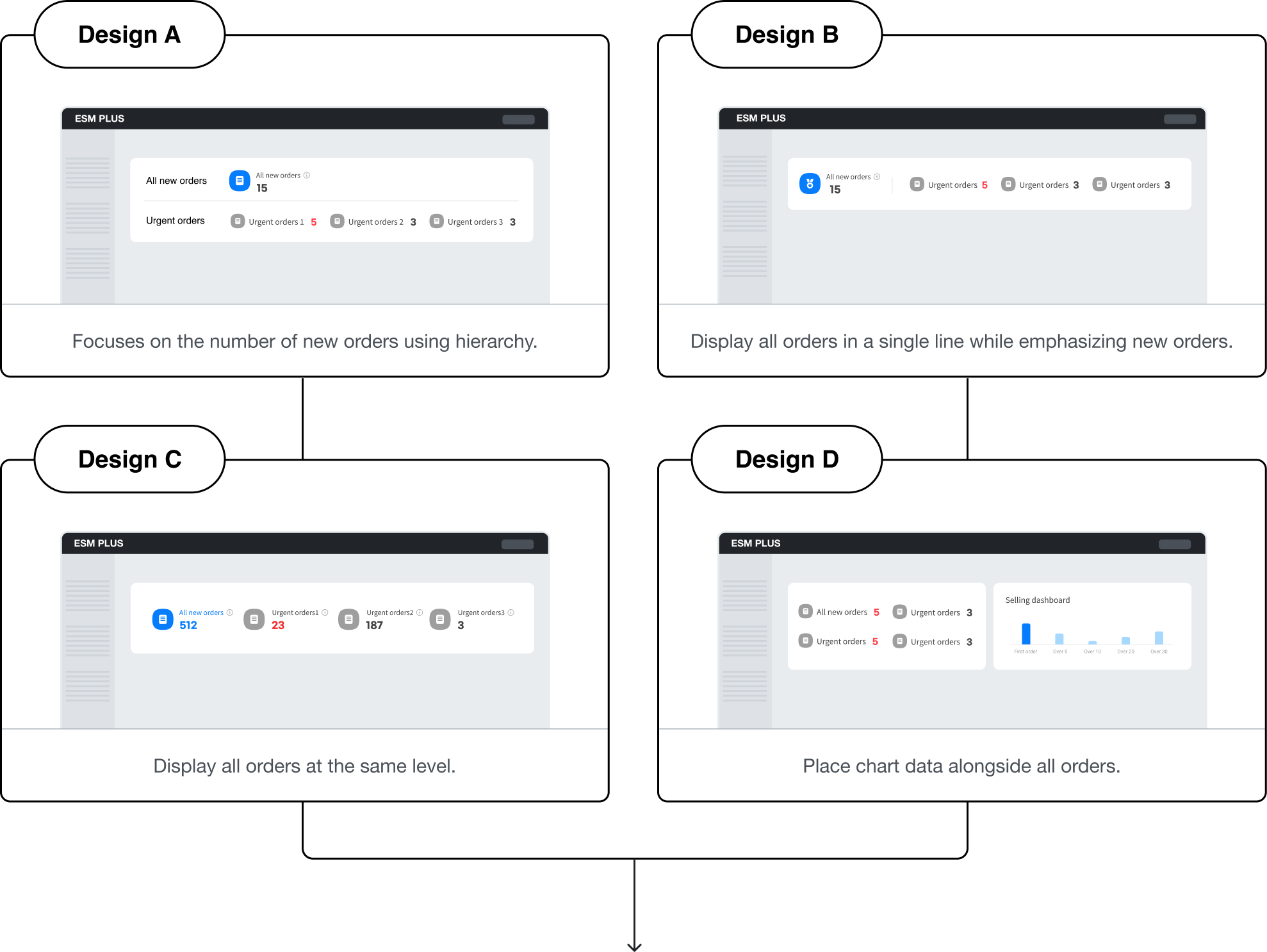
Design C displays a complete overview of all new orders and urgent orders in one place. The numbers for each category are prominently shown, making it easier for sellers to quickly assess the situation.
The information hierarchy between orders isn’t important. Presenting them as separate types of orders could slow down the seller’s processing time. A simple display using titles and numbers would be the most effective.
- Introducing Automated Invoicing System
A new automated shipping label system will streamline sellers' shipping processes from 7 steps to 2, enhancing convenience. As this feature is from a different company's product, designing it to integrate seamlessly with ESM's internal UX requires careful consideration.
Refined Solutions
Operation of Each Dashboard Area
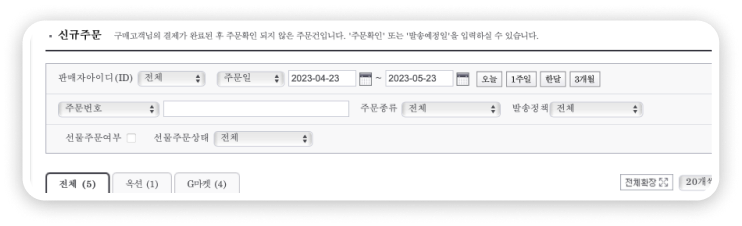
The user want to check urgent orders from each sites of Gmerket, Auction.
The dashboard represents the highest level in the hierarchy. Information selected on the dashboard is directly applied to the search area below.
Design service usage guidelines
Designed a service guide page to help sellers understand and use new features.
Feature Request
Conducted discussions to add features seamlessly into the existing workflow.
Define UX Writing
Gathered and rewrote all UX writing for the dial interface to ensure users can track shipping status and address errors.
Final Design
Design process3 :
Refund management
Current problem
The return process is not user-friendly.
Due to the backend logic designed for handling returns, users may receive feedback that doesn’t align with the context. For example, based on the data processing results, a return may be marked as 'collection completed' instead of 'return processed,' even if that’s not what the user intended.
There is no way to communicate with customers.
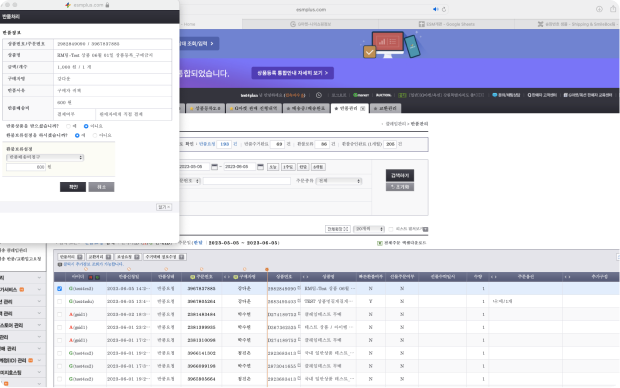
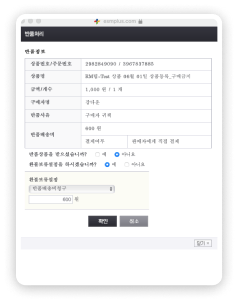
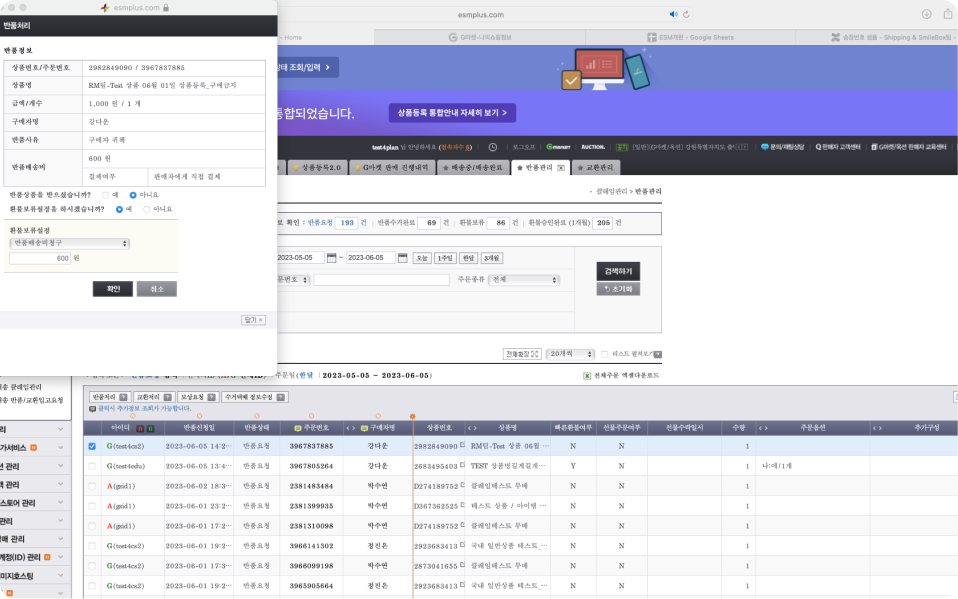
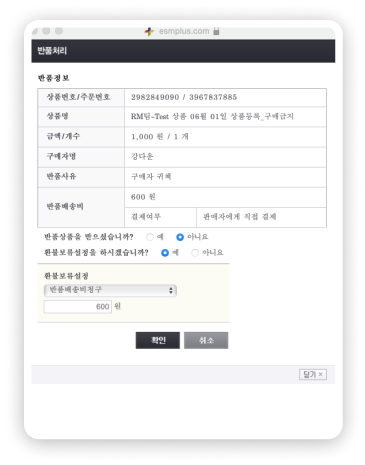
Clicking the "Process Return" button displays the customer's order details, product information, and shipping costs. The return reason is available only in the selected multiple-choice format, and any custom reason written by the customer is not accessible.
UX Stratgies
1
Design a return process that considers the seller’s situation.
The UX allows for user-friendly decision-making, enabling sellers to make different choices based on the condition of the returned item.
2
Create a communication methods between sellers and customers.
Sellers can view not only the existing return reasons but also the customer's custom-written reasons, which can provide valuable insights for improving sales. Customers can send direct messages to sellers, which can help reduce the number of inquiries received by customer service.
Testing & Iteration
- Dashboard usability
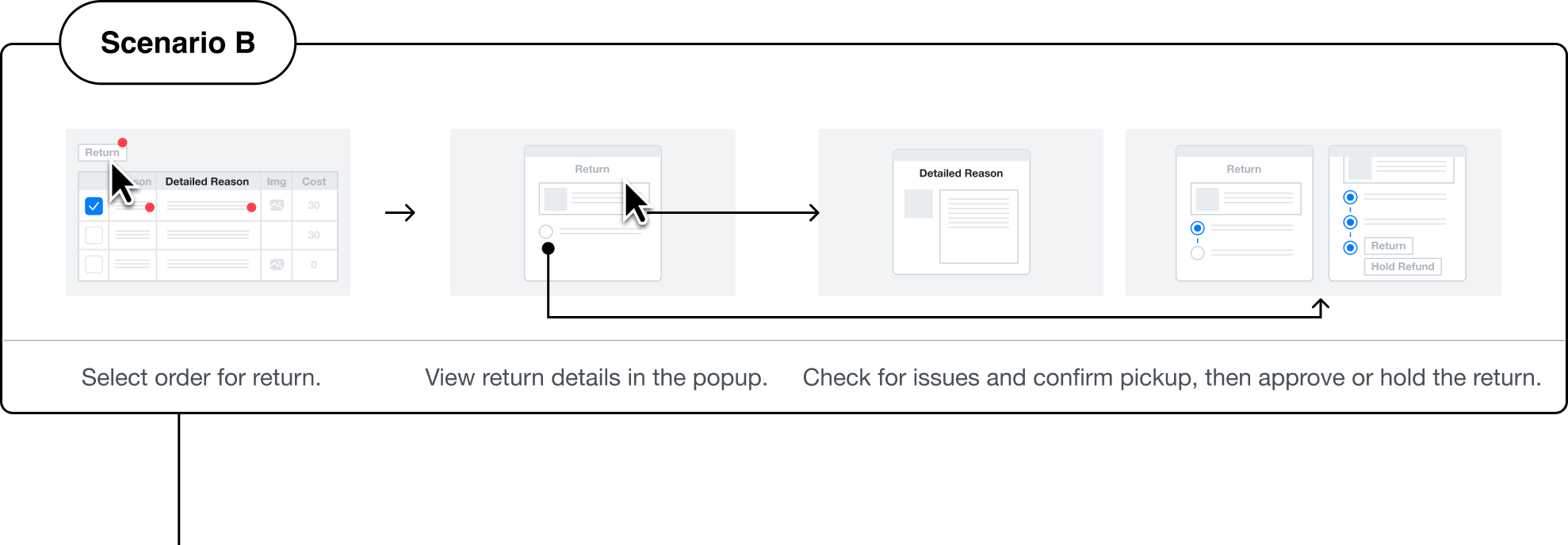
Selected Scenario:B

Chat

esm119


Setting
Help
ESM PLUS


Chat
esm119
Setting
Help
ESM PLUS


Claim menu
department
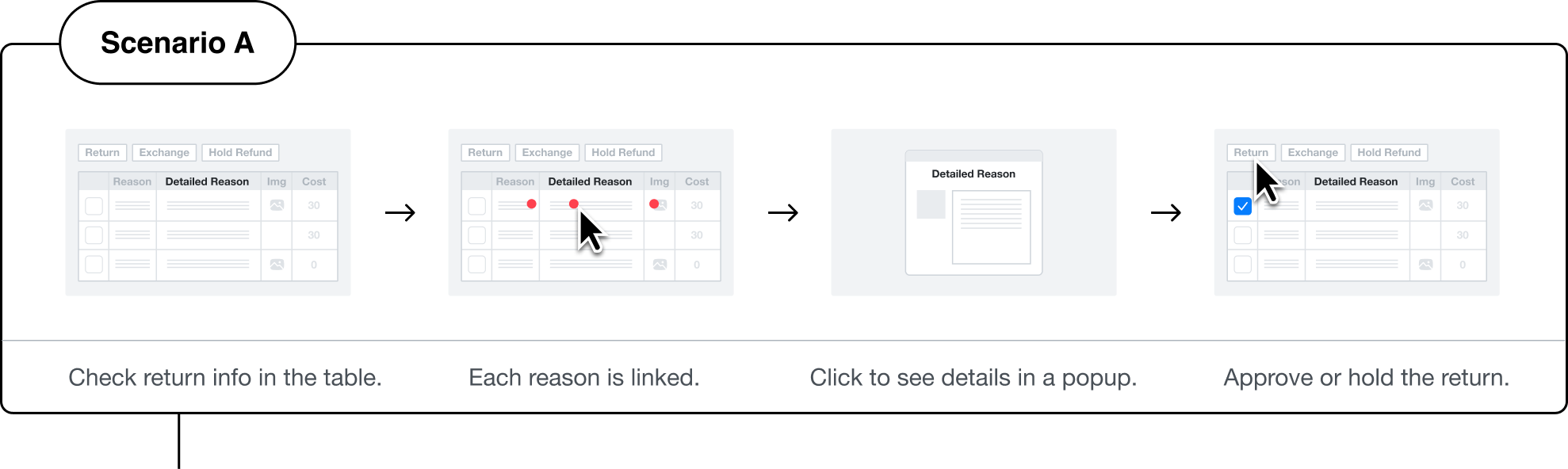
Since return-related information is interrelated, it should be consolidated into a single area rather than scattered. Additionally, items being returned can have varying statuses, so they need to be checked simultaneously within a pop-up before proceeding to the next action. Each item in the data table should be individually accessible, but their connection points should be unified.


Engineer
The return reason can vary in length depending on the buyer, so a separate area is necessary. Within the pop-up, there can be a 'View Return Reason' button to navigate to this section, while in the data table, a text button can be used to direct users to the respective path.
Refined Solutions
Creating UX Reflecting the Seller's Actual Workflow
It's crucial for sellers to verify the condition of returned or exchanged items and identify the reasons for return. Therefore, within a popup, we guide sellers through the necessary procedures based on their specific situation and prompt detailed explanations in a separate window, minimizing distraction.
Make new features
Seller’s perspective : Sellers can view not only the existing return reasons but also the customer's custom-written reasons, which can provide valuable insights for improving sales. Customers can send direct messages to sellers, which can help reduce the number of inquiries received by customer service.
Buyer’s perspective : Sellers can view not only the existing return reasons but also the customer's custom-written reasons, which can provide valuable insights for improving sales. Customers can send direct messages to sellers, which can help reduce the number of inquiries received by customer service.
Final Design
Result
Restructured ESM’s shipping experience to eliminate inefficiencies in seller operations, driving a 34% increase in overall user satisfaction. At the feature level, inquiry response rates rose by 14% and template registrations increased by 30%. Faster order processing improved shipping-related satisfaction by 28% and reduced last-minute orders by 14%.
Reflection
Designing the seller experience was one of the most interesting and challenging tasks I handled at the open market. Understanding how key data is processed and used differently depending on the menu was crucial for admin design. This wasn't a quick process; it took a long time to master. Learning to be patient and persistent will be very helpful in my future career.

Let’s Get in Touch ✨
Open to coffee chats, advice, or conversations about favorite movies. :)
©Dawoon Kang 2026